

QuickBooks Logo
Editor's Rating:

QuickBooks Time is best for businesses and teams that need easy, accurate time tracking with seamless payroll and scheduling integration.

HR Stacks offers comprehensive, data focused and unbiased solutions. We are a user supported platform and may earn a referral fee when you visit a vendor through our links

QuickBooks Time Review 2026: Pricing, Features, Pros & Cons

What is QuickBooks Time?

Keeping track of work hours shouldn’t feel like a job in itself, and that’s exactly where QuickBooks Time makes life easier.

It’s a cloud-based time tracking tool designed to help businesses, freelancers, and teams log hours with ease, whether they’re in the office or working remotely. No more chasing down timesheets or second-guessing payroll, this tool keeps everything organized in one place.

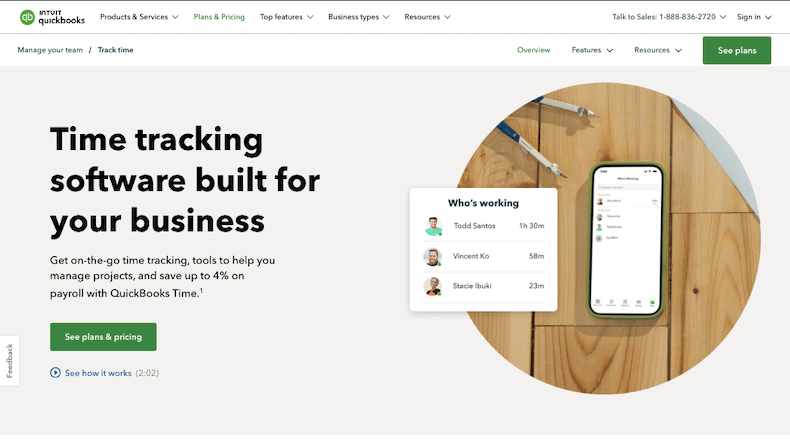
With QuickBooks Time, employees can clock in and out from anywhere using a mobile app or desktop, and GPS tracking ensures accuracy for teams on the go.

Need to manage schedules? It lets you create, edit, and share employee shifts in real time, so there’s no confusion about who’s working when. Plus, with automatic reminders, late clock-ins and missed punches become a thing of the past.

For businesses that handle multiple projects, job and shift tracking features help break down where time is actually being spent. You can see which tasks take up the most hours, making billing and payroll simpler and more precise.

And since it syncs seamlessly with QuickBooks Payroll and other accounting software, there’s no need for manual data entry, everything flows smoothly from timesheets to paychecks.

Approvals are quick and easy too. Managers can review and approve time entries in a few clicks, cutting down on admin work. For teams paid by the hour, overtime tracking helps prevent unexpected payroll surprises.

Plus, detailed reports give insights into productivity trends, so businesses can make smarter decisions about staffing and budgeting.

At the end of the day, QuickBooks Time is about saving time, reducing errors, and keeping things running smoothly.

Whether you’re managing a handful of employees or a growing team, it takes the hassle out of tracking hours so you can focus on the work that really matters.

Show More
About QuickBooks Time
Company Name: Intuit Ltd.
Est: 2006
Employees: 101-250
HQ: Eagle, Idaho, United States
Support Offered
Email Support
Tutorial Videos & Documentation
Phone

Key Features of QuickBooks Time

Mobile Time Tracking
Employees can clock in and out from anywhere using the mobile app, making it easy for remote teams and field workers to log hours accurately.
GPS Tracking
The built-in GPS feature ensures employees are clocking in from the right location, helping businesses manage mobile teams more effectively.
Seamless Payroll Integration
Syncs effortlessly with QuickBooks Payroll and other accounting software, reducing manual work and ensuring payroll accuracy.
Employee Scheduling
Create, edit, and share schedules in real time so employees always know when and where they need to be.
Overtime Monitoring
Tracks employee hours and alerts managers when someone is nearing overtime, preventing unnecessary labor costs.
Project and Job Costing
Businesses can track time spent on specific jobs or projects, making it easier to manage budgets and client billing.
Customizable Alerts and Reminders
Automated notifications remind employees to clock in or out, reducing missed punches and time-tracking errors.
Time-Off Management
Allows employees to request time off directly in the system, keeping all scheduling information in one place.
Offline Time Tracking
Employees can log hours even without an internet connection, and the data syncs automatically when they’re back online.
Detailed Reporting
Provides real-time insights into labor costs, productivity trends, and project hours, helping businesses make smarter decisions.

QuickBooks Time Pros & Cons 2026

Pros
Easy-to-use time tracking from mobile or desktop.
GPS tracking for accurate location-based clock-ins.
Seamless integration with QuickBooks Payroll and other software.
Automated reminders to prevent missed clock-ins.
Simple scheduling with real-time updates.
Cons
GPS tracking may raise privacy concerns for employees.
Requires internet access for real-time updates.
Limited advanced project management features.
Learning curve for first-time users.

QuickBooks Time Pricing 2026

QuickBooks Time offers 2 plans to choose from with a Free Trial to explore the features. Their plan starts from $10 and so on . Check out all details of their plans
Time Premium
$10 / mo
Time Elite
$20 / mo

QuickBooks Time User Sentiment Analysis

Ease of Use

Users find QuickBooks Time easy to set up and navigate, with a clean interface that simplifies time tracking
User Sentiment Score
91%

Features

The tool offers powerful features like GPS tracking, scheduling, and payroll integration, making workforce management smooth and efficient.
User Sentiment Score
90%

Value For Money

For the price, businesses get great value with accurate time tracking, automated reports, and seamless accounting sync.
User Sentiment Score
89%

Customer Support

Customer support is responsive and helpful, quickly resolving issues through chat, phone, and email assistance.
User Sentiment Score
90%

QuickBooks Time Quick Comparison Table

Here is a quick comparison with some of the products that offers similar features as QuickBooks Time.
No data was found

QuickBooks Time FAQs

QuickBooks Time allows employees to clock in and out using a mobile app, desktop, or even a kiosk. It records time entries accurately and offers GPS tracking for location verification.
Yes, employees can track their hours offline, and the data automatically syncs when they regain internet access.
Yes, it integrates seamlessly with QuickBooks Payroll and other payroll software, ensuring accurate and hassle-free payroll processing.
Absolutely! With mobile time tracking, GPS location verification, and real-time scheduling, it’s ideal for businesses with remote or field-based employees.
Pricing varies based on the plan and number of users. QuickBooks offers a free trial, so businesses can test it before committing to a paid subscription.

HR Stacks Review Methodology

Every product on HRStacks is reviewed using a consistent methodology that combines editorial analysis with real user feedback. Our goal is to give HR teams clear, practical insights they can rely on when comparing software

Data Sources

Our research draws on multiple trusted sources, including verified user reviews on reliable public review platforms. We also review product documentation, feature sets, pricing structures, and publicly available information from the vendor.

Editorial Analysis

Each platform is evaluated across several key areas such as core functionality, ease of use, integrations, scalability, and overall value. This analysis helps us understand how the product performs in real HR and global workforce management scenarios.

Editor’s Rating

The HRStacks Editor’s Rating reflects our overall assessment of the platform based on product capabilities, usability, reliability, and feedback trends from real users.

User Sentiment

We analyze recurring themes across user reviews to identify commonly reported strengths, limitations, and overall satisfaction levels.

Independent Reviews

HRStacks reviews are created independently and are not influenced by vendors. Product pages are updated periodically to reflect new features, pricing changes, and evolving user feedback.

Scoring Framework

Ratings and sentiment scores are derived from a combination of editorial evaluation and analysis of recurring feedback patterns from real users.

Manjuri Dutta
Article By: Manjuri Dutta

Manjuri Dutta is the co-founder and Content Editor of HR Stacks, a leading HR tech and workforce management review platform, and EmployerRecords.com, specializing in Employer-of-Record services for global hiring. She brings a thoughtful and expert voice to articles designed to inform HR leaders, practitioners, and tech buyers alike.

Get HR Stacks Weekly
Get our weekly news update with all latest news in HR community.

Get Started With QuickBooks Time

QuickBooks Time Alternatives

Here is a quick list of some of the top QuickBooks Time alternatives with similar features that you may explore.
No data was found
Rating Distribution
0
0 out of 5 stars (based on 0 reviews)
Excellent
Very good
Average
Poor
Terrible
Share Your Experience

QuickBooks Time: Recent Reviews

There are no reviews yet. Be the first one to write one.

Submit Your Review For QuickBooks Time

Featured HR Products

Pebl Logo
Pebl
Pebl (formerly Velocity Global) is a leader...
Deel Logo
Deel
Deel is a well-recognized all-in-one HR solution...
usemultiplier_logo
Multiplier
Multiplier is an emerging global employment platform...
When I Work Logo
When I Work
When I Work is a scheduling tool...
Connecteam Logo
Connecteam
Connecteam is an all-in-one employee management platform...
Receive the latest HR news

Subscribe To Our Weekly HR Newsletter

Get the latest from the HR & AI tech industry. All your news at one place. 

HR Stacks uses cookies

This website uses cookies to enhance user experience and to analyze performance and traffic on our website. By continuing to browse this site you are agreeing to our use of cookies.
