


ADP Key Facts
What Is ADP?
ADP is a US payroll and HR provider that pays staff, files payroll taxes and produces year-end forms for employers of almost any size. This review covers its two main software lines, RUN Powered by ADP and Workforce Now, and scores them against other payroll software.
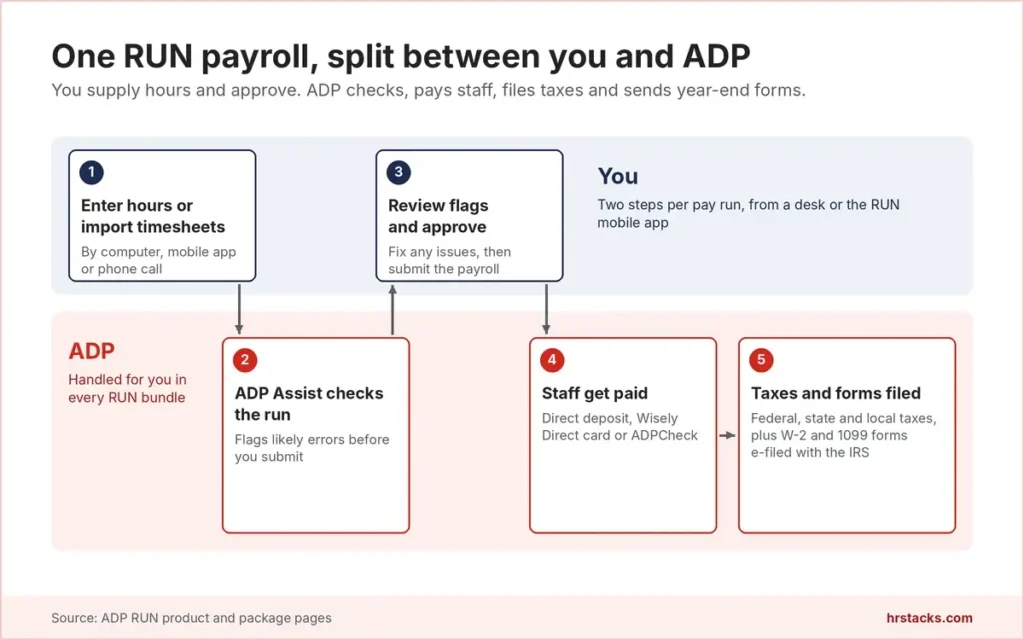
RUN is the core product for businesses with 1 to 49 employees. You enter hours or import timesheets, ADP Assist checks the run for errors, then ADP pays staff by direct deposit, debit card or check and files federal, state and local taxes. It is sold in four bundles on ADP’s RUN page.
Around RUN sit HR add-ons, hiring tools and insurance. Above it sits Workforce Now, an HR software suite for 50 to 999 and 1,000+ employees. A single-state team of five may find ADP overshoots, while midsize buyers should compare Workforce Now with other HRIS platforms.
Editor’s Verdict on ADP
ADP fits US employers that want federal, state and local taxes filed for them and a path from RUN (1 to 49 employees) to Workforce Now (50 to 999 and 1,000+). It fits less well if you need a published price before the first sales call.
We score above the 3.7 user average because 3,132 company-wide public reviews, many from client employees locked out of pay portals, pull it down, while RUN itself averages 4.6 to 4.7 in product-specific reviews.
ADP Pros and Cons
ADP’s biggest strength is tax filing depth, with federal, state and local filing plus W-2 and 1099 e-filing in every RUN bundle. Its biggest weakness is price opacity, since no bundle or package carries a public price. For multi-state employers the filing coverage usually outweighs the extra sales calls.
Strengths
- Tax filing in every bundleEven the entry Essential bundle files federal, state and local payroll taxes and covers multi-jurisdiction payroll and multi-company management.
- One vendor from 1 to 1,000+RUN serves 1 to 49 employees and Workforce Now covers 50 to 999 and 1,000+, so growing firms change products, not payroll vendors.
- 24/7 support on every bundleADP’s package table lists 24/7 support in Essential, Enhanced, Complete and HR Pro, so night and weekend payroll problems reach a person.
- HR tools you can add laterComplete adds HR HelpDesk, a handbook wizard and salary benchmarks. HR Pro adds a CareerPlug applicant tracker and a learning system.
Limitations
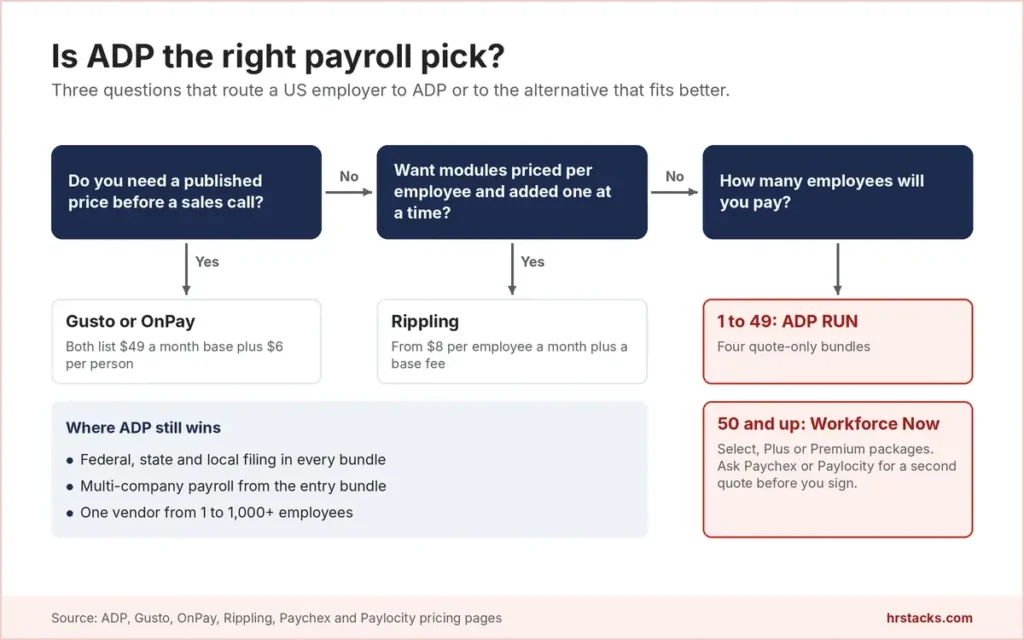
- No published pricesAll four RUN bundles and all three Workforce Now packages are quote only, so you cannot compare costs before talking to sales.Alternative: Gusto, publishes Simple at $49 a month plus $6 per person
- Key tools sit in higher bundlesSUI management, garnishment payments and electronic I-9 start at Enhanced, time tracking is an add-on, and Essential charges extra for W-2s.Alternative: OnPay, $49 base plus $6 per worker with W-2s and 1099s included
- Prices can rise after month sixADP’s RUN terms let it raise processing fees on 30 days’ notice once a new client’s first six months have passed.Alternative: Rippling, publishes a starting rate of $8 per employee a month
ADP Features
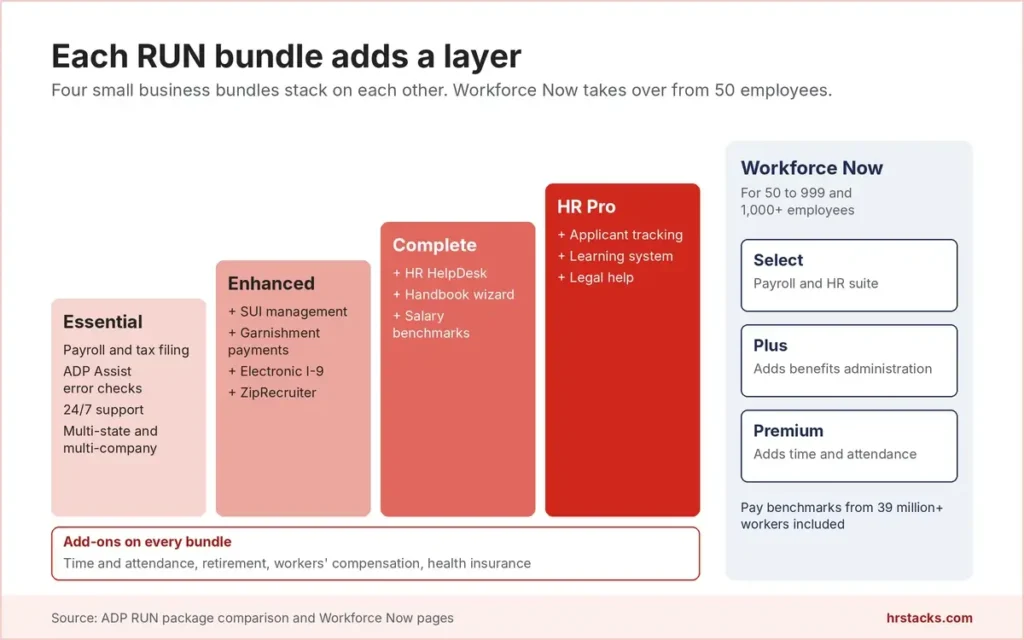
RUN covers payroll, tax filing and pay delivery in every bundle, then sells HR, hiring and compliance tools by tier. Time tracking and benefits are add-ons at every level. Workforce Now folds benefits administration into Plus and time tracking into Premium.
Core features
- Payroll and tax filingFederal, state and local tax deduction and filing, plus W-2 and 1099 e-filing with the IRS, with tax law updates for all 50 states.Strong
- ADP Assist payroll inspectorAI checks flag likely payroll errors before submission, alongside a virtual assistant and smart timesheet import in every bundle.Strong
- Multi-state and multi-companyMulti-jurisdiction payroll and multi-company management are part of Essential rather than upsells, which matters for owners running several entities.Strong
- Pay optionsDirect deposit, the Wisely Direct debit card and ADPCheck. Bill pay and contractor payments run through third parties, with possible extra fees.Strong
- ReportingStandard reports and a general ledger interface ship in Essential. Users say custom reports are rigid and slow to build.Adequate
Extras
- HR supportHR HelpDesk, the handbook wizard, HR forms and training toolkits start at Complete. Essential and Enhanced get HR tracking and onboarding only.Adequate
- HiringZipRecruiter comes with Enhanced. The CareerPlug applicant tracker and a learning management system are reserved for HR Pro.Adequate
- Time and attendanceAn add-on in all four bundles. Users report weak links between time data and payroll, and many connect Deputy or Homebase instead.Limited
- Benefits and insuranceHealth insurance, retirement and workers’ compensation are add-ons sold through ADP affiliates, with insurance licensed in 50 states.Adequate
- Workforce Now packagesSelect, Plus and Premium for 50 to 999 and 1,000+ employees, with pay benchmarks drawn from more than 39 million workers.Strong
ADP Integrations
ADP names accounting, time, hiring and ERP connectors on its integrations page, and ADP Marketplace sells RUN-specific connectors such as Deputy and Homebase. Accounting coverage matters most for small firms. The five named ERP links matter more to Workforce Now buyers.
 QuickBooks
- Xero
- Wave
- Clover
- Deputy
- Homebase
- ClockShark
- 7shifts
- ZipRecruiter
- JazzHR
- HR Cloud
- Sage
- Acumatica
- SAP
- Oracle
- Workday
ADP Pricing
ADP publishes no prices for any RUN bundle or Workforce Now package, and every tier routes to a quote. It does publish bundle contents, a free-months offer for new RUN clients and its RUN service terms. Time tracking, retirement, health insurance and workers’ compensation sit on top of every tier as add-ons.
Published plans
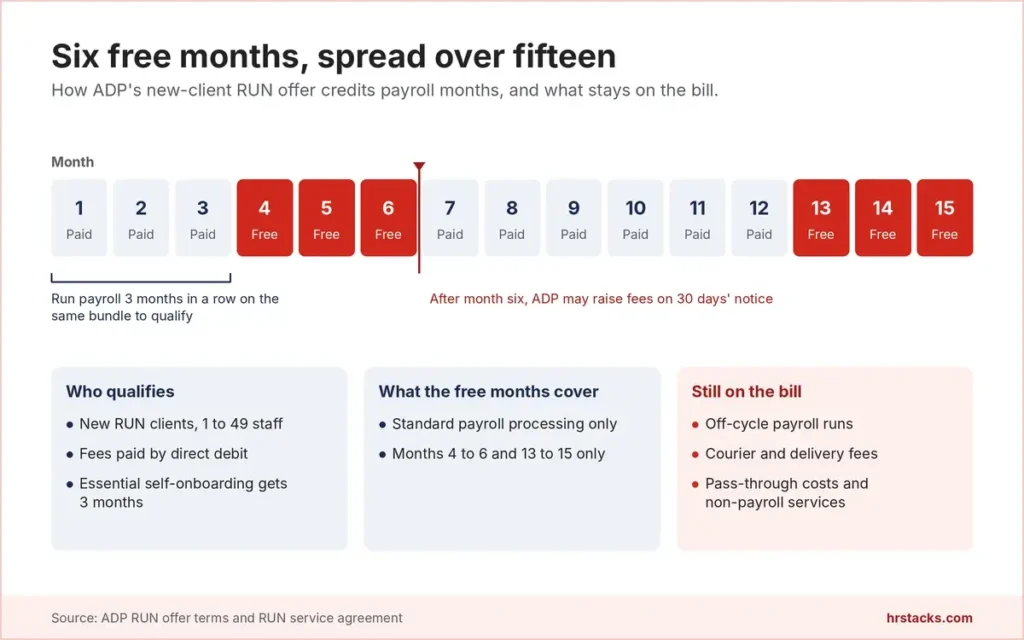
Every tier is quote only, and fees are debited from your bank account on your payroll processing cycle. New RUN clients with 1 to 49 employees can get up to six free payroll months if payroll starts by November 26, 2026.
Fees and contract terms
What ADP states publicly, and what to get in writing before you sign.
What 10 employees cost a year
Rivals with published rates land between $1,308 and $2,400 a year, and ADP’s figure only arrives with a quote.
Who Should Use ADP?
ADP suits employers who value filing coverage and a long upgrade path more than price transparency. It suits buyers less well if they want to compare costs online or need time tracking without paying for an add-on. Headcount then decides between RUN, built for 1 to 49 employees, and Workforce Now.
Best for
- US employers with staff in several states who want state and local payroll taxes filed for them
- Owners running more than one company who want multi-company payroll inside the entry bundle
- Teams of 1 to 49 that expect to pass 50 and would rather upgrade within ADP than switch vendors
- Clover POS merchants who want point-of-sale data connected to payroll through the RUN integration
Skip if
- You want to see a price before you book a demo or sign a sales orderConsider OnPay, $49 base plus $6 per worker on one plan
- You run payroll in a single state and want month-to-month software at a listed rateConsider Gusto, Simple at $49 a month plus $6 per person
- You want payroll and HR modules priced per employee and added one at a timeConsider Rippling, from $8 per employee a month plus a base fee
ADP Alternatives
We shortlisted the five payroll vendors US small and midsize buyers most often weigh against ADP. Two publish prices and three quote, and each one beats ADP on at least one row below.
ADP vs GustoPublished prices and month-to-month billing
Choose Gusto if you want to price payroll online and keep month-to-month terms. Read our Gusto review
ADP vs OnPayOne plan, one price, multi-state payroll included
Choose OnPay if you want W-2s, 1099s and multi-state filing at one listed rate. Read our OnPay review
ADP vs PaychexQuote-based rival, compare both quotes side by side
Choose Paychex if its written quote beats ADP’s for the same bundle contents. See Paychex vs ADP Payroll
ADP vs PaylocityQuote-based HR suite with tiers by company size
Choose Paylocity if you have 100 or more staff and want a second midsize HR suite quote. See Paylocity vs ADP
ADP vs RipplingModular platform with a published starting rate
Choose Rippling if you want to build HR and payroll from separately priced modules. See Rippling vs ADP
What Users Say About ADP
Product-specific reviews of RUN are strong, with small businesses praising quick pay runs and tax handling. The company-wide listing tells a different story, driven by login failures and billing disputes after cancellation. We weight both, because a buyer’s employees will use the same logins.
What users praise
- Fast payroll runsSmall business owners say a regular pay run takes minutes once employees and schedules are set up.
- Tax filing handledReviewers value automatic federal, state and local filing and year-end W-2 preparation.
- Live support availableMany mention chat and phone help from a real person, including outside office hours.
- Onboarding and recordsUsers like keeping new-hire onboarding, employee records and HR resources in one system.
What users complain about
- Costs climb with add-onsOwners report bills rising as headcount grows or when they add time tracking and HR features.
- Login and access loopsRepeated verification prompts, password resets and app crashes, mostly from employees checking pay stubs.
- Rigid reportingCustom reports are described as clunky, and the interface as dated next to newer payroll tools.
- Billing after cancellationCompany-wide reviews describe charges continuing after cancellation and trouble reaching the right ADP team.
Is ADP Worth It?
Yes, if you pay staff in several states, value filing coverage over a listed price and expect to grow past 50 employees. No, if you want to compare costs online, need time tracking without an add-on, or run payroll in one state, where Gusto and OnPay both publish a $49 base rate.
Negotiate the per-employee rate, a price lock past month six and the exact free months before you sign. ADP’s RUN terms allow fee increases on 30 days’ notice, so a written rate guarantee is worth more than any promotion.
Get these in writing before you sign
None of them appear on ADP’s pricing page.
- Per-employee and base feesAsk for both rates in the sales order, plus the price of each employee added mid-year.
- Year-end form chargesConfirm what W-2 and 1099 preparation costs on your bundle, since Essential lists it as extra.
- Rate lock beyond month sixRequest a fixed rate for at least 12 months, because fees can rise on short notice.
- Which free months you getGet the credited months in writing, and whether off-cycle, delivery and pass-through costs still apply.
- Setup and migration costsAsk whether onboarding, data migration from your old provider or timeclock installation carries a one-time fee.
- Records access after you leaveConfirm how long payroll reports and tax forms stay downloadable once your agreement ends.
ADP: Common Questions
These are the questions buyers ask most before signing with ADP, answered from ADP’s own pages and RUN service terms. Pricing questions come first, because ADP answers none of them with a number.
How much does ADP payroll cost?
ADP does not publish prices for RUN or Workforce Now. Every bundle shows a Get pricing button, and your rate is set in a quote based on headcount, bundle and add-ons. Dollar figures quoted elsewhere are third-party estimates, not ADP prices.
Does ADP offer a free trial?
There is no free trial. New RUN clients with 1 to 49 employees can get up to six free payroll months if they sign and start processing by November 26, 2026.
The free months are months 4, 5, 6, 13, 14 and 15, and they cover standard payroll processing only. Clients who self-onboard on Essential get three free months instead.
Does ADP charge a setup fee?
ADP does not publish a general setup fee. Its RUN terms do state an installation and setup fee for each timeclock unit ADP installs on site, so ask for any onboarding charge in writing.
Does ADP charge extra for W-2s?
On the Essential bundle, ADP’s package table lists W-2 and 1099 forms with an additional fee. The amount is not published.
Can ADP raise its prices?
Yes. For new clients, the RUN terms allow ADP to increase processing fees on at least 30 days’ notice once the first six months of service have passed.
Is there a contract, and can I cancel ADP anytime?
RUN has no fixed term. Either party can end the agreement with at least 30 days’ written notice, and it renews automatically with your payroll cycle.
Download your records before you leave. Access to ADP’s I-9 system ends on the termination date, and ADP keeps payroll reports and tax forms only for a period it decides.
What is the difference between RUN and Workforce Now?
RUN Powered by ADP is built for 1 to 49 employees and sold in four bundles. ADP Workforce Now targets 50 to 999 and 1,000+ employees in three packages, adding benefits administration in Plus and time tracking in Premium.
Which RUN package should I choose?
Essential covers payroll, tax filing and 24/7 support. Enhanced adds SUI management, garnishment payments, electronic I-9 and ZipRecruiter. Complete adds HR HelpDesk and a handbook wizard, and HR Pro adds an applicant tracker, a learning system and legal help. Pick the lowest bundle that covers your compliance tasks.
Does ADP file state and local payroll taxes?
Yes. RUN deducts and files federal, state and local payroll taxes and e-files W-2 and 1099 forms with the IRS, with multi-jurisdiction payroll included from Essential.
Does ADP integrate with QuickBooks?
Yes. ADP lists QuickBooks, Xero and Wave among its accounting integrations, and RUN includes a general ledger interface. Clover POS, Deputy and Homebase also connect to RUN.
Does ADP have a mobile app?
Yes. ADP Mobile runs on iOS and Android. Employees see pay stubs, tax forms and time off there, and RUN clients can run payroll, view reports and add employees from a phone.
Is ADP secure?
ADP issues SOC 1 Type 2 and SOC 2 Type 2 reports for some products and holds ISO/IEC 27001 and 27701 certification for some services and locations. Ask for the report that covers the product you buy.
Is ADP better than Gusto?
For multi-state filing and growth past 50 employees, ADP has the longer runway. Gusto wins on transparency, with Simple at $49 a month plus $6 per person and month-to-month terms. See our Gusto review.
ADP vs Paychex: which is better?
Both quote every plan, so compare written quotes for the same bundle contents. Paychex sells bundles from Basic to Complete. Our Paychex vs ADP Payroll comparison covers features side by side.
Does ADP offer a PEO?
Yes. ADP runs a PEO business that paid 775,000 worksite employees at June 30, 2026. This review covers RUN and Workforce Now, not the PEO.