


What is When I Work?
When I Work is an employee scheduling platform that combines shift scheduling, time tracking, and team messaging into a single mobile app.
It’s built exclusively for hourly and shift-based workforces, restaurants, retail stores, healthcare clinics, franchises, and similar operations where the schedule lives on the floor, not in an inbox. Managers build it in minutes. Employees open it without being told to. That combination is rarer in this category than it sounds.
Chad Halvorson founded the company in Minneapolis in 2010 after watching scheduling consume hours every week that hourly managers couldn’t spare. That founding instinct still defines the product. More than 200,000 workplaces and one million users across 50-plus countries now run their scheduling through When I Work. Named customers include Kay Pharmacy, Caring Transitions, and Comfort Dental.
When I Work is bootstrapped with no external funding and roughly 180 employees. It reached approximately $8 million in annual recurring revenue by 2024. The business has grown on subscription revenue alone — no venture capital, no acquisition story.
Pricing starts at $2.50 per user per month on Essentials, $5 on Pro, and $8 on Premium. Time and attendance tracking is an add-on, not included in base plan pricing. No annual contracts, no setup fees. A 14-day free trial requires no credit card. At larger team sizes, the per-user cost compounds, model the total before committing, especially if your hourly headcount fluctuates seasonally.
The platform integrates natively with nine payroll systems: Rippling (preferred payroll partner), Gusto, QuickBooks Online, ADP Run, ADP Workforce Now, Square Payroll, Paychex, OnPay, and Simplepay.ca. Zapier handles broader automation.
Clair provides on-demand pay access. When I Work customers who connect Rippling get six free months on the platform, one of the more concrete partnership deals in the scheduling software market.
No SOC 2 or ISO 27001 certification is publicly confirmed. That rarely blocks a deal at the SMB level but will matter for healthcare organizations or enterprise procurement teams running formal vendor security reviews.
The product has a clear lane. Small to mid-size shift-based businesses that need scheduling, time tracking, and team communication in one app their staff will actually open. It does not cover payroll, HR recordkeeping, compliance management, or complex shift structures.
For operations that fit within those boundaries, the price-to-value ratio is hard to argue with. For operations that need more, the limits show up quickly and don’t have workarounds.

Editor’s Rating for When I Work
Scheduling software rarely fails because of missing features. It fails because managers build the schedule and employees ignore the app. When I Work built its product around that problem specifically. The scores below reflect how well it solves that problem and where it runs out of road.
Two numbers in the rating above will determine whether this platform works for your operation. The mobile app score matters most if you run a busy location with large simultaneous clock-ins at shift change.
The reporting score matters most if anyone above you in the organization asks for labor cost data by department or location. If neither of those applies, the rest of the scores point clearly in one direction.
When I Work Review: Strengths & Limitations
Based on G2, Capterra, and Software Advice reviews, vendor documentation, and independent platform research.
Top Features of When I Work
When I Work keeps its feature set deliberately narrow. Everything on the list below connects back to the schedule, building it faster, communicating it instantly, tracking time against it accurately, and keeping labor costs from running ahead of it. That focus is the product’s strength and its ceiling at the same time.
10 Core Capabilities
Evaluated against G2 and Capterra review patterns, vendor documentation, and independent platform analysis.
1. Auto Scheduling
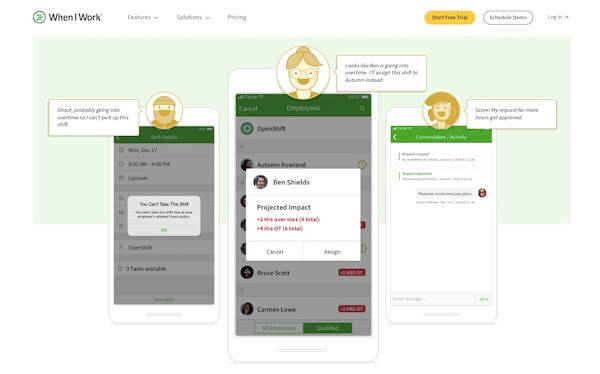
One click fills the week based on employee availability, position eligibility, and labor targets. Managers running standard shift patterns, same roles, similar coverage needs week to week, save the most time here.
The auto-scheduler doesn’t handle exceptions well. If your scheduling has a lot of conditional rules or non-standard shift lengths, expect to make manual adjustments after every run.
2. OpenShifts and Shift Swapping
Employees see open shifts and claim them without calling a manager. Swap requests go through the app and land in the manager’s approval queue. The workflow that used to eat 20 minutes of phone tag takes 30 seconds. Capterra reviewers flag this as one of the features they’d miss most if they left the platform.
3. Time Clock and Attendance
GPS clock-in and geofencing work cleanly for fixed-location teams. The honest issue is twofold: it’s priced as an add-on rather than a base inclusion, and the clock-in interface slows significantly when large groups punch in simultaneously.
A dental practice with six staff has no problem. A restaurant with 35 people changing shifts at 5pm on a Friday might.
4. Labor Forecasting
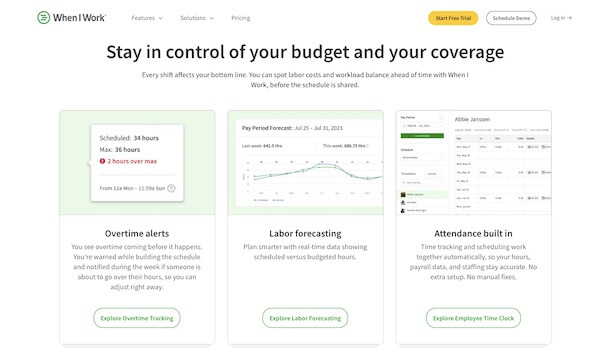
The forecasting tool lets managers compare scheduled hours against their labor budget before publishing the schedule, not after. Overtime threshold alerts fire in real time.
For operations where labor is the primary cost, this feature alone justifies the subscription. It’s not a sophisticated demand forecasting engine, it compares your inputs against your targets, nothing more.
5. Team Messaging
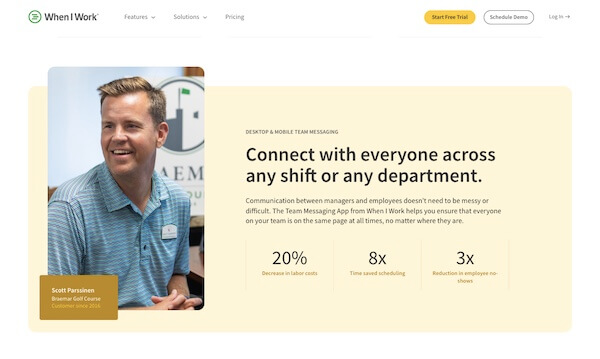
WorkChat keeps all shift communication inside the same app employees already use for their schedule. No personal numbers shared, no group texts spiraling out of control.
The feature works. Notification delivery is the weak point, delays show up frequently enough in reviews that teams running on tight shift handoffs should test it specifically during the trial period.
6. Payroll Integrations
Nine native payroll connections is not a number that happens by accident. Rippling is the preferred partner with the deepest integration and a six-month free offer for new When I Work customers.
QuickBooks Online, Gusto, both ADP products, Square, Paychex, OnPay, and Simplepay.ca round out the list. For most SMB payroll stacks, at least one of those connects natively. That’s a meaningful operational advantage over competitors in this price range.
7. Schedule Templates
Build a template once for your standard weekday coverage, your weekend rush pattern, your holiday skeleton crew. Reuse it every week without rebuilding from scratch. Shift-level task checklists attach directly to templates, so employees know what’s expected before the shift starts. Simple feature. Saves real time.
8. Multi-Location Scheduling
All locations visible from one dashboard, each manageable independently. Labor sharing across sites, moving an employee from one location to cover another, is available on Pro and above. The multi-location view works well for franchise operators and retail chains with consistent shift structures across sites.
It gets harder to manage when locations have significantly different role structures or scheduling rules.
9. Reporting and Analytics
Hours worked, schedule vs. actual, basic overtime summaries. Custom reporting is a Pro feature and still limited when you get there. This section of the product hasn’t kept pace with the rest of it. If your operations team needs labor cost broken down by position, department, or location, plan on exporting data and building reports outside the platform.
10. Mobile App
The iOS app is reliable for individual use. Checking shifts, messaging, clocking in and out, submitting time-off requests, all of it works as expected for one person at a time.
The documented problem is concurrent use at busy locations. Multiple simultaneous clock-ins slow the app or freeze it, which forces manual timesheet corrections. Android users experience this more frequently than iOS users based on the review record.
11. When I Work Integrations
When I Work connects natively to nine payroll systems, more than any direct competitor at this price point. Rippling is the preferred partner, with the deepest connection and a six-month free offer for new customers.
QuickBooks Online, Gusto, both ADP products, Square Payroll, Paychex, OnPay, and Simplepay.ca cover the rest of the common SMB payroll stack. Zapier handles anything outside that list, and a public API is available for custom builds.
The integration story is genuinely strong for a $2.50/user platform. The honest caveat is that several connections are export-based rather than bidirectional syncs. Payroll teams should verify exactly how data flows between When I Work and their specific provider before assuming it’s fully automated.
When I Work Integrations
Native connections confirmed from wheniwork.com/integrations. API available for custom stack builds.

When to Choose When I Work
Not every shift-based business fits this platform equally. These four profiles are where the product consistently delivers based on pricing structure, feature depth, and what the review record actually shows.
When When I Work is the right choice
Four buyer profiles where the platform consistently delivers based on pricing, features, and documented user outcomes.
A 10 to 30 person hourly team moving off paper or Google Sheets will feel the difference immediately. Setup takes hours, not weeks. Employees adopt it without prompting. At $2.50 per user there’s no business case to write.
Franchise owners and retail chain managers who run the same shift structures across multiple sites get real value from the multi-location dashboard and labor sharing features. Consistent scheduling needs across locations is where this setup works best.
If your payroll already runs on one of When I Work’s nine native connections, the scheduling-to-payroll workflow closes without manual exports or reconciliation work. The Rippling preferred partnership adds six free months for new customers switching payroll at the same time.
Donna Rea at Caring Transitions cut scheduling from 8 hours to 15 minutes. That outcome repeats across the review record for managers handling availability requests, swap approvals, and last-minute coverage by phone. The time saving is real and shows up fast.
When to Skip When I Work
Four situations where the platform’s documented limits are specific enough to send your evaluation elsewhere.
When to consider alternatives
Four scenarios where When I Work’s documented limits are specific enough to redirect your evaluation.
When I Work is built for standard shift structures. Manufacturing crews, construction teams, and healthcare operations with complex rotation rules will hit hard limits within weeks of setup.
Consider Deputy for complex shift rulesThe reporting tools won’t get you there. Operations managers who need to present labor analytics to a regional director or ownership group will be building those reports manually in Excel every single week.
Consider Dayforce for workforce analyticsThe mobile app freezes under simultaneous high-volume clock-ins. That’s documented across G2 and Capterra by restaurant and retail managers specifically. At that scale the operational risk of failed clock-ins outweighs the price advantage.
Consider Homebase for high-volume clock-inWhen I Work handles the schedule and nothing else. No HR records, no performance cycles, no built-in compliance tracking. Teams that need those functions will be running a separate HR system in parallel from day one.
Consider Paylocity for full HR coverageIndustries Where When I Work Fits Best
When I Work names more than 30 industries on its website. Not all of them are equal fits. This card maps actual product strength against the verticals where the platform gets used most, based on feature alignment and what the review record shows in practice.
Which Industries Get the Most From When I Work
Fit ratings based on feature alignment, review patterns, and real-world use cases across When I Work’s documented customer base.
How When I Work Compares to the Alternatives
When I Work wins on price and simplicity. Where it loses depends entirely on what your operation needs beyond those two things. The six comparisons below are specific to the competitors named most often by buyers evaluating this category.
When I Work vs Top Alternatives
Four attributes that drive real buying decisions in employee scheduling — mapped across When I Work and five direct competitors.
When I Work sits at the bottom of the published price band. Every named competitor charges more per user at entry level. Homebase charges per location rather than per user, which changes the math depending on team size and site count.
Nine native payroll connections at $2.50/user is not matched by any direct competitor in this price band. Homebase has built-in payroll but fewer third-party connections. Deputy and Connecteam offer fewer native connections at higher price points.
Standard shift patterns are well covered. 4x10s, rotating splits, credential-based scheduling, and compliance-driven rules are not. Deputy and Dayforce handle complex shift structures significantly better. Connecteam focuses on field-based deskless teams rather than complex rotation rules.
When I Work covers scheduling, time tracking, and messaging. It stops there. Paylocity and Dayforce are full HCM platforms covering HR, payroll, benefits, compliance, and talent. Homebase adds hiring and built-in payroll. For teams that need only scheduling, the focus is an advantage. For teams that need more, it’s a ceiling.
When I Work vs Homebase
Homebase prices per location, not per user. That changes the math entirely depending on your setup. A single-location coffee shop with 20 staff pays a flat monthly rate regardless of headcount.
A six-location franchise with 10 people per site pays six times that rate. When I Work charges $2.50 per user across all locations, which often wins at multi-site operations with moderate headcounts. Homebase also includes built-in payroll, which When I Work doesn’t.
If payroll is your primary pain point and you run one location, Homebase is the stronger all-in-one choice. If you’re managing multiple sites and already have a payroll provider, When I Work’s nine native connections make more sense.
When I Work vs Connecteam
Connecteam’s free plan covers up to 10 users. That’s the lead for very small teams. Past 10 users it moves to a flat monthly fee starting at $29, which makes it cheaper than When I Work at larger headcounts. Where they diverge is focus.
Connecteam is built for field-based deskless workers, GPS tracking, task management, digital forms, and operational checklists. When I Work is built for shift-based workplaces where the schedule is the product. A cleaning company managing 30 field technicians fits Connecteam better.
A 30-person retail store fits When I Work better. They solve different problems for different teams and rarely belong on the same evaluation.
When I Work vs Deputy
Deputy doubled down on AI scheduling and raised its base price to $5/user in late 2025. That’s twice When I Work’s Essentials rate.
The price gap is real and for standard shift-based businesses it’s hard to justify. Where Deputy earns the premium: biometric facial recognition for clock-in, stronger support for complex shift rules, and AI auto-scheduling that optimizes against labor cost rather than just filling availability.
For a restaurant running standard front and back of house shifts, When I Work covers the need at half the price. For a healthcare operator managing credential-based scheduling across departments, Deputy’s extra capability matters.
When I Work vs Hubstaff
These two products are aimed at completely different workers. Hubstaff is a productivity monitoring platform built for remote and hybrid teams, screen captures, activity tracking, project time logs.
Employee scheduling is a secondary feature added later. When I Work is a scheduling platform for people who work on a floor, in a kitchen, or at a retail counter. Buyers who end up comparing both have usually misread one of the two products.
If your team works remotely and you need to monitor output, use Hubstaff. If your team works shifts and you need to manage coverage, use When I Work.
When I Work vs Paylocity
Paylocity is a mid-market HCM system covering payroll, benefits administration, talent management, learning, and compliance. Its pricing isn’t published and requires a sales conversation. A 15-person restaurant does not need Paylocity.
A 200-person multi-state retail operator running benefits and compliance across several states probably does. The only time these two appear on the same evaluation is when a growing business is deciding whether it has outgrown point solutions and needs a consolidated platform.
At that inflection point, the question isn’t which scheduling tool to pick. It’s whether the business is ready for the implementation cost and ongoing complexity of a full HCM system.
When I Work vs Dayforce
Dayforce is enterprise workforce management. Real-time payroll calculations, predictive demand scheduling, built-in compliance automation, and pricing that reflects all of it.
When I Work doesn’t compete here and doesn’t try to. The scenario where both appear on the same shortlist is a multi-location operator with 150 or more hourly workers who has hit the ceiling on simpler tools and is evaluating what a proper WFM platform costs. At that scale, Dayforce’s implementation investment makes sense. Below it, the overhead doesn’t.
When I Work vs Alternatives at a Glance
Where When I Work wins, loses, and draws across four buying attributes versus six direct competitors.
| Platform | Price | Payroll Integrations | Shift Complexity | Platform Breadth | Overall Edge |
|---|---|---|---|---|---|
|
When I Work This Product
|
|||||
|
Homebase
|
|||||
|
Connecteam
|
|||||
|
Deputy
|
|||||
|
Hubstaff
|
|||||
|
Paylocity
|
|||||
|
Dayforce
|
Real-World Use Cases for When I Work
Four scenarios with specific team sizes, industries, and honest fit verdicts. Two strong fits, one that works with caveats, and one where the platform isn’t the right tool.
How When I Work performs in practice
Four scenarios with specific team sizes, industries, and honest fit verdicts based on documented platform capabilities.
The owner builds the weekly front and back of house schedule in under 20 minutes using templates. Staff get notified instantly and can swap shifts without calling anyone. Time-off requests go through the app. The manager stops fielding calls on days off. At $2.50 per user with the time and attendance add-on, total monthly cost lands around $90 to $110 for the full team. Setup takes an afternoon.
All five locations run the same opening, midday, and closing shift structure. The multi-location dashboard gives the operator visibility across all sites from one view. Labor sharing lets staff cover gaps at nearby locations when someone calls out. QuickBooks Online connects natively so timesheet data flows to payroll without a manual export. At 40 total staff, the per-user cost is significantly lower than Deputy or Homebase at comparable headcount across multiple sites.
When I Work handles the scheduling and GPS clock-in well enough for a home care agency running standard visit-based shifts. The caveat is GPS accuracy. Field-based reviews document location verification errors often enough that agencies relying on precise clock-in confirmation for billing or compliance purposes should test this specifically during the trial. If GPS accuracy is critical to your operation, verify it against your actual service area before committing. For agencies where scheduling and team communication are the primary pain points, it covers the need at a price Homebase or Deputy can’t match per user.
When I Work doesn’t support 4×10 shift structures, rotating crew assignments, or the overtime calculation rules that apply to them. A manufacturing plant running this schedule will hit that limit on day one of setup and spend the rest of the trial working around it manually. The price advantage over Deputy or Dayforce becomes irrelevant when the platform can’t build the schedule your operation actually runs. This is not a caveat or a workaround situation. It’s a hard product limit.
What Users Say About When I Work
1,620 reviews across G2, Capterra, and Software Advice is a large enough sample to identify patterns that hold across platforms. The themes below repeat consistently enough that they tell you something real about the product, not just about individual experiences.
What 1,620+ users say about When I Work
Themes sourced from verified reviews on G2, Capterra, and Software Advice. Identified independently of vendor input.
Jay Miller at Comfort Dental said it was a no-brainer and took minutes to configure. That experience repeats consistently. Most managers are scheduling live within the same day they sign up.
The most common specific praise across Capterra reviews. Employees check shifts, submit availability, and swap without manager prompting. That outcome alone separates When I Work from most scheduling tools in the category.
Reviewers switching from Deputy or more expensive platforms cite the price-to-feature ratio as the primary reason they stayed. Nine payroll integrations at $2.50/user is hard to argue with for a standard shift-based operation.
Managers report a measurable drop in phone calls and texts once employees start handling swap requests through the app. Donna Rea at Caring Transitions took scheduling from 8 hours to 15 minutes a week.
Restaurant and retail managers document this most. Multiple simultaneous clock-ins slow or freeze the app, forcing manual timesheet corrections. Android users report it more than iOS users.
The add-on cost catches teams off guard. Several Capterra reviews specifically mention discovering the real total cost only after starting the trial or receiving the first invoice.
Operations managers wanting labor cost by department or position end up exporting to spreadsheets. This complaint appears across both G2 and Capterra and hasn’t changed across multiple product versions.
Staff sometimes don’t receive schedule change alerts in time. In operations where last-minute shift changes are common, this becomes a recurring operational problem rather than an occasional inconvenience.
When I Work Pricing
Three plans, one add-on decision. The table below maps exactly what each plan includes. The time and attendance add-on applies across all three tiers and is not included in the base per-user rates shown.
When I Work doesn’t publish the add-on price on the pricing page, request the full breakdown before budgeting, particularly if you’re managing more than 20 hourly staff.
Verified from wheniwork.com/pricing as of May 2026. Time and attendance is a separate add-on across all plans. Add-on pricing not published — request directly from When I Work before budgeting.
Our Final Verdict When I Work
When I Work’s 4.7 on ease of use is not a number that comes from feature checklists. It comes from 1,600 reviewers describing the same outcome: staff open the app, check shifts, and manage their own scheduling without being asked to.
For a shift-based SMB, that outcome has direct operational value. Fewer phone calls, fewer texts, fewer interruptions on days off.
The 3.0 on reporting is the score that will end the evaluation for some buyers before it starts. If anyone above you in the organization regularly asks for labor cost by department, position, or location, this platform won’t give it to them. That’s not a roadmap item. It’s a product priority decision that has held across multiple versions.
Our Final Verdict on When I Work
Based on 1,620+ verified reviews, independent platform analysis, and direct vendor research.
The simplest scheduling platform in the SMB market for hourly teams. Gets staff using it from day one without training. Mobile app freezes under simultaneous high-volume clock-ins and reporting won’t satisfy anyone tracking labor cost beyond basic hour summaries.
A 15-person restaurant replacing a whiteboard and a group text chain will get more value from this platform in the first week than from anything else at this price. A 60-person manufacturing plant running rotating shifts will hit a hard wall on day one. The product is honest about what it is. The question is whether your operation fits inside it. Visit wheniwork.com to start the free trial.
Frequently Asked Questions
When I Work — Common Questions
Starts at $2.50 per user per month on Essentials, $5 on Pro, $8 on Premium. Time and attendance is a separate add-on across all three plans and the price isn’t published on the pricing page. Request it directly before budgeting. No annual contract, no setup fee, 14-day free trial with no credit card.
Available on all plans but it’s a paid add-on, not included in the base per-user price. That detail doesn’t surface prominently during signup and catches teams off guard on the first invoice. The full trial does include time tracking so test it before committing.
Nine native connections: Rippling (preferred partner), Gusto, QuickBooks Online, ADP Run, ADP Workforce Now, Square Payroll, Paychex, OnPay, and Simplepay.ca. Zapier covers additional tools. A public API is available for custom builds.
Yes, on all plans. Unlimited job sites from one dashboard. Labor sharing across locations is a Pro and Premium feature. Each location can manage its own shifts while a central admin sees everything company-wide.
No. This is a hard product limit, not a workaround situation. 4x10s, rotating splits, and overlapping shift types aren’t supported at any plan level. Manufacturing and construction teams should look at Deputy or Dayforce instead.
No permanent free plan. There’s a 14-day free trial with full feature access and no credit card. If a no-cost option is a hard requirement, Homebase and Connecteam both offer permanent free tiers.
Rippling is When I Work’s preferred payroll partner. New When I Work customers who connect Rippling get six free months of Rippling’s payroll, HR, and benefits platform. Timesheet data flows directly to Rippling payroll without manual exports.
Four issues repeat consistently across G2 and Capterra: the mobile app freezes when large groups clock in simultaneously, the time and attendance add-on cost isn’t visible upfront, reporting is too thin for teams tracking labor cost by department, and notification delays cause employees to miss schedule updates.
Yes, and this is consistently the most praised aspect of the platform. Employees submit availability, request time off, and initiate swaps directly in the app. Managers approve in one tap. No personal phone numbers shared. The whole workflow that used to happen over group texts moves into the platform.


