Asana Logo
Editor's Rating:

Asana is best for organizing team projects, tracking tasks, and improving collaboration in one easy-to-use workspace.

HR Stacks offers comprehensive, data focused and unbiased solutions. We are a user supported platform and may earn a referral fee when you visit a vendor through our links

Asana Review 2026: Pricing, Features, Pros & Cons

What is Asana?

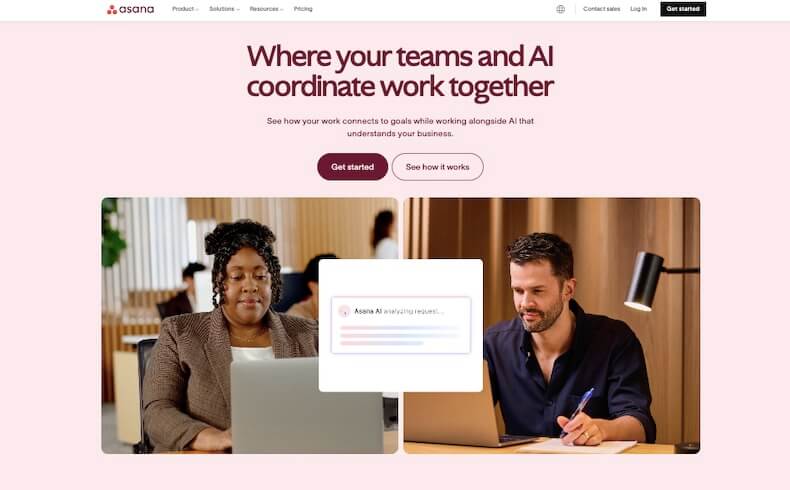
Asana is a work management tool designed to help teams stay organized, track their tasks, and get things done without the usual back-and-forth confusion. It’s like a digital to-do list, but for entire teams.

Whether it’s a small startup juggling client projects or a large company trying to manage remote teams, Asana brings all the moving parts together in one place so nothing falls through the cracks.

The tool lets users create projects and break them down into individual tasks, assigning each to the right person with due dates and priorities. Each task can hold extra details like comments, attachments, and tags, making sure everyone has the context they need without switching between apps.

One of the handy things is the timeline view, a visual way to see how all tasks line up and how changes in one might affect the rest. For teams who love seeing progress in different ways, Asana offers calendar views, Kanban boards, and simple list formats too.

It also comes with automation tools, which help cut down repetitive work. Think of setting rules like “when task A is done, automatically assign task B.” That sort of thing saves time and keeps projects flowing. Integration is another plus.

Asana works smoothly with tools like Slack, Google Drive, Zoom, and even email, so teams don’t have to jump around to keep work moving.

There’s also a reporting feature that gives a snapshot of how projects are progressing, where things are slowing down, and what needs attention.

Whether the goal is better planning, improved team communication, or just making sure deadlines stop slipping, Asana helps keep everything clear and moving. It’s a solid choice for teams looking to cut the chaos and work with more focus and less stress.


Show More
About Asana
Company Name: Asana, Inc.
Est: 2008
Employees: 1001-5000
HQ: San Francisco, California, United States
Support Offered
Email Support
Live Chat
Tutorial Videos & Documentation
Social Media

Key Features of Asana

Task Management
Create, assign, and track tasks with clear deadlines and priorities to keep everyone on the same page.
Project Views
Switch between list, board, calendar, and timeline views to manage work the way that fits your team best.
Timeline
Visualize project schedules and dependencies with a drag-and-drop timeline to plan ahead without bottlenecks.
Automation
Set up rules to automate routine actions like assigning tasks or updating statuses, saving time and reducing manual work.
Team Collaboration
Comment on tasks, tag teammates, and share files within each project to keep communication focused and clear.
Integrations
Connect with tools like Slack, Zoom, Google Drive, and Outlook for smoother workflows across platforms.
Custom Fields
Add specific data fields to tasks to match your team’s unique tracking needs and workflows.
Reporting Dashboards
Get real-time insights into task progress, project status, and team workload with customizable dashboards.
Workload Management
See who’s busy and who’s available to balance work across the team and avoid burnout.
Goals Tracking
Set company or team goals, link them to tasks, and measure progress as work moves forward.

Asana Pros & Cons 2026

Pros
Easy-to-use interface
Strong task assignment and tracking
Helpful automation features
Great for team collaboration
Integrates with popular tools like Slack and Google Drive
Clear progress tracking and reporting
Cons
Too many notifications if not managed properly
No built-in time tracking
Mobile app lacks some desktop functions
Limited features in the free plan

Asana Pricing 2026

Asana offers three plans - Personal, Starter & Advanced to choose from. Their pricing starts from $10 . 99 and so on. Check out all details of their plans
Personal
US$ 0
Starter
US$10 . 99 Per user, per month billed annually
Advanced
US$ 24 . 99 Per user, per month billed annually

Asana User Sentiment Analysis

Ease of Use

Users find Asana very easy to navigate with a clean and simple layout. Even new users can quickly understand how to create and manage tasks.
User Sentiment Score
91%

Features

Most users appreciate the wide range of features like task tracking, automation, and project views. It fits well for both small teams and large projects.
User Sentiment Score
90%

Value For Money

Many feel the free plan covers a lot, and paid plans bring in good value with advanced tools. It’s seen as affordable compared to other project tools.
User Sentiment Score
89%

Customer Support

Users say support is responsive and helpful, with a solid knowledge base and tutorials. Getting help is usually quick and clear.
User Sentiment Score
90%

Asana Quick Comparison Table

Here is a quick comparison with some of the products that offers similar features as Asana.
Monday.com Logo
monday.com
4.5
Free Trial
Yes
Starting Price
$9/User
Hub Planner Logo
Hub Planner
4.0
Free Trial
Yes
Starting Price
$7
Recruit CRM Logo
Recruit CRM
0
Free Trial
Yes
Starting Price
$85/Month
Asana Logo
Asana
0
Free Trial
Yes
Starting Price
$11
Wrike Logo
Wrike
0
Free Trial
Yes
Starting Price
$10
Toggl Logo
Toggl
0
Free Trial
Yes
Starting Price
$10

Asana FAQs

Asana is used to manage tasks, projects, and team collaboration by organizing work, setting deadlines, and tracking progress in one shared space.
Yes, Asana offers a free plan with basic features for individuals and small teams. Paid plans unlock advanced tools like timeline, automation, and reporting.
Asana helps teams by streamlining task management, improving communication, setting clear priorities, and providing visibility into project progress.
Yes, Asana integrates with popular tools like Slack, Google Workspace, Zoom, Outlook, and more to simplify workflows and reduce app switching.
Yes, Asana is widely used for project management. It offers features like timelines, dependencies, workload tracking, and reporting to manage projects efficiently.

HR Stacks Review Methodology

Every product on HRStacks is reviewed using a consistent methodology that combines editorial analysis with real user feedback. Our goal is to give HR teams clear, practical insights they can rely on when comparing software

Data Sources

Our research draws on multiple trusted sources, including verified user reviews on reliable public review platforms. We also review product documentation, feature sets, pricing structures, and publicly available information from the vendor.

Editorial Analysis

Each platform is evaluated across several key areas such as core functionality, ease of use, integrations, scalability, and overall value. This analysis helps us understand how the product performs in real HR and global workforce management scenarios.

Editor’s Rating

The HRStacks Editor’s Rating reflects our overall assessment of the platform based on product capabilities, usability, reliability, and feedback trends from real users.

User Sentiment

We analyze recurring themes across user reviews to identify commonly reported strengths, limitations, and overall satisfaction levels.

Independent Reviews

HRStacks reviews are created independently and are not influenced by vendors. Product pages are updated periodically to reflect new features, pricing changes, and evolving user feedback.

Scoring Framework

Ratings and sentiment scores are derived from a combination of editorial evaluation and analysis of recurring feedback patterns from real users.

Manjuri Dutta
Article By: Manjuri Dutta

Manjuri Dutta is the co-founder and Content Editor of HR Stacks, a leading HR tech and workforce management review platform, and EmployerRecords.com, specializing in Employer-of-Record services for global hiring. She brings a thoughtful and expert voice to articles designed to inform HR leaders, practitioners, and tech buyers alike.

Get HR Stacks Weekly
Get our weekly news update with all latest news in HR community.
Asana Review

Get Started With Asana

Asana Alternatives

Here is a quick list of some of the top Asana alternatives with similar features that you may explore.
Monday.com Logo

monday.com

monday.com is a work operating system that enables teams and...
Hub Planner Logo

Hub Planner

Hub Planner is an online resource management and project scheduling...
Recruit CRM Logo

Recruit CRM

Recruit CRM is a global recruitment platform that manages all...
Asana Logo

Asana

Asana is a work management tool designed to help teams...
Wrike Logo

Wrike

Wrike is an online work management tool that helps teams...
Toggl Logo

Toggl

Toggl is a simple yet powerful tool designed to make...
Rating Distribution
0
0 out of 5 stars (based on 0 reviews)
Excellent
Very good
Average
Poor
Terrible
Share Your Experience

Asana: Recent Reviews

There are no reviews yet. Be the first one to write one.

Submit Your Review For Asana

Featured HR Products

Pebl Logo
Pebl
Pebl (formerly Velocity Global) is a leader...
Deel Logo
Deel
Deel is a well-recognized all-in-one HR solution...
usemultiplier_logo
Multiplier
Multiplier is an emerging global employment platform...
When I Work Logo
When I Work
When I Work is a scheduling tool...
Connecteam Logo
Connecteam
Connecteam is an all-in-one employee management platform...
Receive the latest HR news

Subscribe To Our Weekly HR Newsletter

Get the latest from the HR & AI tech industry. All your news at one place. 

HR Stacks uses cookies

This website uses cookies to enhance user experience and to analyze performance and traffic on our website. By continuing to browse this site you are agreeing to our use of cookies.