Rippling vs. Darwinbox: Detailed Comparison 2026

A detailed side-by-side Rippling vs. Darwinbox comparison to help you select the best option between these two solutions. We have considered top features, pros and cons, pricing and other details to help you choose the right solution.
Featured HR Tech Solutions
Deel Logo
Deel
Company Profile Deel Built by Deel, Inc....
Pebl Logo
Pebl
Company Profile Pebl Formerly Velocity Global ·...
usemultiplier_logo
Multiplier
Company Profile Multiplier Built by Multiplier Technologies...
When I Work Logo
When I Work
Company Profile When I Work Built by...

Rippling vs. Darwinbox: Overview

What is Rippling?

Rippling combines HR, IT, and finance into one system, but its real strength is how tightly everything connects. In this review, we break down where it works well and where it doesn’t.

Rippling Company Profile

Co Name: Rippling People Center, Inc.
HQ: California, United States
Est Year: 2016
Company Size
1001-5000 employees
Website

What is Darwinbox?

Darwinbox mobile app provides a simple and easy-to-use interface for you to perform daily HR transactions and tasks.

Darwinbox Company Profile

Co Name: Darwinbox Digital Solutions Pvt Limited
HQ: Hyderabad, India
Est Year: 2015
Company Size
251-500 employees
Website

Rippling vs. Darwinbox: HR Stacks Score

Rippling vs. Darwinbox HR Stacks score based on a number of data points. We check the features, user feedback, community sentiments while adding the score. The score will give you some idea about the overall quality of the products.

Rippling Score

Ease of Use 92%
Features 94%
Value for Money 94%
Support 90%

Rippling: Editor's Rating

Pricing & Value
3.9/5
Rippling can be cost-effective if you’re using several modules together, because the unified system replaces multiple tools. But once you add EOR, payroll, IT management, and advanced automations, the total price climbs.
Global Coverage
4.3/5
Rippling supports hiring and payroll in dozens of countries. It works well for companies scaling a remote workforce, though it doesn't yet match the “hire anywhere” coverage of the largest dedicated EOR vendors.
Compliance & Local Expertise
4.2/5
Rippling performs reliably with contracts, statutory requirements, and payroll compliance across supported regions. Users praise how well the system handles U.S. and major international markets.
Payroll & Benefits
4.3/5
The payroll engine is fast and dependable, with accurate tax calculations and clear payment timelines. Benefits management is also strong, especially when integrated with the broader HR modules.
Onboarding & Employee Experience
4.2/5
Users consistently highlight Rippling’s smooth onboarding, device provisioning, access permissions, forms, payroll setup, all handled in a single workflow. Employees generally find the portal easy to use.
Platform & Ease of Use
4.4/5
Rippling’s unified dashboard is one of its biggest advantages. HR, payroll, IT, and EOR functions sit in one clean interface.
Integrations
4.4/5
The platform integrates with a wide ecosystem, HR systems, finance tools, identity management platforms, time-tracking apps, and more.
Customer Support
4.0/5
Support is generally helpful and knowledgeable, especially during guided onboarding. Users appreciate the structured implementation process.
Overall Score
4.2/5
Rippling is a strong choice for companies wanting an all-in-one platform that combines HR, payroll, IT management, and EOR. It’s especially well-suited for distributed teams and mid-size companies that value automation and a unified system.

Darwinbox Score

Ease of Use 90%
Features 92%
Value for Money 90%
Support 90%

Darwinbox: Editor's Rating

Pricing & Value
4.0/5
Strong value for feature breadth and HR consolidation, though enterprise-oriented pricing can feel opaque and high for smaller teams.
Global Coverage
4.2/5
Cloud-based platform with broad international adoption; excels in unified HR operations though not designed specifically for localized statutory compliance.
Compliance Strength
3.9/5
Good data governance and security; payroll and attendance compliance solid for core markets, but broader statutory compliance workflows depend on configuration.
Onboarding Experience
4.1/5
Setup and rollout receive positive feedback for comprehensive features; some users note the learning curve and initial configuration effort.
Payroll & Benefits
4.0/5
Payroll and attendance modules are reliable and widely praised; benefits functionality is functional but not as deep as standalone payroll/benefit platforms.
Integrations
4.0/5
Integrates well with common HR tools and workflows; extensive API support and connectors exist, though connecting niche legacy systems may need extra effort.
Customer Support
4.0/5
Generally helpful and responsive support; some users note variability in response time on complex cases.
Ease of Use
4.1/5
Users often highlight a user-friendly UI and streamlined workflows; occasional performance lags and initial complexity for new users temper the experience.
Overall Score
4.1/5
A comprehensive, enterprise-ready HRIS with strong core HR, payroll and analytics capabilities; excellent for mid-to-large teams seeking an all-in-one HR platform, though experience varies with setup and scale.

Rippling vs. Darwinbox: Pricing Comparison

Rippling vs. Darwinbox pricing comparison. The pricing is one of the most important aspect to look at when we compare two products. It can be an important aspect to make a decision.

Rippling Pricing Details

Free Version: No

Free Trail: Yes

Starting Price: $8/User

Darwinbox Pricing Details

Free Version: No

Free Trail: No

Starting Price: Custom

Rippling vs. Darwinbox: Pros & Cons

Rippling Pros & Cons

Pros of Rippling

Unified HR and IT management
HR teams can manage employee data, devices, and app access from one platform, reducing tool fragmentation and manual coordination.
Powerful workflow automation
Custom workflows automate onboarding, approvals, and policy enforcement, helping teams reduce repetitive tasks and maintain consistency across processes.
Extensive integration ecosystem
The platform connects seamlessly with hundreds of business tools, allowing companies to centralize operations without disrupting their existing tech stack.
Fast and structured onboarding
New hires can be onboarded quickly with automated provisioning of accounts, payroll setup, and compliance tasks handled in a single flow.
Scalable for growing organizations
The system adapts well as companies expand, supporting additional modules, users, and workflows without requiring a complete system overhaul.
Strong payroll and compliance features
Payroll processing is reliable and automated, with built-in compliance support that reduces the risk of errors and regulatory issues.

Cons of Rippling

Modular pricing adds up quickly
Costs can increase significantly as companies add more features, making it less predictable for teams planning long-term budgets.
Initial setup can be complex
Configuring workflows, permissions, and integrations requires time and expertise, especially for organizations with more complex operational structures.
Customer support inconsistency
Support quality can vary depending on subscription tier, with some users experiencing slower responses or less personalized assistance.

Darwinbox Pros & Cons

Pros of Darwinbox

Comprehensive HR suite coverage
It brings core HR, payroll, performance, and engagement tools into one system, reducing reliance on multiple disconnected platforms.
Strong regional localization
The platform handles country-specific compliance and payroll requirements well, especially across India and Southeast Asia, making regional operations easier to manage.
Modern, intuitive interface
Its clean design and mobile-first approach help employees and managers complete HR tasks quickly without needing extensive training.
Flexible workflows and automation
HR teams can configure workflows for approvals, onboarding, and lifecycle events, improving operational efficiency and reducing manual follow-ups.
Mobile app usability
The mobile experience is well-designed, allowing employees to manage attendance, leave, and approvals conveniently without relying on desktop access.
Solid payroll capabilities in key markets
Payroll processing is reliable in primary regions, with built-in statutory compliance that reduces manual calculations and compliance risks.

Cons of Darwinbox

Limited maturity in Western markets
Organizations operating heavily outside Asia may find fewer localized features and less mature compliance support compared to global HRIS providers.
Integration depth can vary
While integrations exist, some require custom development or lack depth, which can create extra work for complex tech stacks.
Reporting customization complexity
Advanced reporting often requires additional configuration effort, making it less straightforward for HR teams needing quick, flexible insights.

Rippling vs. Darwinbox: Demo

Understand the products better by checking the demo videos listed below. 

Rippling Demo Video

Youtube video

Darwinbox Demo Video

Youtube video

Rippling vs. Darwinbox Comparison Summary

If you’re comparing Rippling and Darwinbox, you’re really deciding between two very different approaches. One is built around automation and centralized control. The other is designed for HR depth, compliance, and regional execution.

This comparison breaks down how each platform works in practice so you can decide what actually fits your organization.

Product Overview

At a high level, Rippling tries to unify employee management across HR, IT, and finance. Darwinbox stays focused on HR, but goes deeper into workflows, payroll, and compliance.

Rippling

Rippling is built as a system of record for everything tied to an employee. That includes payroll, benefits, devices, apps, and even finance workflows.

Its biggest strength is automation. You onboard someone once, and the system can trigger payroll setup, assign apps, configure devices, and update permissions without manual follow-ups.

We’ve seen fast-growing companies lean toward Rippling when they want fewer tools and tighter operational control. It works especially well if you already have IT or ops teams who can take advantage of that flexibility.

Rippling Review

Darwinbox

Darwinbox is a full HCM platform designed primarily for HR teams. It has strong traction across Asia-Pacific and the Middle East, with growing global adoption.

The platform focuses on core HR, payroll, engagement, and talent management, with heavy emphasis on localization. Things like statutory compliance, regional payroll rules, and structured HR workflows are built into the system.

In real-world use, Darwinbox tends to fit organizations that want HR to run smoothly without relying too much on IT. It feels closer to how HR teams actually operate day to day.
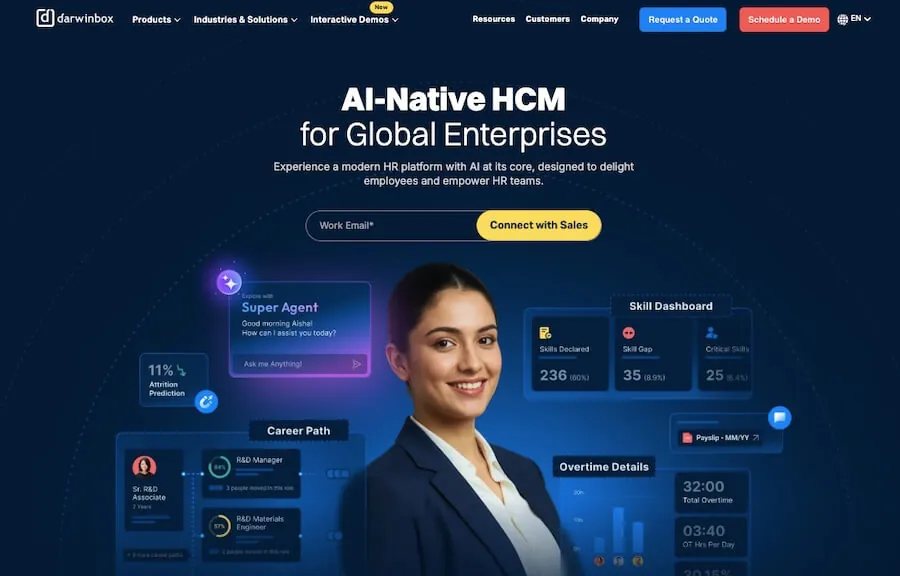
Darwinbox review

Rippling vs. Darwinbox: Feature Comparison

FeatureRipplingDarwinbox
Global Coverage50+ countries (EOR + partners)100+ countries (strong APAC & MENA focus)
Platform TypeUnified HR + IT + FinanceFull-suite HCM (HR-first)
Onboarding SpeedHighly automated, often same-dayStructured with compliance checkpoints
Contractor SupportYes, self-serveYes, managed via HR workflows
Payroll EngineCentralized multi-country systemLocalized payroll engines
BenefitsBuilt-in, stronger in USRegion-specific flexibility
ComplianceAutomated workflows and trackingStrong local compliance handling
UX / UIModern and configurableIntuitive and HR-focused
Integrations500+ apps + open APICore integrations, expanding
Customer SupportChat and account managementDedicated support with regional teams
PricingModular, scales with usageCustom pricing, often enterprise-friendly
SecuritySOC 2, ISO, GDPRGDPR and ISO-aligned
ScalabilityCross-functional scalingHR and geographic scaling

Rippling vs. Darwinbox: Feature Deep-Dive

Onboarding & Employee Setup

With Rippling, onboarding is fast and highly automated. You enter employee details once, and everything else gets triggered in the background. Payroll, benefits, system access, device setup. It all happens in sync.

That kind of speed matters when hiring at scale.

Darwinbox takes a more structured route. Onboarding flows are configurable, but they are designed around approvals, documentation, and compliance steps.

In regions with strict labor laws, this approach reduces risk. You are less likely to skip something important.

Payroll & Compliance

This is where the gap becomes more noticeable.

Rippling offers centralized payroll management across multiple countries. It simplifies reporting and gives you a single system to manage everything. In some regions, it still depends on partners for execution.

It works well if you want consistency across locations.

Darwinbox is more localized. Payroll engines are designed to handle country-specific rules, filings, and statutory requirements.

For companies operating in India, Southeast Asia, or the Middle East, this often makes a real difference. Payroll is not just processed, it is aligned with local expectations.

Integrations & Ecosystem

Rippling stands out here. It integrates with hundreds of tools across HR, IT, and finance. The API is flexible, and the platform can act as a central layer connecting different systems.

If your stack is already complex, this helps bring everything together.

Darwinbox takes a different approach. It handles most HR workflows within the platform itself, so the need for external integrations is lower.

That said, if you are building a highly customized tech stack, Rippling gives you more flexibility.

Employee Experience & UX

Both platforms are modern, but they feel different in daily use.

Rippling is modular and flexible. It gives you a lot of control, which is great if you know exactly how you want things to work.

Darwinbox feels more guided. Workflows are structured in a way that aligns with HR processes, so teams can adopt it quickly without heavy configuration.

We have seen HR teams get comfortable with Darwinbox faster. We have also seen broader team usage with Rippling across departments.

Rippling vs. Darwinbox: Editor’s Note

This comparison comes down to how your organization operates.

Rippling is built for companies that want to centralize systems and automate aggressively. It can replace multiple tools, but it works best when you have the internal capability to set it up properly.

Darwinbox focuses on doing HR really well. It handles complexity in payroll, compliance, and regional workflows in a way that feels practical, especially outside North America.

We have seen mid-sized companies choose Rippling when they are scaling quickly and want operational efficiency.
We have also seen enterprises, particularly in Asia, prefer Darwinbox because it aligns better with local HR realities.

Rippling vs. Darwinbox: Final Recommendation

Choose Rippling if you:

  • Want a single platform for HR, IT, and finance
  • Prefer automation and minimal manual work
  • Have internal resources to manage setup and integrations
  • Are scaling quickly and need operational efficiency

Choose Darwinbox if you:

  • Need strong payroll and compliance localization
  • Operate heavily in Asia, the Middle East, or similar regions
  • Want an HR-first system that is easy for teams to adopt
  • Prefer structured workflows over full customization

Verdict

If your priority is automation and system consolidation, Rippling comes out ahead. It gives you control and flexibility across departments.

If your focus is HR depth, compliance, and regional alignment, Darwinbox is the better fit. It matches how HR teams actually work in more complex environments.


Our Comparison Methodology: How We Research & Evaluate

Every HR Stacks comparison is built on structured independent research — not sponsored placements or vendor influence.
Independent Research
No sponsored placements — affiliate links never affect our verdicts
Hands-On Product Testing
Demos, trials, and live walkthroughs — not marketing material
User Review Analysis
We analyze real user reviews in publicly available platforms
Feature Verification
Every claim verified against live platforms or official documentation
Pricing Transparency Check
Public pricing vs. sales-only costs — hidden fees flagged clearly
Compliance & Legal Assessment
How each platform handles local law, tax, and buyer risk exposure
Support Experience Evaluation
Response times, availability, and support model tested directly
Regular Content Updates
All comparisons reviewed periodically as products and pricing change
Source: HR Stacks Editorial Standards © HR Stacks
Manjuri Dutta
Article By: Manjuri Dutta

Manjuri Dutta is the co-founder and Content Editor of HR Stacks, a leading HR tech and workforce management review platform, and EmployerRecords.com, specializing in Employer-of-Record services for global hiring. She brings a thoughtful and expert voice to articles designed to inform HR leaders, practitioners, and tech buyers alike.

HR Stacks offers comprehensive, data focused and unbiased solutions. We may earn a referral fee when you visit a vendor through our links

Related Comparisons

Oyster HR Vs Papaya Global
Deel vs Remote Comparison

Deel vs Remote

Remofirst vs. Papaya Global Comparison

Remofirst vs. Papaya Global

Remofirst vs. Oyster HR

Remofirst vs. Oyster HR

Pebl Vs Remote

Pebl Vs Remote

Pebl Vs Rippling

Pebl Vs Rippling

Deel Vs Pebl

Deel Vs Pebl

Remofirst vs. Pebl

Remofirst vs. Pebl

This website uses cookies to enhance user experience and to analyze performance and traffic on our website. By continuing to browse this site you are agreeing to our use of cookies.