


Eddy HR Key Facts
What Is Eddy HR?
Eddy HR is an HR and payroll platform for small and midsize US businesses, especially teams with deskless staff. It keeps employee records, onboarding, time tracking and payroll under one login, so owners stop juggling spreadsheets and separate tools.
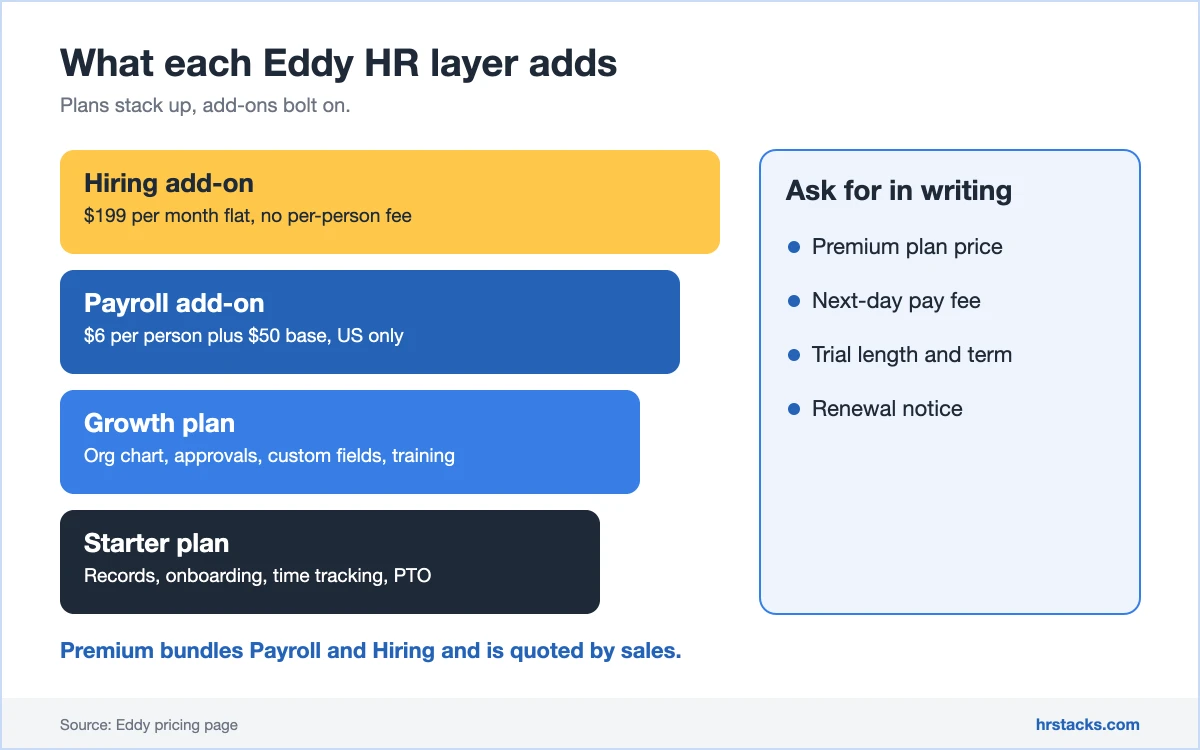
The core is a people database with documents, e-signatures and PTO, sold in Starter and Growth plans. Payroll and hiring are paid add-ons that bolt onto either plan, and Premium bundles both for a quote. Teams that want a deeper HRIS usually compare it with BambooHR.
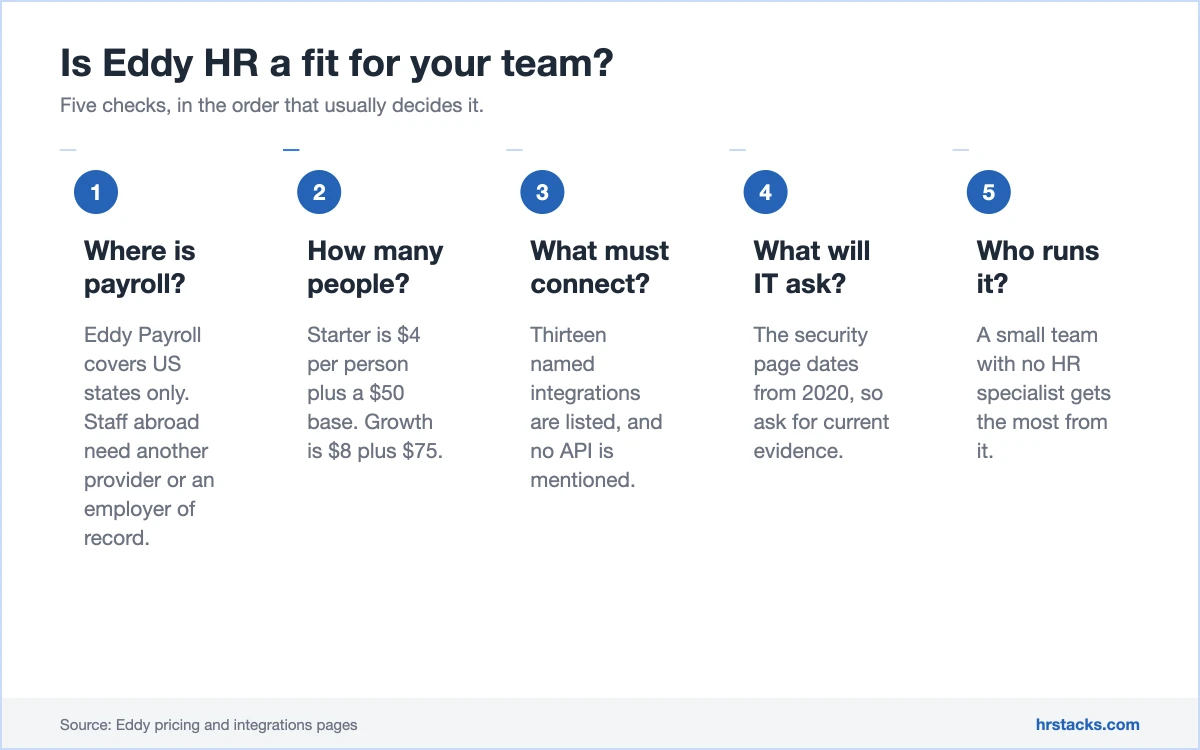
Eddy is US-only for payroll and thin on integrations, so it undershoots global teams. Companies hiring abroad should look at an employer of record instead. You can see current plans on the Eddy site.
Editor’s Verdict on Eddy HR
Eddy HR is one of the cheaper ways for a small US business to get payroll, onboarding and time tracking in one place, with every plan price published. It gets less convincing once you need integrations, reporting depth or documented security.
We sit below users because they rate the day-to-day experience, while we also score the 2020 security page and the integration gaps.
Eddy HR Pros and Cons
Eddy’s biggest strength is transparent pricing: Starter, Growth and both add-ons are priced on the page. Its biggest weakness is how little it connects to, with 13 named integrations and no API mentioned. Small US teams get good value, and everyone else should look elsewhere.
Strengths
- Published, low entry priceStarter is $4 per person plus a $50 monthly base, and Growth is $8 plus $75, so a quote is only needed for Premium.
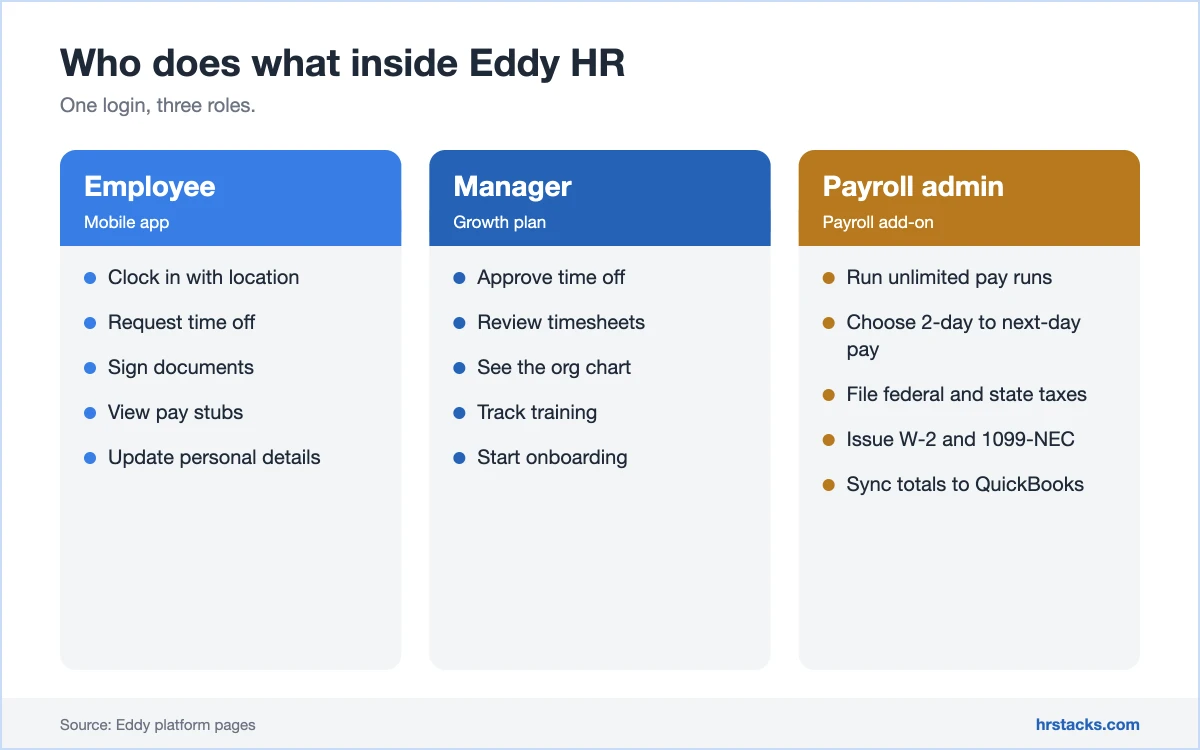
- Payroll bolts onto any planPayroll costs $6 per person plus $50 monthly, with unlimited pay runs, tax filings and W-2 or 1099-NEC forms across all 50 states.
- Reviewers like the supportOne source scores customer service 4.9 out of 5, and reviewers describe quick, friendly help during setup.
- Hiring tools at a flat feeThe Hiring add-on is $199 per month flat, covering job board posting, scheduling and custom offer letters.
Limitations
- Payroll limited to the USEddy Payroll covers US states only, so any employee outside the US needs a separate provider or an employer of record.Alternative: Rippling, HR modules from $8 per employee per month plus a base fee
- Few integrations, no API notedThe integrations page lists 13 tools and mentions no API, so connecting a larger stack means manual work.Alternative: BambooHR, Core plan at $10 per employee per month
- Security page dated 2020The page was last updated May 20, 2020, lists no SOC 2 report, and does not mention two-factor authentication.Alternative: Gusto, Simple plan at $49 per month plus $6 per person
Eddy HR Features
Eddy covers the HR and payroll basics well and keeps the price low by selling payroll and hiring separately. Reporting and customisation are the weak spots reviewers raise most.
Core features
- Employee records and documentsCentral database with document storage and e-signatures, and custom data fields only on Growth.Strong
- Onboarding templatesTemplated task lists and signature documents get new hires set up, with custom templates on Growth.Strong
- Time tracking and PTOTimesheets, geotagged clock-ins and PTO tracking are included from Starter.Adequate
- Org chart and approvalsGrowth adds an org chart and manager approval flows, while reviewers still ask for more reporting options.Adequate
- ReportingBasic reporting only on Starter, and reviewers say they want more time and payroll reports.Limited
Extras
- Eddy PayrollUnlimited pay runs, 2-day, 4-day or next-day deposit, and tax filings, for US employers only.Strong
- Eddy HiringPosts jobs to boards and your career page for $199 per month flat, with automated messaging and offer letters.Adequate
- Training trackingTraining records sit in the Growth plan and later, with no learning content built in.Limited
Eddy HR Integrations
Eddy lists 13 named tools, grouped by job. The benefits row is the deepest, and payroll data can sync to QuickBooks Online.
 Checkr
- LinkedIn
- Indeed
- SimplyInsured
- 401GO
- Vestwell
- Employee Navigator
- QuickBooks Online
- Tilt
Eddy HR Pricing
Eddy publishes monthly prices for Starter, Growth and both add-ons, and only Premium needs a quote. Each paid plan carries a monthly base fee on top of the per-person rate. Annual discounts and contract terms are not stated.
Published plans
All prices are monthly, with no annual rate or discount published.
Fees and contract terms
What Eddy HR states publicly, and what to get in writing before you sign.
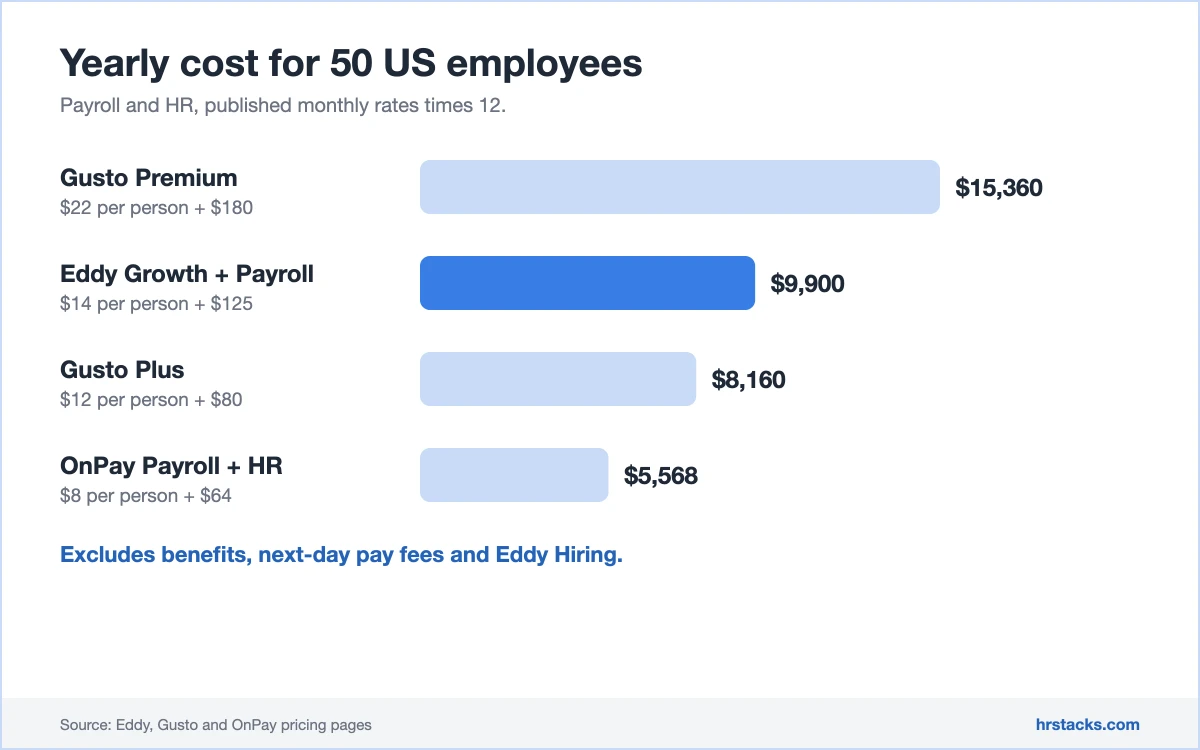
What 50 employees cost a year
Eddy sits between OnPay and Gusto once payroll and HR are both counted.
Who Should Use Eddy HR?
Eddy suits owners who want one login for payroll and basic HR at a known price. Teams that need integrations, global payroll or documented security should shortlist others.
Best for
- US small businesses with 5 to 100 staff that want payroll and HR under one login.
- Deskless teams that need geotagged clock-ins, PTO tracking and onboarding templates on a phone.
- Owners who want a published price list and a $4 entry point before talking to sales.
- Employers adding job posting for a flat $199 a month without a separate recruiting tool.
Skip if
- You pay or hire staff outside the US, since Eddy Payroll covers US states only.Consider Rippling, HR modules from $8 per employee per month plus a base fee
- You need many integrations or an API to connect finance, ATS and benefits tools.Consider BambooHR, Core at $10 per employee per month
- Your security team needs a current SOC 2 report or two-factor authentication documented.Consider Gusto, Plus plan at $80 per month plus $12 per person
Eddy HR Alternatives
These four are the small-business payroll and HR platforms Eddy most often meets. Three publish full rate cards, so the cost gap is easy to check.
Eddy HR vs GustoGusto costs more at scale, adds time tracking tiers
Choose Gusto if you want tiered plans with HR guidance in Premium. Read our Gusto review
Eddy HR vs OnPayOnPay is cheaper for payroll plus HR
Choose OnPay if payroll is the main job and HR is secondary. Read our OnPay review
Eddy HR vs BambooHRBambooHR wins on HR depth, loses on payroll price clarity
Choose BambooHR if HR depth and a larger integration list matter more than price. Read our BambooHR review
Eddy HR vs RipplingRippling wins on breadth, Eddy on simplicity
Choose Rippling if you need HR, IT and payroll under one contract. Read our Rippling review
What Users Say About Eddy HR
Reviews are positive and mostly from small businesses. Scores cluster at 4.6 and 4.7, and the complaints are about depth rather than reliability.
What users praise
- Friendly, simple interfaceEase of use scores 4.7 out of 5, and reviewers say new staff pick it up quickly.
- Attentive customer serviceCustomer service averages 4.9 out of 5, with praise for quick, personal help.
- Cost against featuresReviewers who switched from other tools cite lower cost for the same features.
- One place for HR recordsStaff directory, time tracking and documents sit together, saving tool switching.
What users complain about
- Limited customisationEight reviewers cite forms and settings that cannot be changed.
- Thin reportingReviewers want more time reports and richer payroll reporting.
- Payroll feels separateOne reviewer says HR and payroll are not fully integrated.
- Weak for international staffA reviewer finds some features unfriendly for employees abroad.
Is Eddy HR Worth It?
Choose Eddy HR if you run a small US business and want published prices, payroll and HR under one login, and light time tracking. Skip it if you hire abroad, need a deep integration list or want audited security evidence.
Before signing, ask for the Premium quote, the next-day pay fee and a current security document. Confirm how payroll and HR data sync, since one reviewer found them separate.
Confirm these before you buy
None of them appear on Eddy HR’s pricing page.
- Premium plan quoteAsk what Premium costs and which of Payroll and Hiring it bundles.
- Next-day pay feeGet the exact extra charge for next-day direct deposit in writing.
- Current security evidenceRequest a current security document, since the public page dates from 2020.
- Contract length and exit termsConfirm minimum term, cancellation notice and how data exports on exit.
- Payroll and HR data syncAsk a demo to show payroll and HR records updating each other.
Eddy HR: Common Questions
These are the questions small-business buyers ask most about Eddy HR. Answers come from the vendor’s own pages, checked in November 2026.
How much does Eddy HR cost?
Starter is $4 per person per month plus a $50 monthly base. Growth is $8 per person plus $75. Premium needs a quote.
How much does Eddy Payroll cost?
Payroll is an add-on at $6 per person per month plus a $50 base, with unlimited pay runs. Next-day pay carries an extra, unlisted charge.
Does Eddy offer a free trial?
Starter and Growth show free account buttons, but the trial length is not stated. Ask sales for the exact terms before you rely on it.
Does Eddy HR work outside the US?
Payroll covers US states only. For employees abroad you need another provider, such as an employer of record.
Is Eddy HR secure?
The security page lists AWS data centers with ISO 27001 certification, encryption at rest and field-level encryption for sensitive data.
It was last updated in 2020 and mentions no SOC 2 report or two-factor authentication, so ask for current evidence.
Does Eddy have a mobile app?
Yes. Employees get an app on the Apple App Store and Google Play.
What does the Hiring add-on include?
It costs $199 per month flat and covers job board posting, career page posting, automated messaging, scheduling and custom offer letters.
Does Eddy integrate with QuickBooks?
Yes, with QuickBooks Online. The integrations page names 13 tools in total, and it mentions no API.
What are the best Eddy HR alternatives?
Is Eddy HR good for larger companies?
Reviews include mid-market firms of 51 to 1,000 employees, but most come from companies with 50 or fewer.
Larger teams usually want a longer integration list, an API and deeper reporting, which Eddy does not show publicly.