


Gusto Key Facts
What Is Gusto?
Gusto is a US payroll, benefits and HR platform for small businesses. It lets an owner or office manager pay employees and contractors, file payroll taxes and offer health insurance from one account, without hiring a payroll specialist. Our best payroll software guide shows how it stacks up against 19 other tools.
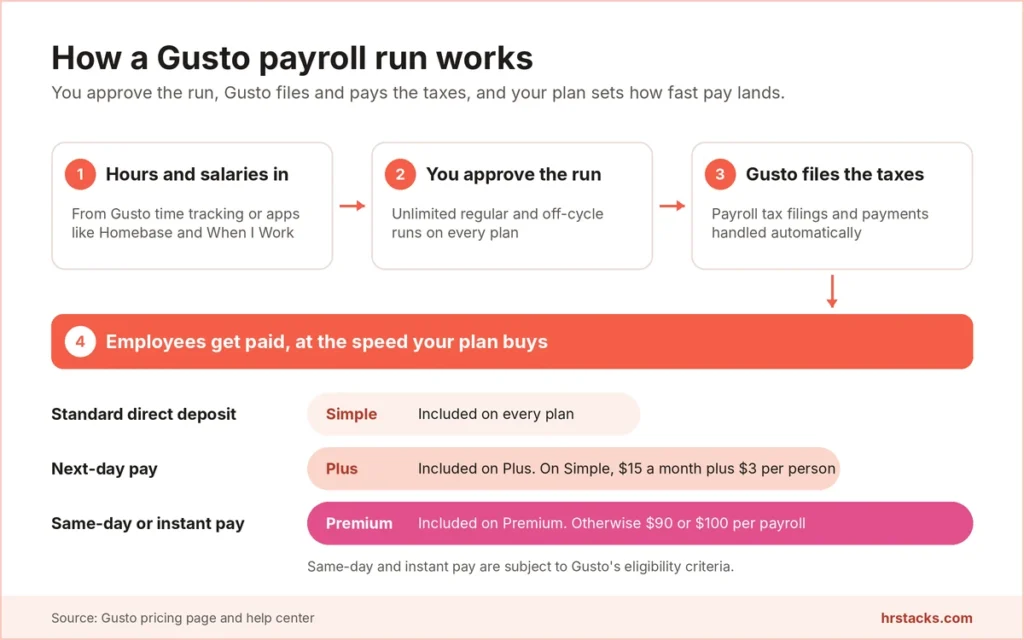
The core is full-service payroll: you enter hours or salaries, approve the run, and Gusto calculates withholding, debits your bank, files federal, state and local taxes, and sends W-2s and 1099s. Every plan includes unlimited payroll runs, and off-cycle runs cost nothing extra.
Around payroll, Gusto adds benefits administration, time tracking, hiring and onboarding, and a 153-app directory. That puts it in our HR software and HRIS lists too. It fits US-only teams. Companies hiring employees abroad or needing deep HR analytics will outgrow it.
Editor’s Verdict on Gusto
Gusto is the simplest way we found for a US small business to run full-service payroll at a published price. The boundary is geography and depth: it pays employees only in the US, and HR guidance, compliance alerts and premium support sit on the $180 Premium tier.
We land close to users, but we mark down weekday-only callbacks and the $30 Priority Support add-on, which reviewers praising quick payroll runs rarely weigh.
Gusto Pros and Cons
Gusto’s biggest strength is payroll that runs itself, with unlimited runs and automatic tax filings on every plan. Its biggest weakness is support, with callbacks limited to weekdays and escalation complaints common in public reviews. For a one-state team of 20, that trade is easy to accept at $2,028 a year.
Strengths
- Payroll that runs itselfEvery plan includes unlimited payroll runs plus automatic tax filings and payments, and off-cycle runs carry no extra charge.
- Published, month-to-month pricingSimple starts at $49 a month plus $6 per person, with no contract and 30 days’ notice before any fee change.
- Benefits without admin feesHealth, life and disability cover cost only the premiums, and HSAs run $2.50 per participant monthly with no minimum.
- Large app directoryGusto lists 153 apps, from QuickBooks Online and Xero to Homebase, When I Work and Guideline 401(k) plans.
Limitations
- Support is hard to escalateCallbacks run 5 am to 5 pm Pacific on weekdays only, and public reviews often describe tickets that never reach a supervisor.Alternative: Justworks, 24/7 support on PEO Basic at $79 per employee monthly
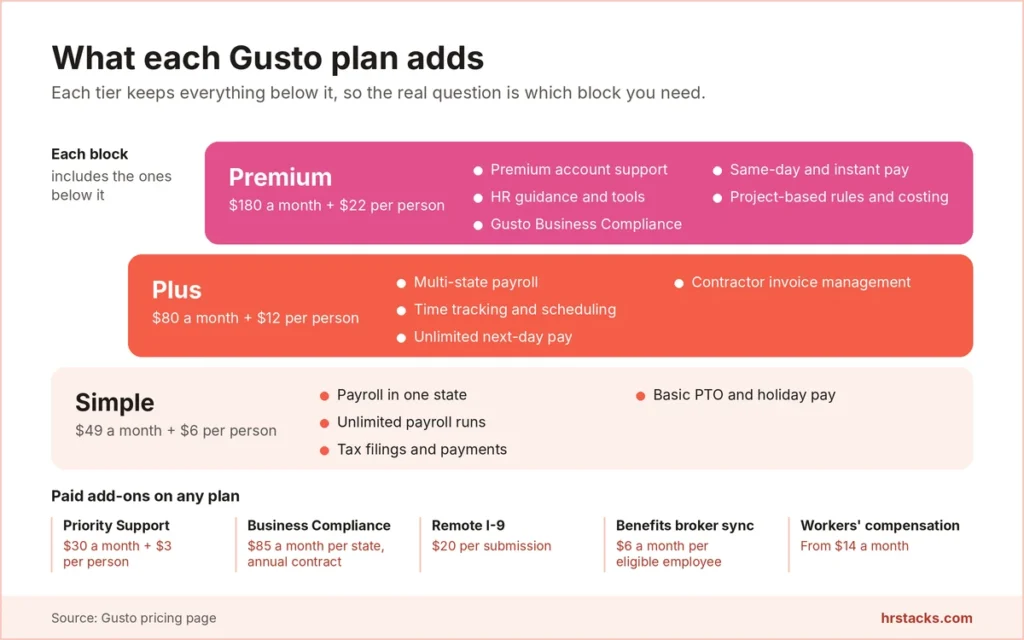
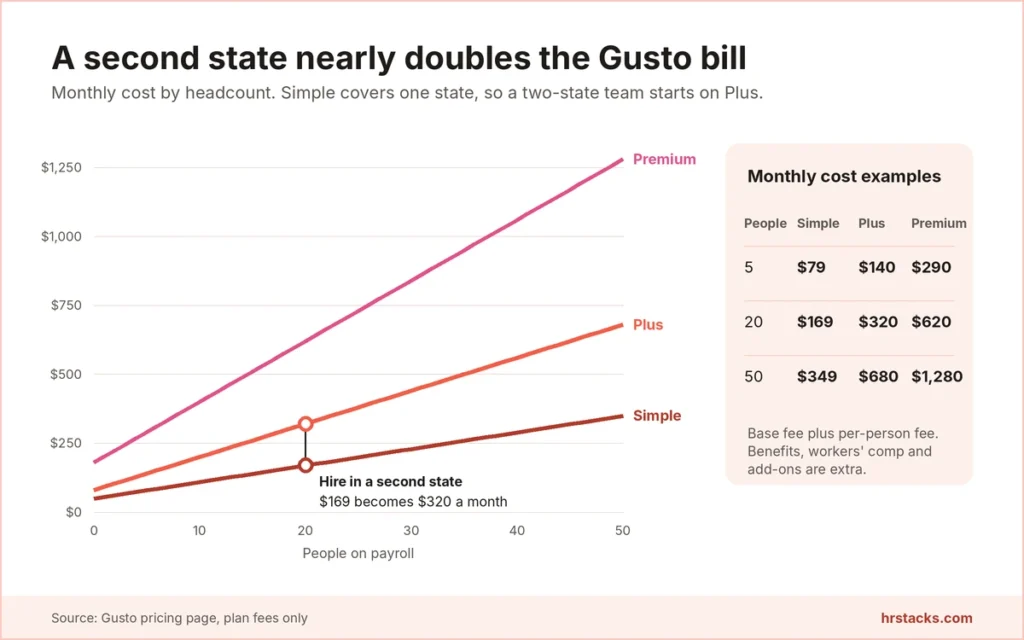
- Multi-state payroll needs PlusSimple pays employees in one state, so hiring in a second state moves you to $80 a month plus $12 per person.Alternative: OnPay, multi-state payroll included at $49 plus $6 per worker
- No employees outside the USGusto pays contractors in 120+ countries with no monthly per-contractor fee, but it cannot employ or run payroll for staff abroad.Alternative: Deel, employer of record from $599 per employee monthly
Gusto Features
Gusto is deepest where payroll meets tax: runs, filings and pay speed. It thins out in HR, where guidance and compliance alerts sit on the $180 Premium tier or behind per-state add-ons. We rate three features Adequate and two Limited.
Core features
- Full-service payrollUnlimited regular and off-cycle runs on every plan, with W-2s and 1099s generated and filed for you.Strong
- Tax filings and paymentsPayroll tax filings and payments run automatically on all three plans. State tax registration is an add-on priced by state.Strong
- Benefits administrationHealth insurance, workers’ comp from $14 a month, HSA and FSA accounts, and 401(k) plans sit in the same account as payroll.Strong
- Time tracking and schedulingIncluded on Plus and Premium. Simple users pay $6 per person monthly for Time and Attendance Plus after a free trial.Adequate
- Contractor paymentsUS contractors bill at your plan’s per-person rate only in months you pay them, and global payments reach 120+ countries.Adequate
- HR toolsSimple stops at basic PTO and holiday pay. HR guidance needs Premium, and Rippling adds IT and device management Gusto lacks.Limited
Extras
- Faster pay optionsNext-day pay is included on Plus. Same-day pay costs $90 and instant pay $100 per payroll unless you are on Premium.Strong
- R&D tax creditsGusto charges 15% of the credits it identifies, with discounts for Premium customers, so the fee scales with the claim.Adequate
- Mobile appThe iOS and Android app runs payroll and approves time off, but it is English only and some settings need the web.Limited
Gusto Integrations
Gusto’s directory is broad for a small-business payroll tool, with 153 listed apps and the most depth in accounting and time tracking. Point of sale is thin: the help center names only Clover and Lightspeed. That help center also counts about 112 integrations, so Gusto’s own pages disagree on the total.
 QuickBooks Online
- QuickBooks Desktop
- Xero
- FreshBooks
- Sage Intacct
- Homebase
- When I Work
- Deputy
- QuickBooks Time
- Guideline
- Human Interest
- Betterment
- Vestwell
- Clover
- Expensify
- Checkr
- Teamtailor
- Slack
Gusto Pricing
Gusto publishes all three plan prices, every per-person fee and most add-on prices, which Paychex and ADP do not. What it leaves out is a contractor-only plan and any annual rate. Benefits premiums, workers’ comp from $14 a month and compliance add-ons sit on top of the plan fee.
Published plans
Billed monthly with no contract, and you pay only for active employees and for US contractors in months you pay them.
Fees and contract terms
What Gusto states publicly, and what to get in writing before you sign.
What 20 employees cost a year
A 20-person team in two states pays Gusto $3,840 a year on Plus, $1,812 more than OnPay.
Who Should Use Gusto?
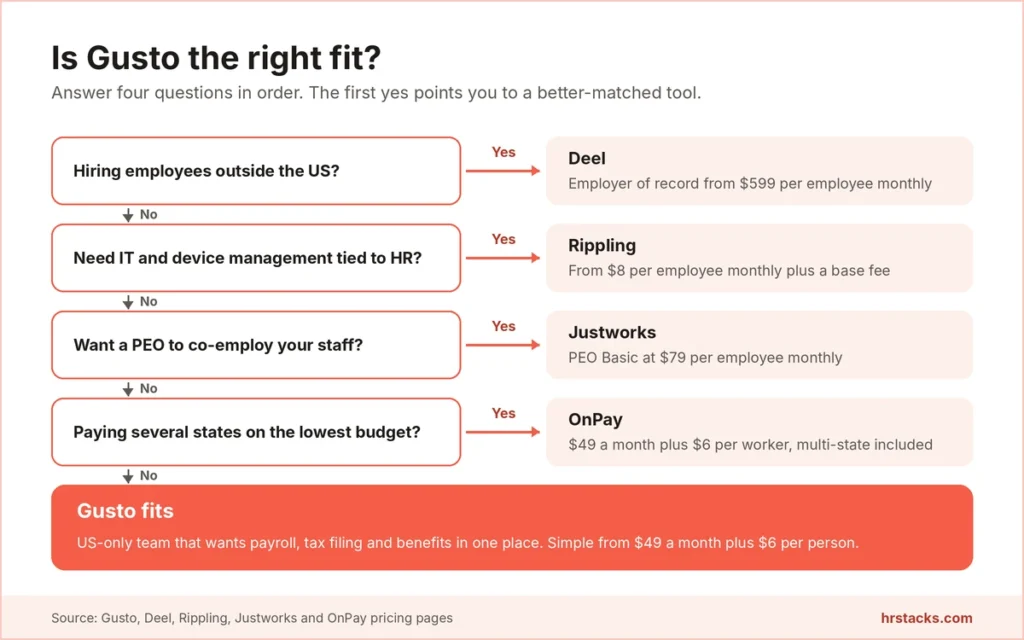
Gusto earns its place with US owners who want payroll, tax filing and benefits handled without a specialist. It loses the deal when the team crosses borders, needs PEO co-employment, or wants IT tied to HR. The $49 base fee keeps a trial run cheap for a small team.
Best for
- Owners running their first payroll who want filings, W-2s and 1099s done without hiring a bookkeeper.
- One-state teams on a tight budget, where 20 people on Simple cost $2,028 a year.
- Hourly businesses already scheduling in Homebase or When I Work that want hours flowing into payroll.
- Employers adding a first health plan and 401(k) alongside payroll, managed from one login.
Skip if
- You need IT, device and app management tied to your HR records.Consider Rippling, from $8 per employee monthly plus a base fee
- You want a PEO to co-employ your staff and share HR liability.Consider Justworks, PEO Basic at $79 per employee monthly
- You would rather buy payroll and HR support as a quoted bundle with free months up front.Consider ADP, up to six months of free payroll on RUN packages
Gusto Alternatives
Our shortlist is the five tools US small businesses most often weigh against Gusto: two with published payroll prices, two quote-led incumbents and one PEO. OnPay is the closest like-for-like match at the same $49 base fee.
Gusto vs OnPaySame base fee, multi-state included from day one.
Choose OnPay if you pay staff in more than one state and want the lowest published price. Read our OnPay vs Gusto comparison
Gusto vs RipplingBetter when HR has to drive IT and devices.
Choose Rippling if onboarding has to provision laptops and app accounts as well as payroll. Read our Rippling vs Gusto comparison
Gusto vs JustworksPick it for PEO co-employment, not for cheaper payroll.
Choose Justworks if you want a PEO to co-employ staff and you can absorb $79 per employee monthly. Read our Gusto vs Justworks comparison
Gusto vs PaychexQuote-led payroll and HR bundles, no published prices.
Choose Paychex if you prefer a negotiated bundle and its current free-months offer fits your start date. Read our Paychex vs Gusto comparison
Gusto vs ADPBig-brand payroll with free months, but quote only.
Choose ADP if you want HR support bundled into payroll and will negotiate the price. Read our ADP review
What Users Say About Gusto
Public reviews split sharply by platform: the two software review sites score Gusto 4.6, while the consumer review site scores it 1.9. Praise centers on fast payroll runs and easy setup, and complaints center on support escalation and reporting.
What users praise
- Intuitive for non-specialistsReviewers describe a clean layout that first-time admins learn quickly, with setup sometimes done in minutes.
- Automated tax filingOwners value that filings and payments happen without manual work, saving time each quarter and at year end.
- Easy employee self-serviceEmployees find pay stubs, W-2s and tax forms quickly instead of asking the owner for paper copies.
- Built-in time trackingClocking in, adjusting hours and approving time feed payroll directly, which hourly teams mention often.
What users complain about
- Support escalation dead endsRecent reviews describe unresolved tickets, missed follow-ups and being told no supervisor was available.
- Rigid reportingReporting is the most cited weakness, with users wanting more custom fields and simpler navigation.
- Thin mobile experienceUsers report slow loading, crowded screens and tasks like W-4 signing that must finish on the web.
- Tax and deposit errorsA minority of reviews cite delayed direct deposits, filing mistakes and payrolls blocked by verification checks.
Is Gusto Worth It?
Yes, if you run a US-only team and want payroll, taxes and benefits handled for $49 a month plus $6 per person. No, if you employ people abroad, want a PEO to share employer liability, or need callbacks at weekends, where Deel or Justworks fit better.
Before signing, work out which plan your state mix forces, what state tax registration costs where you hire, and whether Premium beats paying $85 per state for Business Compliance. Then ask how a stuck payroll gets escalated, because public reviews flag that gap repeatedly.
Confirm these before you buy
None of them appear on Gusto’s pricing page.
- State tax registration costAsk for the registration fee in each state you hire in, since pricing varies by state.
- Support escalation pathAsk how a stuck payroll or tax issue reaches a senior specialist, and the expected response time.
- Annual billing or discountNo annual rate is published, so ask whether paying yearly or adding entities lowers the bill.
- Data export after cancellingConfirm you can download payroll history and tax forms, not just view them read-only.
- Benefits availability in your stateCheck which carriers and plan types Gusto offers where your staff live before promising coverage.
- Global contractor FX costsGet the foreign exchange margin in writing, since Gusto says only that rates may vary.
Gusto: Common Questions
These answers come from Gusto’s pricing page, terms, help center and security page, checked in October 2026. We cover pricing first, then contracts, coverage, support and how Gusto compares with OnPay and Rippling.
How much does Gusto cost?
Gusto Simple costs $49 a month plus $6 per person, Plus costs $80 a month plus $12 per person, and Premium costs $180 a month plus $22 per person. Billing is monthly with no contract. Benefits premiums, workers’ comp and add-ons such as state tax registration are extra.
Does Gusto have a contractor-only plan?
Gusto’s pricing page did not list a contractor-only plan when we checked in October 2026.
US contractors are billed at your plan’s per-person rate, and only in months you pay them. Contractors abroad can be paid in 120+ countries through the global contractor payments add-on, which has no monthly per-contractor fee.
Does Gusto require a contract or charge a setup fee?
No contract is required. Gusto bills month to month, lists free account setup, and lets you cancel anytime from your account. Cancelling mid-month still bills the full month, and fees are non-refundable.
Does Gusto offer a free trial?
Gusto does not list a free trial or free plan for its payroll plans. The only trial on the pricing page is for the Time and Attendance Plus add-on, which then costs $6 per person monthly.
Can Gusto run payroll in more than one state?
Yes, on Plus and Premium. Simple covers payroll in one state only, so a second-state hire moves you to Plus at $80 a month plus $12 per person.
Does Gusto file payroll taxes automatically?
Yes. Every plan includes automatic payroll tax filings and payments, while registering new state tax accounts is a separate add-on priced by state.
Can Gusto pay employees in other countries?
No. Gusto runs payroll for US employees only.
It can pay contractors in 120+ countries through its global contractor payments add-on. To employ staff abroad, you need an employer of record such as Deel, which starts at $599 per employee monthly.
Does Gusto offer health insurance?
Yes. Gusto offers health insurance where you pay only the premiums, with no Gusto administration fee. If you keep your own broker, the broker integration costs $6 per eligible employee monthly. Plan availability varies by state.
What are Gusto’s support hours?
Chat runs 5 am to 5 pm Pacific on weekdays and 5 am to 3 pm on weekends. Callbacks run 5 am to 5 pm Pacific on weekdays, and email is open all week with slower replies outside those hours.
Does Gusto integrate with QuickBooks?
Yes, Gusto connects with QuickBooks Online and QuickBooks Desktop, plus Xero, FreshBooks, Sage Intacct and the rest of a 153-app directory.
Is Gusto safe to use?
Gusto keeps SOC 1 and SOC 2 reports, updated annually, encrypts data at rest with AES-256 and in transit with TLS, and offers two-step verification. It says more than 500,000 businesses use it.
Does Gusto have a mobile app?
Yes, on iOS and Android. Employers can run regular and off-cycle payroll, approve time off and expenses, and pay contractors. The app is English only, and some account features still need the web.
How fast can Gusto pay employees?
Plus includes next-day pay, and Premium adds same-day and instant pay, subject to eligibility. On other plans, same-day pay costs $90 and instant pay $100 per payroll, and Simple users can add next-day pay for $15 a month plus $3 per person.
Is Gusto better than OnPay?
OnPay matches Gusto’s $49 base fee and $6 per-worker price and includes multi-state payroll, which Gusto reserves for Plus. Gusto offers more apps and faster pay options. See our OnPay vs Gusto comparison.
Should I choose Gusto or Rippling?
Choose Gusto for simpler payroll with published prices. Choose Rippling, from $8 per employee monthly plus a base fee, when you need IT, device and app management tied to HR. Our Rippling vs Gusto comparison covers the details.