
Quick answer: what is HR workflow automation?
HR workflow automation is software that runs repeatable HR steps, like approvals, reminders and record updates, from set rules instead of manual handoffs. Paychex research puts HR admin work at 7.3 to 12.1 hours a week per administrator. Start with high-volume, rule-based tasks like onboarding and payroll inputs, and leave judgment calls to people.
- Key number7.3 to 12.1 admin hours a week
- Start withPayroll inputs and onboarding tasks
- Check firstClean employee data in one record
- Main riskAutomating a broken process faster
Key takeaways
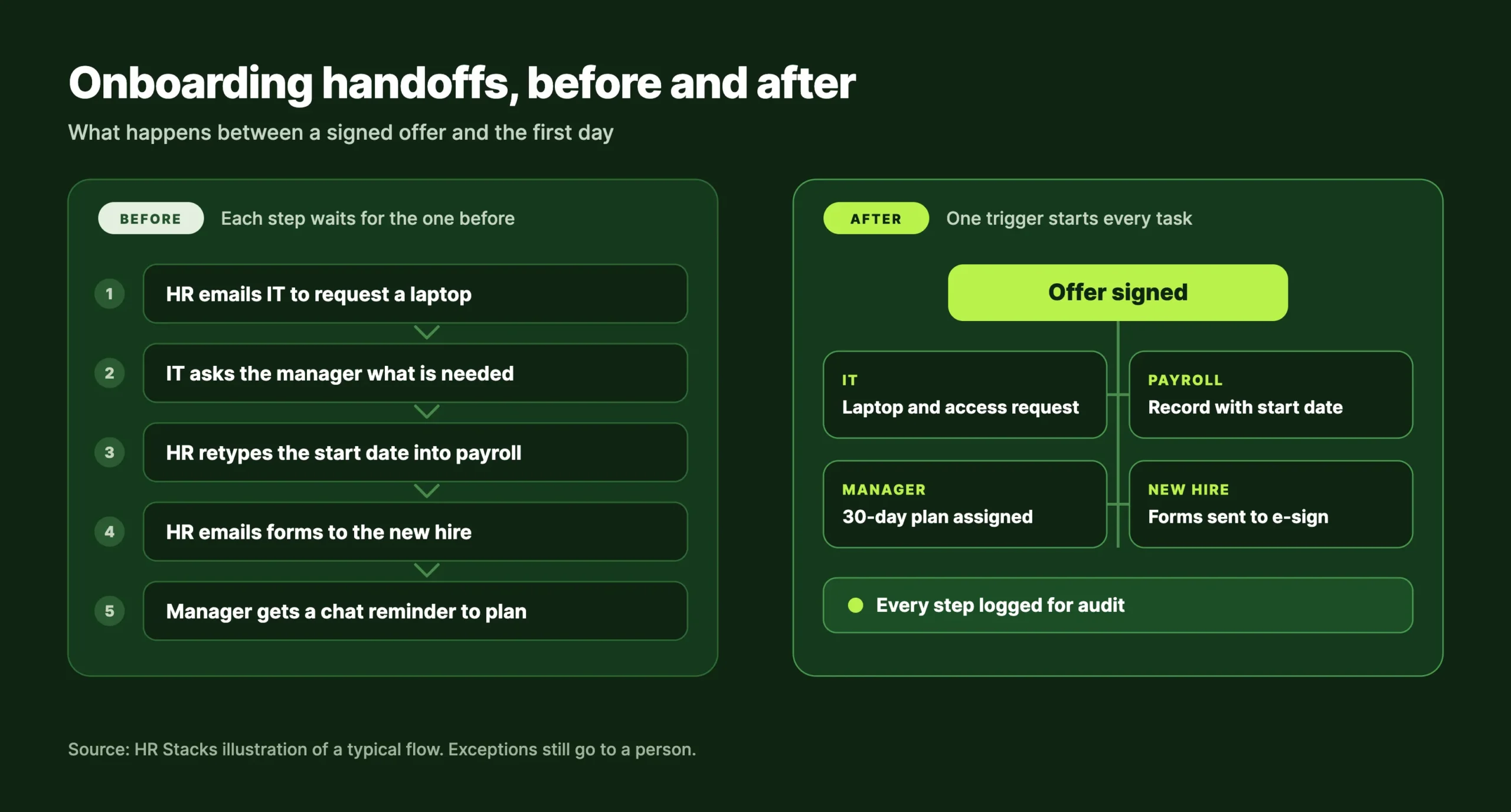
The tool is rarely the problem. The chain of handoffs around it is. An offer gets signed, someone emails IT, someone else retypes the start date into payroll, and a third person chases the manager for a plan. Good HR software can run that chain on rules instead of reminders, but only after a team decides which steps deserve it. This guide covers what HR workflow automation includes, which tasks to automate first and where rollouts go wrong.
What HR workflow automation covers
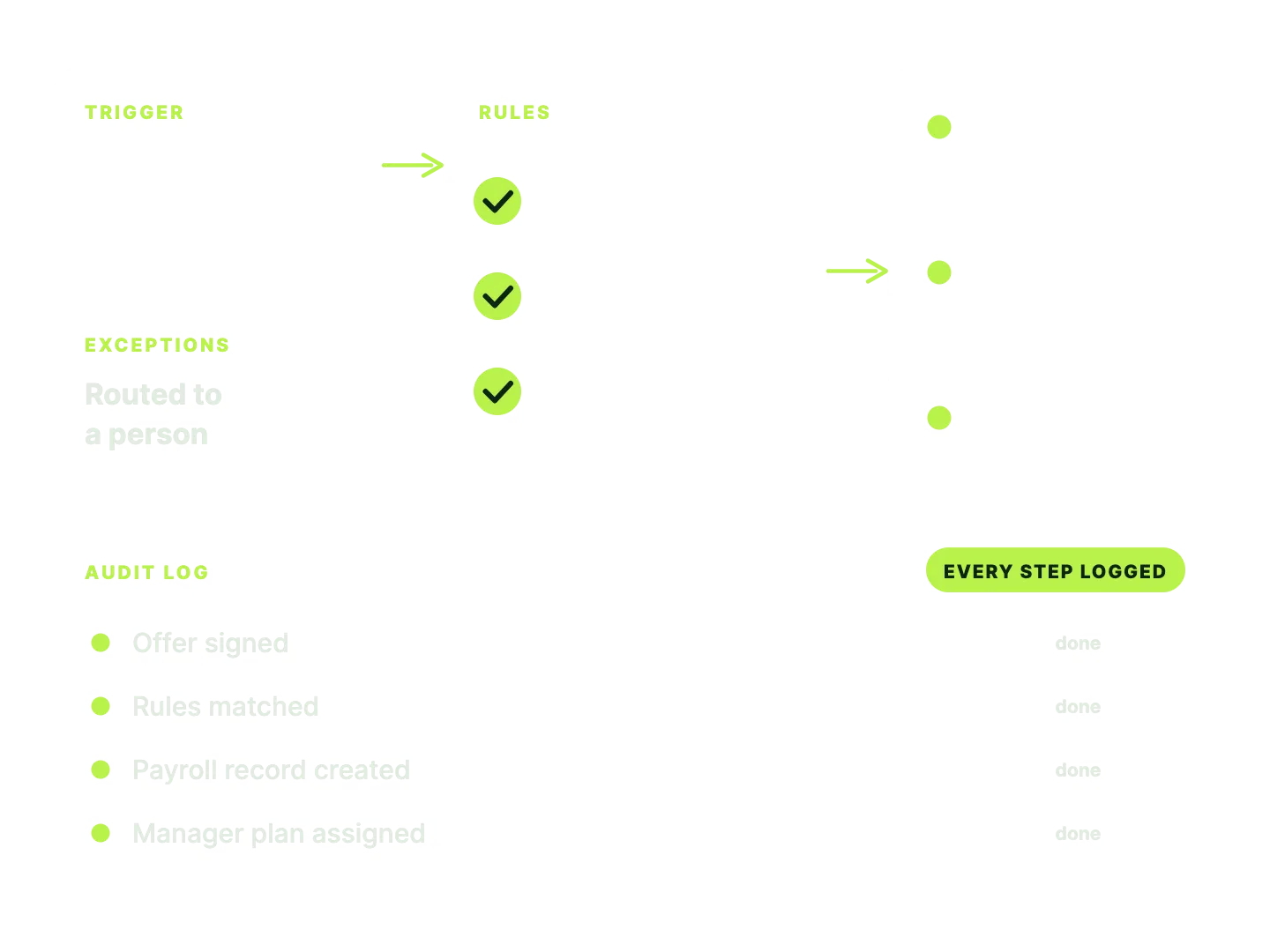
It covers any HR task with a fixed trigger, clear rules and a predictable next step. A signed offer is the trigger. The system checks the role and country, creates the tasks, asks a manager to approve equipment and logs who did what.
- TriggerOffer signed or leave requested
- RulesRole, country and policy checks
- ActionTasks, emails and records created
- ApprovalManager or HR confirms where needed
- RecordEvery step logged for audit
The same five parts run leave requests, expense claims and document collection. What the pattern does not cover is judgment. A workflow follows rules you wrote. An AI tool makes predictions or drafts content, and it can behave differently on similar inputs. SHRM’s 2026 research on AI in HR, based on 1,908 HR professionals surveyed in December 2025, says 46% of organizations expect to use AI in HR in 2026. Vendors often bundle the two, so evaluate them separately: rules can be audited line by line, and models are much harder to audit.
Where HR time actually goes
Administration takes most of it, and payroll is the biggest single piece. Paychex research finds HR administrators spend 7.3 to 12.1 hours a week on administrative tasks, and payroll processing alone takes 17% of HR time. The top of that range is about two-thirds more time than the bottom for the same work, which points to process design rather than headcount.
Payroll errors carry the clearest price. An EY study commissioned by Paycom found errors in 1 of 5 payrolls, at an average cost of $339 each after a 2026 inflation update. Missing or wrong time punches were the costliest category. The sponsor sells payroll software, so treat the dollar figure as a guide. The direction is clear: errors start as bad inputs, and a workflow can check those before payroll runs.
Onboarding shows the other side of the problem. Gallup’s 2019 onboarding research found that only 12% of employees strongly agree their organization does a great job of onboarding, and only 29% of new hires feel fully prepared and supported afterwards.
What to automate first
Start with payroll inputs and onboarding tasks, then time off, document collection, interview scheduling and offboarding. We rank each on three tests: how often it happens, how clear the rule is and what a mistake costs. A task that scores high on all three is where automation pays back fastest.
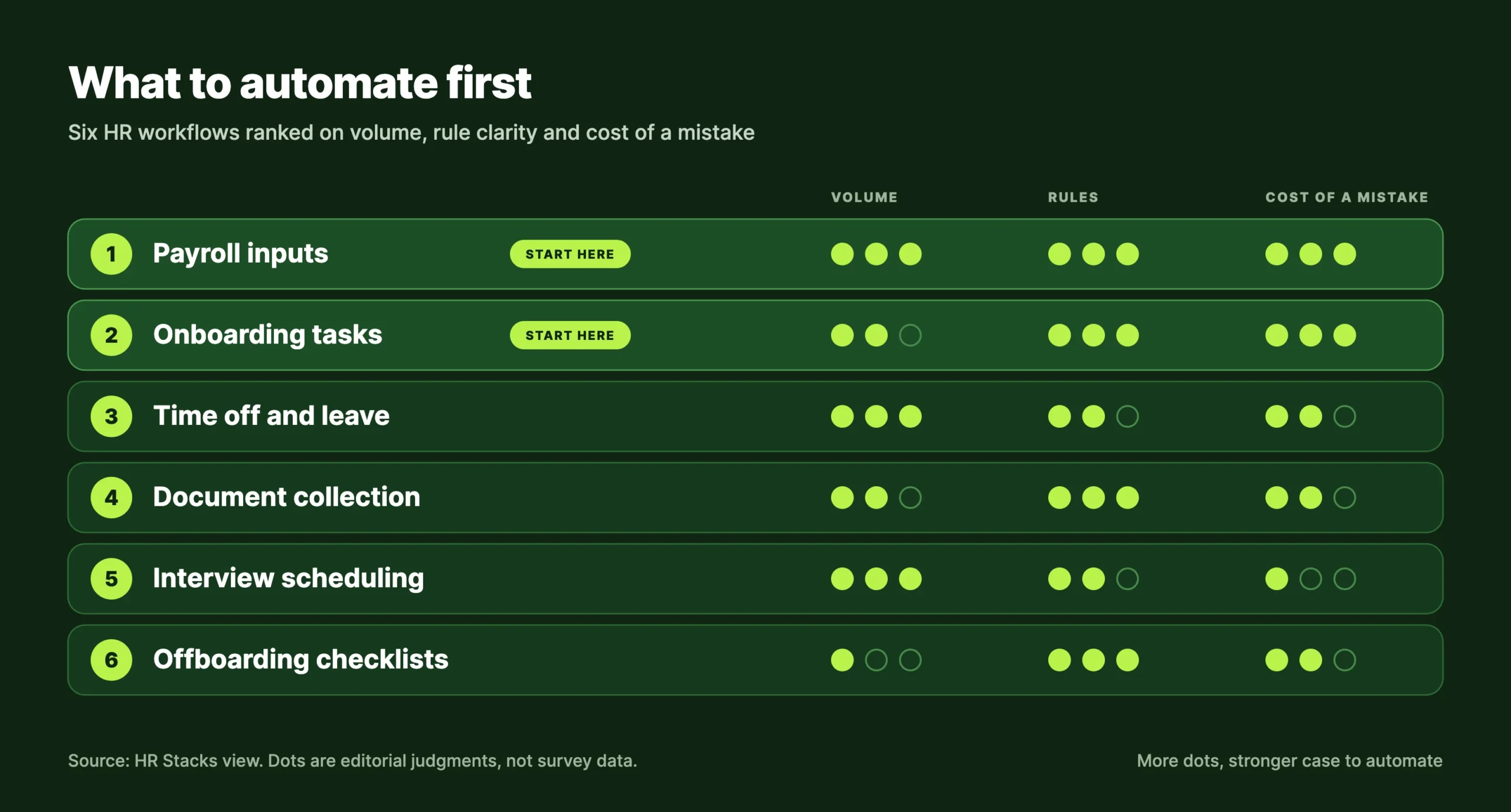
Each row maps to a software category. Payroll software covers the first row, onboarding software the second and an applicant tracking system the fifth. If you already run a core HRIS, check what its built-in workflows do before you buy another tool.
Interview scheduling sits low for a reason: it happens often, but a missed slot costs little. Hold back on performance ratings and pay decisions too. Review reminders are worth automating. Scoring people is not.
Automating the employee lifecycle
Automation can help at every stage from recruiting to exit, but each stage needs a different level of control.
- RecruitJob posts, screening and interview slots run from the applicant tracking system.
- OfferApproval chains and e-signature replace forwarded emails.
- PreboardDocuments, equipment and access requests start before day one.
- OnboardTasks with due dates go to the new hire, the manager and IT.
- RunLeave, time and pay changes reach payroll after approval.
- ExitChecklists remove access and trigger final pay steps.
Onboarding is where the gain is easiest to see. A signed offer can create IT, payroll, manager and paperwork tasks together instead of one after another.
Adoption is uneven. SHRM’s 2022 survey found that 16% of employers with fewer than 100 workers used automation or AI in HR, against 42% of those with 5,000 or more. Small teams have the most room to start. The exit stage has its own checklist in our guide to automating offboarding.
What goes wrong in rollouts
Rollouts usually fail on data, ownership and trust before they fail on features. Bad data comes first. A workflow that reads the wrong job title, location or manager sends tasks to the wrong people, quickly and at scale. Clean the employee record before you build on it.
Ownership is next. Every workflow needs one named owner and a backup, because an approval assigned to HR in general tends to sit.
Trust is the third risk. SHRM’s coverage of the same survey reports that 54% of organizations using automation or AI had met challenges, including no resources to audit or correct the tools. The press release adds that 19% had seen qualified applicants or employees overlooked or excluded by them.
A 90-day rollout plan
Run one workflow in the first 30 days, add a second only if it runs clean and review everything by day 90. Tool selection is covered in the platform section below.
- Days 1 to 30
- Time one week of HR admin, clean the employee record, map one workflow and name its owner. Build it and test it on a small group.
- Days 31 to 60
- Launch to one team or country. Log every exception and fix the rule, not the person. Add a second workflow only if the first runs clean.
- Days 61 to 90
- Compare hours saved, errors caught and exceptions by type against your week-one baseline. Decide what to expand, change or switch off.
Report two numbers to leadership: hours returned to HR and errors caught before payroll. Anything more complicated rarely survives a budget review.
Time these four before you build anything, so day 90 has a baseline: onboarding tasks finished before day one, approval turnaround, payroll corrections per cycle and weekly HR hours spent on the workflow.
Which platform fits your team
Choose by team size and footprint, not by the longest feature list. The platform notes below come from vendor documentation and our published reviews, not from new hands-on testing for this article.
Start with a simple HRIS
BambooHR keeps employee records, onboarding and time off in one place.
Look at Rippling
Rippling ties HR to device and app management, so one hire can start IT setup too.
Look at Deel
Deel covers global payroll and compliance for international teams.
Other platforms worth a look
Each has a full review on HRStacks. Fit notes follow vendor documentation, not new testing.
Six checks before you shortlist
Automations move sensitive employee data between systems, and GDPR and CCPA both apply to that data wherever you have staff they cover.
Frequently Asked Questions
What is HR workflow automation?
Software that runs repeatable HR steps from set rules: a trigger, checks, actions, approvals and a record. Examples are onboarding task routing, leave approvals and payroll input checks. It follows rules you define, so each step can be audited.
Which HR processes should you automate first?
Start with high-volume, rule-based work: payroll inputs, onboarding tasks, time off and document collection. Leave decisions that need judgment, such as pay changes, ratings and disciplinary cases, with people. Time one week of admin work first so the choice rests on hours, not guesses.
How much time does HR automation save?
No neutral figure fits every team. Paychex finds HR administrators spend 7.3 to 12.1 hours a week on admin, and your own one-week time log will show how much of that is rule-based. Treat vendor-published savings as marketing until you see the method.
How is HR workflow automation different from AI in HR?
Workflows follow fixed rules you wrote. AI tools make predictions or generate content and can behave differently on similar inputs. SHRM’s 2026 research says 46% of organizations expect to use AI in HR this year, so ask vendors which parts of a product are rules and which are models.
How long does it take to implement HR workflow automation?
A single workflow such as onboarding tasks can run in a pilot within about 30 days if the employee data is clean and one owner is named. Company-wide rollouts take longer. Plan 90 days to review results before you add more workflows.
Can small companies use HR workflow automation?
Yes. SHRM’s 2022 survey found only 16% of employers with fewer than 100 workers used automation or AI in HR, so small teams have room to start. Check what your current HRIS or payroll tool already offers before you buy another system.