
ClickUp-Logo-Icon

ClickUp is best for teams that need a flexible, all-in-one workspace to manage tasks, projects, and collaboration in one place.

ClickUp Review 2026: Pricing, Features, Pros & Cons

What is ClickUp?

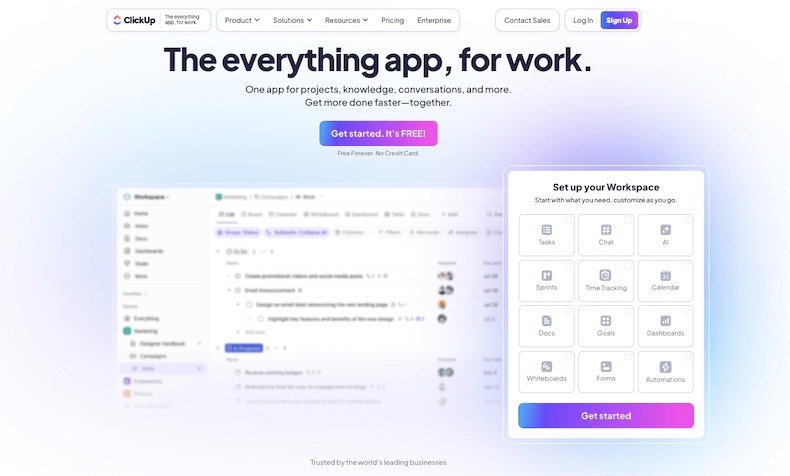
ClickUp is a work management platform that helps teams bring everything together in one place: tasks, docs, chats, goals, and more. It’s built for people who want more control over how they organize projects without jumping between different tools all day.

From startups to HR departments in large companies, ClickUp gives teams a flexible way to handle daily workflows, collaborate easily, and track progress without the usual clutter.

The platform offers a variety of views, like list, board, calendar, and Gantt, so teams can look at their work however it makes the most sense. Tasks can be broken down into smaller steps, assigned to different people, and connected with comments, files, or links.

For HR teams, this is especially useful when managing hiring pipelines, onboarding steps, or performance reviews. It’s easy to set priorities, deadlines, and dependencies so nothing slips through the cracks.

One of the standout features is the ability to create and share documents within the platform. Meeting notes, employee guidelines, training materials, everything can live in one place, linked directly to the related tasks or projects.

There’s also a chat function built into each workspace, so teams can have quick discussions without needing a separate messaging app.

ClickUp supports recurring tasks and automation, helping teams cut down on repetitive work. Need to send a reminder every week? Want to automatically update task statuses? It handles all that.

There’s also time tracking, goal setting, and custom dashboards, making it easier to measure progress and keep stakeholders in the loop.

For HR, it simplifies a lot of things, applicant tracking, team planning, internal requests, even employee feedback cycles. Instead of juggling spreadsheets, emails, and calendars, everything lives in one place, updated in real time. ClickUp gives structure to the mess and makes daily work easier to manage.

Show More

About ClickUp
Company Name: Mango Technologies, Inc.
Est: 2017
Employees: 501-1000
HQ: San Diego, California, United States
Support Offered
Email Support
Live Chat
Tutorial Videos & Documentation
Social Media

Key Features of ClickUp

Task Management
ClickUp lets users create, assign, and organize tasks with due dates, priorities, and custom statuses, helping teams stay on top of work without missing a beat.
Multiple Views
From List and Board to Calendar and Gantt, ClickUp offers flexible views so users can manage projects the way that fits them best.
Docs & Wikis
Users can write, edit, and share docs directly in ClickUp, linking them to tasks or keeping team knowledge in one easy-to-find place.
Time Tracking
Built-in time tracking helps users log hours, monitor productivity, and stay accountable to project timelines.
Automation
ClickUp allows users to automate repetitive actions like moving tasks, updating statuses, or sending reminders—saving time and cutting manual effort.
Goals & OKRs
Teams can set measurable goals, track progress in real time, and align their work with broader company objectives.
Recurring Tasks
Easily set tasks to repeat daily, weekly, or monthly to manage routine work without re-creating it each time.
Chat & Comments
In-task chat and threaded comments keep team communication focused and easy to follow, reducing the need for external messaging tools.
Custom Dashboards
Users can create dashboards with widgets for tasks, goals, time tracking, and more to get a quick overview of team progress.
Templates
Pre-built and customizable templates help users set up workflows faster, whether for hiring, onboarding, or project planning.

ClickUp Pros & Cons 2026

Pros
All-in-one platform for tasks, docs, and chats
Highly customizable workflows
Multiple project views (list, board, calendar, Gantt)
Built-in time tracking and automation
Great for team collaboration and communication
Supports recurring tasks and templates
Cons
Some features locked behind paid plans
Mobile app can be less smooth than desktop
Too many customization options may confuse some
Occasional performance lags with large projects

ClickUp Pricing 2026

ClickUp offers multiple plans to meet every business requirements. You can start with the Free plan to explore basic features to choose the best plan. Check out all details of their plans
Free forever
Free
Unlimited
$10/month
Business
$19
Enterprise
Custom

ClickUp User Sentiment Analysis

Ease of Use

Most users find ClickUp easy to use once they get past the initial setup. The layout is clean, and task management feels smooth after a short learning curve.
User Sentiment Score
91%

Features

ClickUp offers a wide range of tools—from task tracking to docs, automation, and custom dashboards. Users appreciate having everything in one place.
User Sentiment Score
94%

Value For Money

Users feel they get strong value, especially with the free plan covering most essentials. Paid plans are seen as worth it for teams needing more features.
User Sentiment Score
92%

Customer Support

Customer support is responsive and helpful. Many users report quick answers through live chat and helpful resources in ClickUp’s help center.
User Sentiment Score
90%

ClickUp Quick Comparison Table

Here is a quick comparison with some of the products that offers similar features as ClickUp.
Monday.com Logo
monday.com
0
Free Trial
Yes
Starting Price
$9/seat/mo
Recruit CRM Logo
Recruit CRM
0
Free Trial
Yes
Starting Price
$95/user/mo
Asana Logo
Asana
0
Free Trial
Yes
Starting Price
$10.99/user/mo
Close-CRM-Logo
Close CRM
0
Free Trial
Yes
Starting Price
$9/user/mo
Jira Logo
Jira
0
Free Trial
Yes
Starting Price
$8.48/user/mo
onepagecrm-logo
OnePageCRM
0
Free Trial
Yes
Starting Price
$9.95/user/mo

ClickUp FAQs

ClickUp is used for managing tasks, projects, documents, and team collaboration in one centralized workspace, ideal for both individuals and teams.
Yes, ClickUp offers a free plan with core features like task management, docs, and collaboration tools. Paid plans unlock advanced features and more storage.
Yes, ClickUp is highly effective for project management, offering customizable workflows, multiple views, time tracking, and automation features.
Absolutely. HR teams use ClickUp for hiring pipelines, onboarding, performance tracking, and internal team management, all in one platform.
Yes, ClickUp integrates with popular tools like Slack, Google Drive, Zoom, Microsoft Teams, and many more to streamline workflows.
Review Methodology

How HR Stacks reviews products

Every product on HR Stacks is reviewed using a consistent, five-part process that combines hands-on editorial analysis with real user feedback across trusted review platforms. Here's exactly how we evaluate each tool.

1. Data sources we rely on

Our research draws on verified user reviews from G2, Capterra, Trustpilot, TrustRadius, and Software Advice, combined with direct analysis of product documentation, feature sets, pricing pages, and public vendor information.

2. Hands-on editorial analysis

Each platform is evaluated across eight categories including features, pricing, ease of use, integrations, global coverage, compliance strength, support quality, and onboarding experience — the factors HR teams actually care about.

3. How we score each product

Each of the eight categories receives a score from 1 to 5, weighted by importance to produce an overall Editor's Rating. Scores reflect our own evaluation plus feedback patterns from verified user reviews — not vendor-supplied information.

4. User sentiment analysis

We analyze recurring themes across thousands of real user reviews to identify common strengths, limitations, and satisfaction patterns — surfacing the issues users actually encounter rather than the ones vendors highlight.

5. Independent and regularly updated

Our reviews are editorially independent and not influenced by vendors. We may earn an affiliate commission when readers purchase through our links, but this never affects our ratings. Every review is revisited periodically as products evolve.

Manjuri Dutta
Article By: Manjuri Dutta

Manjuri Dutta is the co-founder and Content Editor of HR Stacks, a leading HR tech and workforce management review platform, and EmployerRecords.com, specializing in Employer-of-Record services for global hiring. She brings a thoughtful and expert voice to articles designed to inform HR leaders, practitioners, and tech buyers alike.

HR Stacks offers comprehensive, data focused and unbiased solutions. We are a user supported platform and may earn a referral fee when you visit a vendor through our links

Get HR Stacks Weekly
Get our weekly news update with all latest news in HR community.
ClickUp review

Get Started With ClickUp

ClickUp Alternatives

Here is a quick list of some of the top ClickUp alternatives with similar features that you may explore.

monday.com

monday.com HR solution offers a number of very handy tools to manage your hiring process,...
Starting price$9/seat/mo

Recruit CRM

An ideal software that automate & streamline all your recruitment and staffing operations with ease.
Starting price$95/user/mo

Asana

Asana is best for organizing team projects, tracking tasks, and improving collaboration in one easy-to-use...
Starting price$10.99/user/mo

Close CRM

Manage your business, collaborate with your team, automate important processes to streamline your overall business.
Starting price$9/user/mo

Jira

Jira is best for tracking, managing, and organizing projects efficiently, especially for teams following agile...
Starting price$8.48/user/mo

OnePageCRM

The first action-focused CRM, OnePageCRM transforms a static database into a dynamic to-do list.
Starting price$9.95/user/mo
Rating Distribution
0
0 out of 5 stars (based on 0 reviews)
Excellent
Very good
Average
Poor
Terrible
Share Your Experience

ClickUp: Recent Reviews

No reader feedback yet. Be the first to share how it worked for your team.

Submit Your Review For ClickUp

Featured HR Products

usemultiplier_logo
Multiplier
Multiplier Key Facts Company basics, checked against...
Pebl Logo
Pebl
Pebl Key Facts Company basics, checked against...
When I Work Logo
When I Work
When I Work Key Facts Company basics,...
Connecteam Logo
Connecteam
Connecteam Key Facts Company basics, checked against...
Deel Logo
Deel
Deel Key Facts Company basics, checked against...

This website uses cookies to enhance user experience and to analyze performance and traffic on our website. By continuing to browse this site you are agreeing to our use of cookies.