


Paychex Key Facts
What Is Paychex?
Paychex is a US payroll and HR provider whose Paychex Flex platform lets employers run payroll, file payroll taxes, manage benefits and handle HR compliance in one account. It sits at the full-service end of our payroll software rankings, where the vendor does the tax work instead of leaving it to you.
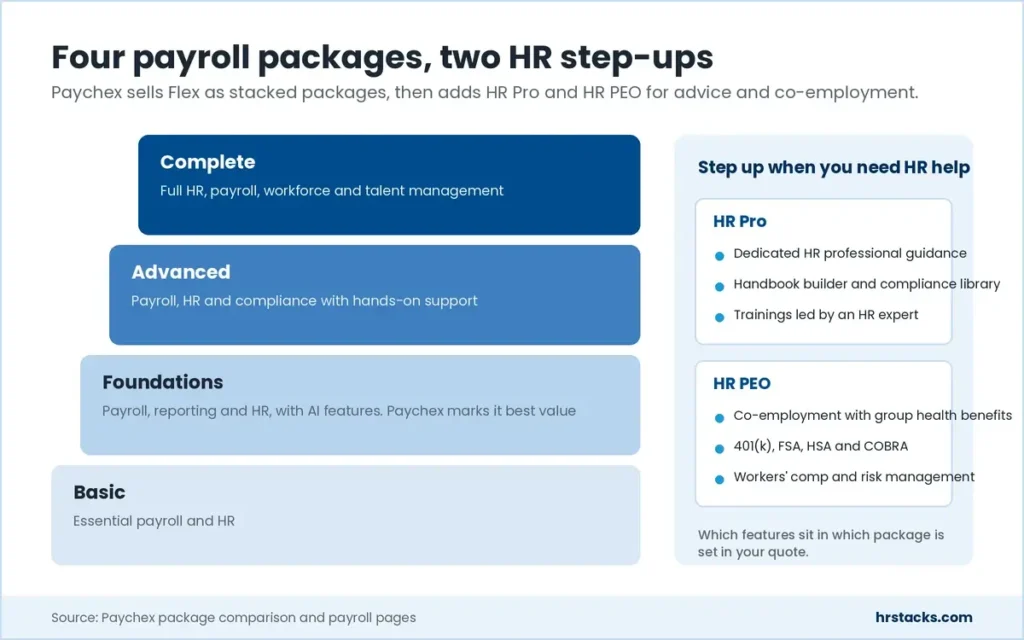
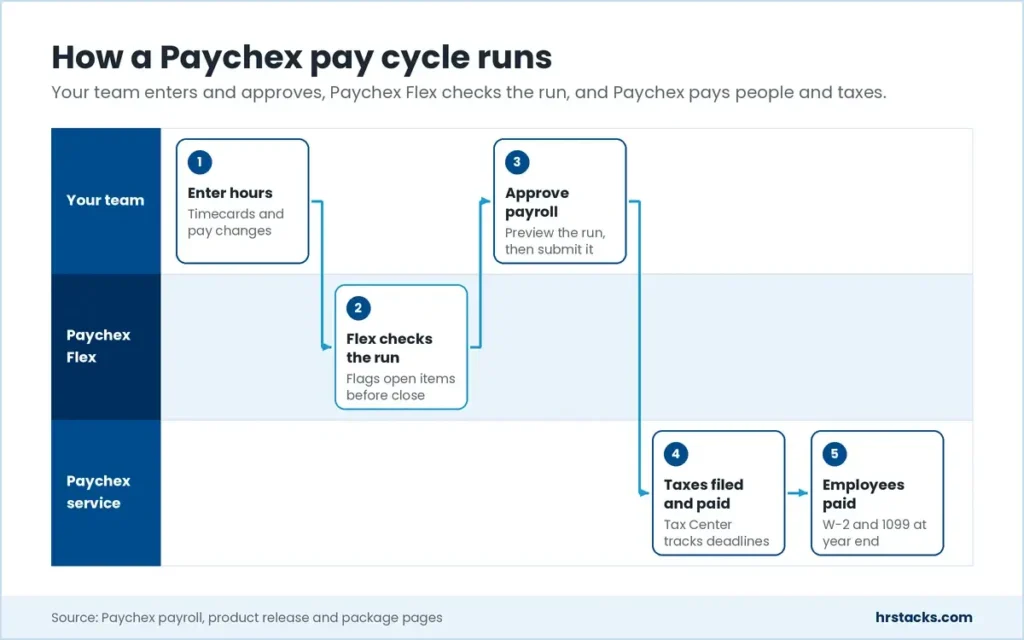
The core product is Paychex Flex, sold as four packages from Basic to Complete. Admins enter hours, the Intelligent Pay Cycle flags open items, and Paychex pays employees and remits taxes. Modules for time tracking, scheduling, applicant tracking and AI reporting under the Paychex WISE name sit around that cycle.
Beyond payroll, Paychex sells 401(k) plans, insurance, HR Pro advisory and a full PEO, which puts it alongside HR software suites and HRIS platforms for growing firms. It fits US employers that want service and room to grow. It overshoots sole traders who only need to pay two or three people.
Editor’s Verdict on Paychex
Paychex Flex fits US employers that want payroll, tax filing, 401(k) and HR advice from one long-running provider, and will trade price transparency for service depth. Teams under 20 with simple payroll can price it at Gusto or OnPay without a sales call: $49 a month plus $6 per person.
We sit 0.3 above the 3.7 user average because tax filing and benefits depth hold up, while a block of 858 mostly one-star reviews centers on billing and service disputes rather than payroll features.
Paychex Pros and Cons
Tax filing and benefits depth is Paychex’s biggest strength, with more than 90,000 401(k) plans under service. Its biggest weakness is price opacity: no package shows a rate, and setup fees appear only in promotion fine print. We still shortlist it for firms that value a service team over a self-serve checkout.
Strengths
- Taxes filed and paid for youPaychex runs payroll tax payments and filings itself, and the new Tax Center and Penalty Tracker show deadlines and notice resolutions in one place.
- Retirement and benefits in-housePaychex serves more than 90,000 401(k) plans and sells health, dental, vision and workers’ comp cover through its own insurance agency.
- Room to grow into a PEOFour payroll packages sit beside HR Pro and HR PEO, so a 10-person firm can add HR advice or co-employment later without changing provider.
- Scale that makes edge cases routinePaychex pays about 1 in 11 US private sector workers and serves roughly 2.6 million worksite employees, so garnishments and multi-entity payroll are familiar ground.
Limitations
- No published prices at allEvery package from Basic to Complete is quote only, and setup fees exist without a stated amount, so you cannot budget before a sales call.Alternative: Gusto, $49 a month plus $6 per person on Simple
- Support complaints outweigh praiseLong holds, unreturned calls and department transfers are the most cited complaint, and 90% of one platform’s 858 reviews are one star.Alternative: OnPay, $49 base plus $6 per worker with no implementation fees
- Thin integration catalogPaychex features 15 apps and says only dozens in total, which limits teams running niche accounting, POS or scheduling tools.Alternative: Rippling, plans from $8 per employee per month plus a base fee
Paychex Features
Paychex sells features as bundles, and its comparison page lists them by module without public per-plan prices. Core payroll and tax work is mature after five decades, while scheduling and pay benchmarking sit outside the base packages.
Core features
- Unlimited payroll runsRun payroll as often as needed with employee pay options, garnishment payments and W-2 and 1099 year-end processing included.Strong
- Payroll tax filingTax payments and filings run automatically, and a Taxpay enablement workflow shows state agencies not yet opted in.Strong
- HR compliance libraryLabor law posters, custom employee handbooks, a compliance library and OSHA and EEO-1 reporting are listed in the HR foundations module.Strong
- Self-service and mobile appEmployees view pay and update details in the Paychex Flex app, and admins can run payroll and approve time off from a phone.Strong
- AI reporting with Paychex WISEAI Insights answers report questions in plain language and Intelligent Pay Cycle flags open items, but pay benchmarking reports are an add-on.Adequate
Extras
- Time and attendanceFlex Time adds capacity scheduling and Timecard Insights, but it is billed outside payroll, whereas Gusto Plus at $80 a month bundles time tools.Adequate
- Applicant tracking and onboardingOnboarding and applicant tracking appear in the talent and workforce module, though Paychex does not say which packages include them.Adequate
- Compensation benchmarkingSold as pay-per-use packages of two lookups with no subscription, so it suits occasional checks rather than ongoing pay planning.Limited
Paychex Integrations
Paychex lists 15 featured integrations across accounting, time tracking and HR apps, and points to its marketplace for the rest. Accounting coverage is solid, but buyers on niche POS or scheduling tools should check the marketplace before signing.
 QuickBooks
- Sage Intacct
- Xero
- Oracle NetSuite
- Jirav
- Connecteam
- When I Work
- 7shifts
- Mindbody
- BambooHR
- Employee Navigator
- Clover
Paychex Pricing
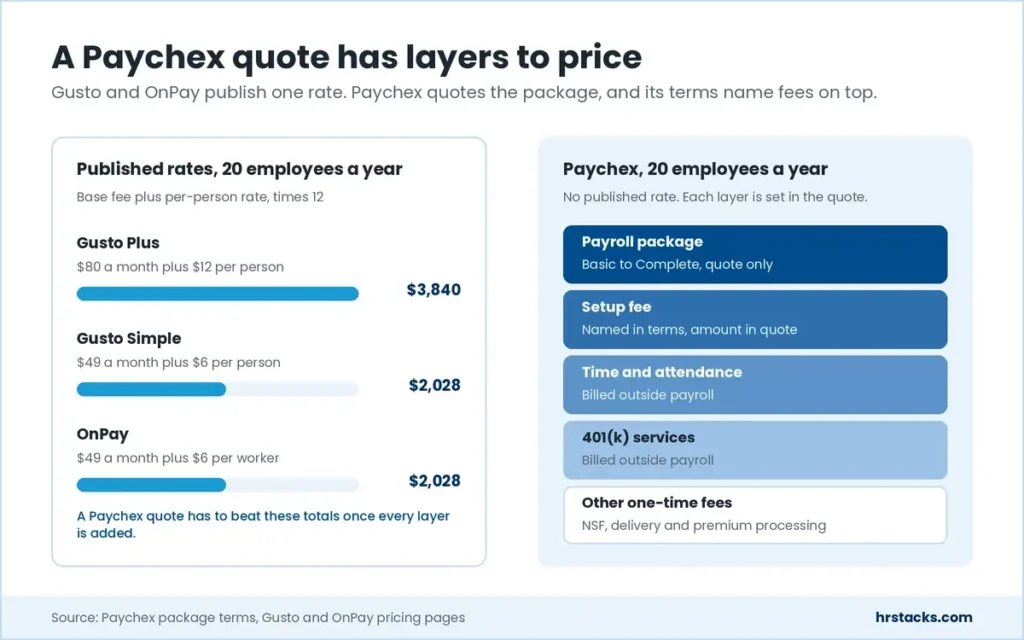
Paychex publishes package names but no prices, so every plan below is quote only. Its own terms confirm setup, delivery, NSF and premium processing fees, plus separate billing for time tracking and 401(k) services. Ask for every line item in writing.
Published plans
Billing terms are set in each quote, and Paychex lists no monthly or annual rates.
Fees and contract terms
What Paychex states publicly, and what to get in writing before you sign.
What 20 employees cost a year
Paychex shows no rate, so these published benchmarks are what a Paychex quote has to beat.
Who Should Use Paychex?
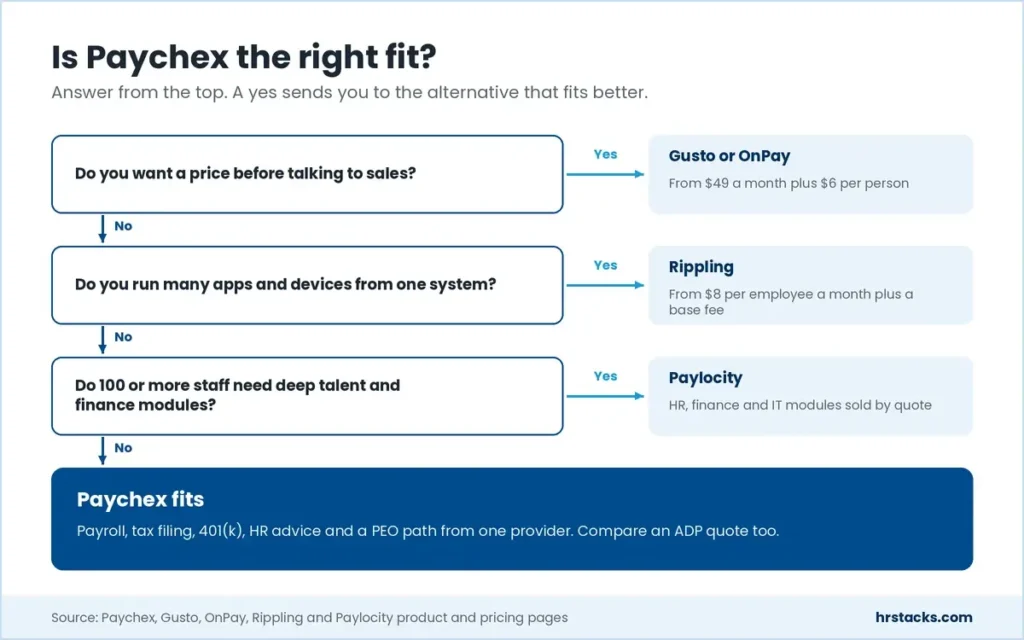
Paychex suits US employers who want a provider to own payroll tax work and who may grow into HR or PEO services. It is a poor match for buyers who compare prices online first or who rely on a long list of niche apps.
Best for
- US employers with 20 to 250 staff who want a named payroll contact rather than a self-serve app.
- Firms planning to add a 401(k) plan, workers’ comp cover or group health through one provider.
- Owners who expect to move from payroll-only to HR Pro or a PEO as headcount grows.
- Multi-location businesses that need cross-entity reporting across several FEINs in one HR Analytics view.
Skip if
- You want to see a price before talking to sales, or you employ fewer than 10 people.Consider Gusto, Plus plan at $80 a month plus $12 per person
- Your team depends on a long tail of apps beyond accounting software and time clocks.Consider Rippling, modular plans priced per employee with a monthly base fee
- You need a mid-market HCM for 100 or more staff with deeper talent and finance modules.Consider Paylocity, HR, finance and IT modules sold by quote
Paychex Alternatives
Buyers comparing Paychex usually shortlist other US payroll providers, two with published prices and three sold by quote. Gusto and OnPay win on transparency, while ADP, Paylocity and Rippling compete on service scale, mid-market depth or app management.
Paychex vs GustoPublished prices and a self-serve setup
Choose Gusto if you want to price payroll online and set it up yourself. Read Paychex vs Gusto
Paychex vs OnPayOne flat plan with no implementation fees
Choose OnPay if a single flat rate matters more than a dedicated service team. Read OnPay vs Paychex
Paychex vs ADPSimilar scale, also quote only
Choose ADP if its quote and service team beat Paychex’s for your headcount. Read Paychex vs ADP
Paychex vs PaylocityDeeper mid-market HCM, also quote only
Choose Paylocity if talent and finance modules matter more than PEO options. Read Paylocity vs Paychex
Paychex vs RipplingBroader app and IT management on one platform
Choose Rippling if you want payroll, devices and app access run from one system. Read Paychex vs Rippling
What Users Say About Paychex
Employers who review Paychex on software sites rate it far higher than reviewers on open consumer sites. The 4,430 reviews we counted split between praise for fast payroll entry and anger over billing, support holds and cancellations.
What users praise
- Fast payroll entryEase of use, especially adding new hire details, is the most mentioned positive at 128 mentions.
- Helpful named repsIndividual payroll specialists and HR leads get praised by name for timely, knowledgeable answers.
- Filings handled for youReviewers value payments and regulatory filings running without manual work, with 58 mentions of efficient payroll.
- Access from anywhereRemote access through the app and browser draws 84% positive sentiment across 86 reviews.
What users complain about
- Long support holdsHolds, unreturned calls and transfers between departments lead the complaints at 63 mentions.
- Unexpected feesReviewers cite charges they did not expect, including fees to resubmit payroll after Paychex errors.
- Glitches and slowdownsTechnical disruptions appear in 246 reviews, and 76% of those mentions are negative.
- Login and closing accountsMulti-step login lockouts frustrate users, and some say billing continued after they tried to cancel.
Is Paychex Worth It?
Yes, if you are a US employer with 10 to 250 people who wants payroll, taxes, 401(k) and HR advice from one provider and is willing to negotiate a quote. No, if you need a published price or a large app ecosystem, where Gusto at $49 a month or Rippling fits better.
Before signing, get the full fee schedule in dollars: setup, delivery, premium processing, time tracking and 401(k) charges. Also confirm the billing unit, the price-increase policy and what leaving early costs, since Paychex can recover the value of promotional free months.
Get these in writing before you sign
None of them appear on Paychex’s pricing page.
- Itemized setup and one-time feesAsk for setup, delivery, NSF and premium processing charges as dollar figures, not ranges.
- Billing unit for payrollConfirm if you pay per pay run, per employee or both, and what extra runs cost.
- Annual price increase capGet the maximum yearly increase and how much notice Paychex gives before renewal pricing changes.
- Notice period and exit feesCheck how much notice cancellation needs and whether any termination fee applies outside promotions.
- Data export on exitConfirm you can download payroll history, tax filings and employee records in a usable format.
- Package feature mappingGet a written list of which features sit in your package and which are billed add-ons.
Paychex: Common Questions
These answers draw on Paychex’s pricing, support and security pages, checked in October 2026. Package terms and promotions change, so confirm them in your quote.
What happened to Paychex Flex Select, Pro and Enterprise?
Paychex now sells four payroll packages named Basic, Foundations, Advanced and Complete, plus HR Pro and HR PEO. Its promotion terms still name the Flex Select, Pro, Enterprise and Enterprise+ bundles, so existing clients may remain on them. Paychex does not publish how the old bundles map to the new ones, so ask your rep.
How much does Paychex cost?
Paychex does not publish prices. Every package, from Basic to Complete, shows a Request Pricing button, and the cost is set in a custom quote.
Figures such as $39 a month that circulate online do not appear on Paychex’s own site. For a published benchmark, Gusto starts at $49 a month plus $6 per person.
Does Paychex charge setup fees?
Yes. Paychex’s promotion terms say clients remain responsible for setup fees, NSF fees, delivery fees and premium processing fees. It does not publish the amounts, so ask for each fee in writing.
Does Paychex offer a free trial?
Paychex does not advertise a free trial of Paychex Flex. It runs limited-time offers for new clients instead, such as free payroll months, which require a one-year service agreement and cover the payroll component only.
Does Paychex require a contract?
Paychex does not publish a standard minimum term. Its current free-months offer requires a one-year service agreement, and Paychex can recover the value of the free months if you terminate early.
Is Paychex Flex good for small businesses?
It fits small businesses that want a service team and room to add HR, 401(k) or PEO support. Paychex markets packages from one employee upward, and its current promotion covers firms with 1 to 250 employees.
Very small teams that only need simple payroll often prefer a published-price tool. OnPay charges $49 a month plus $6 per worker with no implementation fees.
Does Paychex file payroll taxes for you?
Yes. Paychex calculates, files and pays payroll taxes and handles W-2 and 1099 year-end processing. Its Tax Center shows deadlines, and a Penalty Tracker follows notices the Paychex team is resolving for you.
Does Paychex have a mobile app?
Yes. The Paychex Flex app lets admins run payroll, update information and approve time off, and lets employees view their pay details.
What does Paychex integrate with?
Paychex features 15 integrations, including QuickBooks, Xero, Sage Intacct, Oracle NetSuite, When I Work, Connecteam, BambooHR and Clover. More sit in the Paychex Marketplace, and developers can use its APIs, but Paychex gives no total count.
Is Paychex secure?
Paychex maintains SOC 1 Type 2 and SOC 2 Type 2 reports, which clients can request from their rep, and lists ISO 27001 certification. Multi-factor authentication is available in Paychex Flex.
Does Paychex offer a PEO?
Yes. Its HR PEO package bundles payroll, benefits, HR guidance, compliance and risk management under co-employment. HR Pro is the non-PEO option with dedicated HR professional guidance.
Did Paychex buy Paycor?
Yes. Paychex agreed in January 2025 to buy Paycor for an enterprise value of about $4.1 billion. Paychex now lists dual headquarters in Rochester, NY and Cincinnati, OH, where Paycor was based.
What customer support does Paychex offer?
All plans include phone, chat and online support. Paychex describes three levels: self-service, on-demand representatives and dedicated payroll specialists. It does not publish support hours.
Why does Paychex have bad reviews?
Most negative reviews cite billing disputes, unexpected fees, long support holds and trouble closing accounts. Reviewers on business software sites are more positive, rating Paychex Flex 4.1 to 4.2 out of 5.
Is Paychex better than Gusto?
Paychex is stronger on service, 401(k) and PEO options. Gusto is easier to price at $49 a month plus $6 per person and suits self-serve teams. See our Paychex vs Gusto comparison.
Is Paychex better than ADP?
Both are large US payroll providers with quote-only pricing and PEO options, so the choice often comes down to the quote and the service team you are assigned. See our Paychex vs ADP comparison.