


OnPay Key Facts
What Is OnPay?
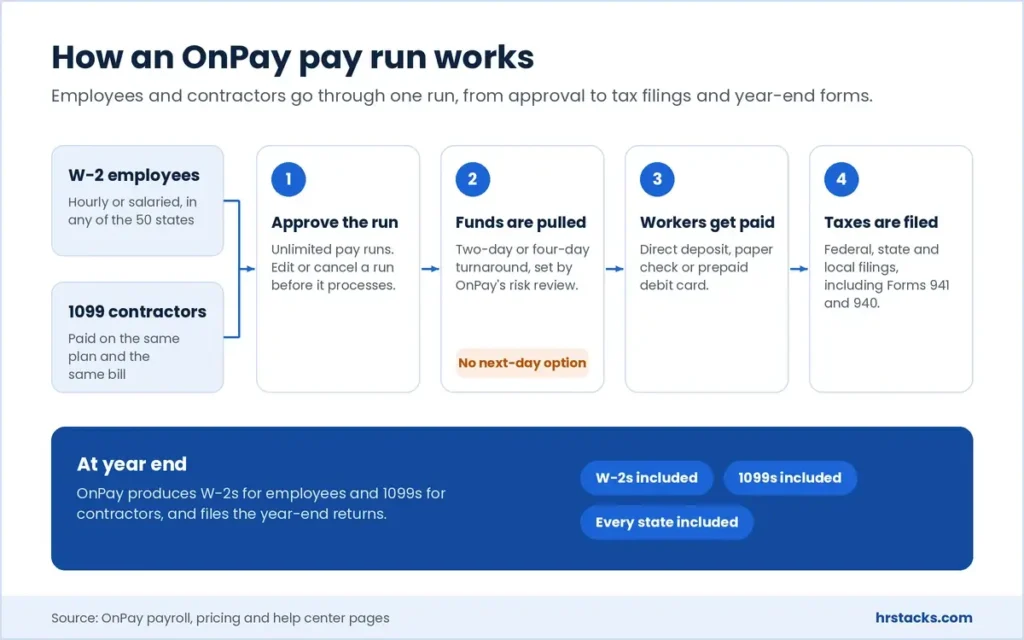
OnPay is a full-service US payroll provider that runs pay, files payroll taxes and produces year-end forms from one account. It sits in our payroll software shortlist next to Gusto and Paychex, and it pays W-2 employees and 1099 contractors under the same plan in all 50 states.
The core plan, Payroll Essentials, covers unlimited pay runs, direct deposit, paper checks, prepaid debit cards and garnishments, plus federal, state and local filings. Employees get an iOS and Android app for pay stubs and documents. Deposits land two or four business days after you run payroll, depending on OnPay’s risk review of your account.
Around payroll, OnPay sells optional HR, time tracking, compliance and live HR support modules, plus health insurance through its own agency. That makes it a light HR software option for small teams. Firms that need deep HRIS reporting or shift scheduling will outgrow it. Plans are listed on OnPay’s site.
Editor’s Verdict on OnPay
OnPay files payroll in every state and pays contractors on one $49 plus $6 per worker plan, where Gusto needs its $80 plus $12 Plus tier for multi-state pay. The boundary is scope: HR workflows, time clocks and live HR advice are paid add-ons, and the partner list is short.
Users mostly rate the pay run itself, which they find quick and accurate, while we also weigh integration depth, deposit speed and add-on costs, where Gusto and Rippling pull ahead.
OnPay Pros and Cons
OnPay’s biggest strength is that one $49 plus $6 per worker plan covers every state, contractors and year-end forms. Its biggest weakness is reach, since the partner list is short and no public API is documented. For a small payroll that lives inside QuickBooks Online or Xero, that trade is easy to accept.
Strengths
- Every state on one planMulti-state payroll, W-2s, 1099s and unlimited pay runs all sit inside the $49 plus $6 per worker plan, with no per-run charges.
- Contractors and employees togetherPay W-2 staff and 1099 contractors in the same account, by direct deposit, paper check or prepaid debit card.
- Penalty coverage in writingOnPay’s terms of service commit it to reimburse tax penalties that result from its own negligent payroll tax errors.
- Free setup and data migrationOnPay moves prior-wage and employee records across at no charge, and new accounts get their first month of service free.
Limitations
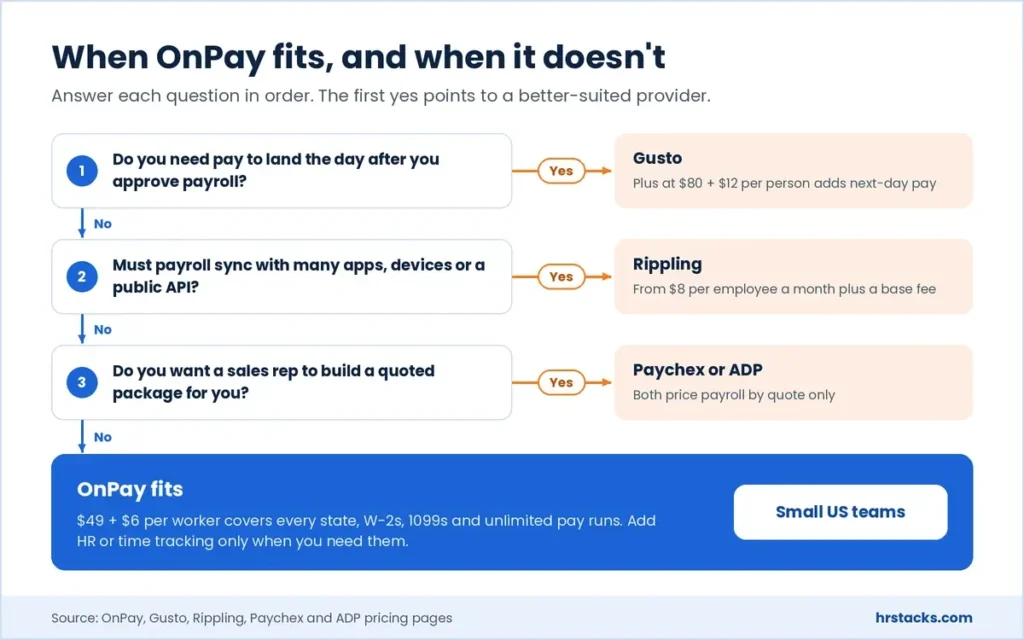
- Thin integration listThe app directory names a short list of partners and OnPay documents no public API, so custom data flows are hard.Alternative: Rippling, from $8 per employee a month plus a base fee
- No next-day direct depositDeposits land two or four business days after you run payroll, set by OnPay’s risk review, with no faster tier to buy.Alternative: Gusto, next-day pay included in Plus at $80 plus $12 per person
- HR workflows cost extraPTO approvals, org charts and time clocks sit in add-ons, so payroll with HR and time tracking runs $70 plus $10 per worker.Alternative: ADP, RUN packages that go up to an HR Pro tier, by quote
OnPay Features
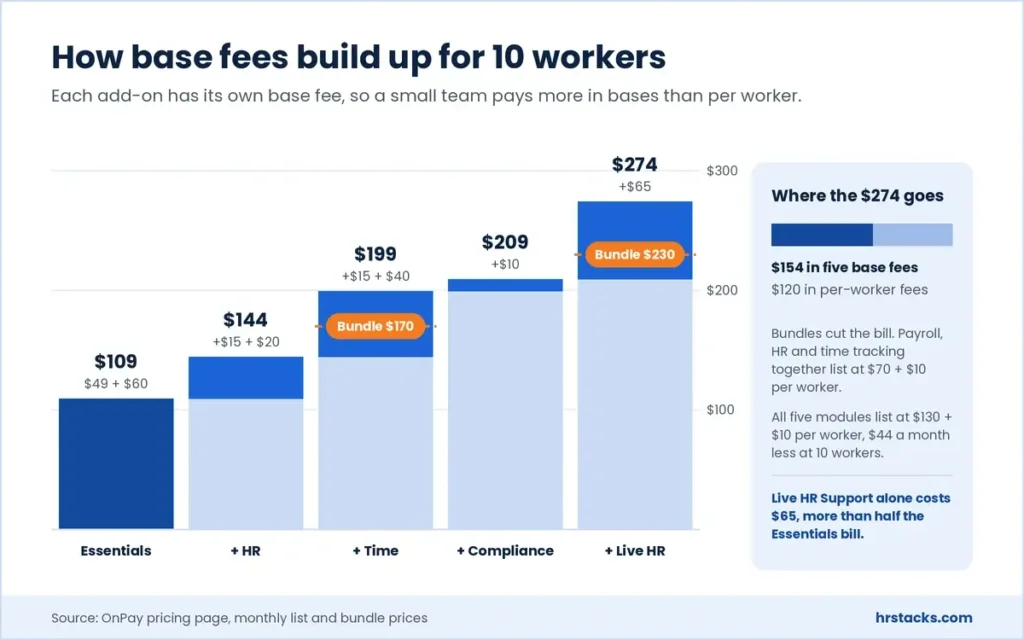
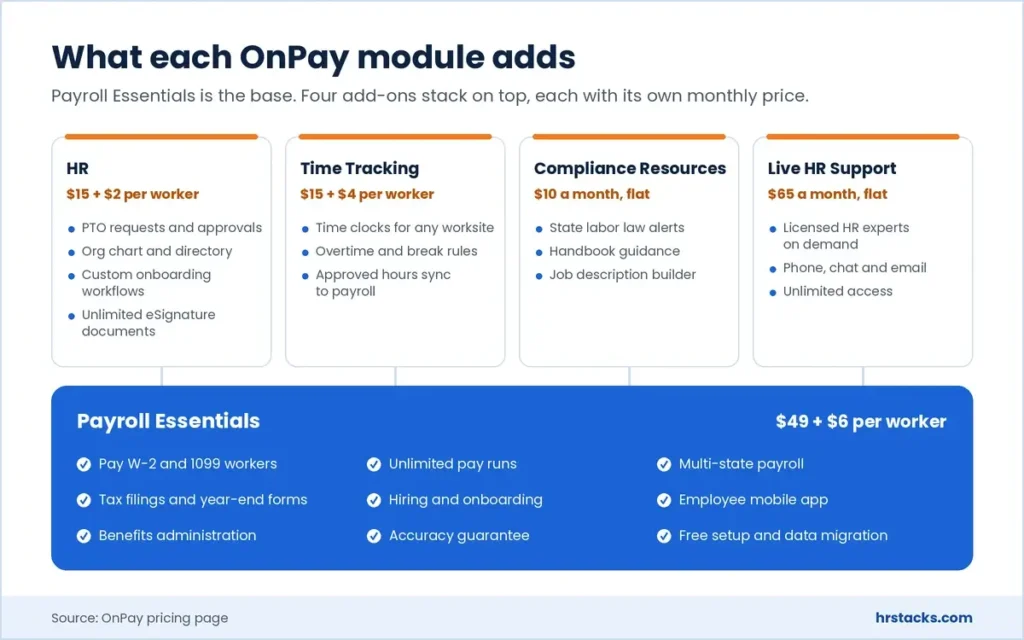
Payroll Essentials carries the weight here: pay runs, filings and onboarding are all included at the base rate. The HR module only launched as a paid add-on in February 2026, and each add-on carries its own base fee of $10 to $65 a month.
Core features
- Full-service payrollUnlimited pay runs on custom schedules, with edits or cancellations allowed before processing and garnishment deductions handled in the run.Strong
- Tax filings and year-end formsFederal, state and local filings, including Forms 941 and 940, plus W-2 and 1099 processing at no added charge.Strong
- Hiring and onboardingOffer letters, e-signed new-hire paperwork and automated state new-hire reporting come inside Payroll Essentials, not a paid module.Strong
- Direct deposit speedTwo-day or four-day turnaround depending on risk review, where Gusto sells next-day pay on its Simple plan and includes it in Plus.Limited
- Employee mobile appStaff check pay stubs and documents on iOS and Android, but OnPay lists no admin app for running payroll.Adequate
Extras
- HR add-on$15 a month plus $2 per worker adds PTO approvals, org charts, equipment tracking and unlimited custom e-signature documents.Adequate
- Time tracking add-on$15 a month plus $4 per worker adds worksite time clocks, overtime and break rules, and approved hours that flow into payroll.Adequate
- Benefits and insuranceHealth plans through OnPay Insurance Agency, 401(k) through Betterment at Work or Vestwell, and pay-as-you-go workers’ comp.Strong
- Compliance and live HRState labor law alerts and handbook guidance cost $10 a month, and on-demand licensed HR experts cost $65 a month.Adequate
OnPay Integrations
The list is short but covers what a small payroll needs most: two accounting ledgers, three time trackers and two 401(k) providers. Anything outside that list means CSV exports, because OnPay publishes no API documentation.
 QuickBooks Online
- Xero
- TurboTax
- Deputy
- QuickBooks Time
- When I Work
- Betterment at Work
- Vestwell
- ERGO NEXT Insurance
- JazzHR
- Traliant
- Middesk
OnPay Pricing
OnPay publishes every price, which Paychex, ADP and Rippling do not. The catch is that each add-on carries its own base fee, so a 10-person team adding HR and time tracking pays more in base fees than in per-worker fees.
Published plans
Billed monthly with no fixed term, and new accounts get the first month free.
Fees and contract terms
What OnPay states publicly, and what to get in writing before you sign.
What 10 workers cost a year
OnPay ties Gusto Simple at this size, but Gusto Simple runs payroll in one state only.
Who Should Use OnPay?
OnPay fits owners who run payroll themselves and want one predictable bill, especially across state lines. It fits less well once a company wants payroll wired into many other tools, or a vendor that handles setup through a sales team.
Best for
- US employers with staff in several states who won’t pay for a higher tier to file each one.
- Businesses mixing W-2 employees and 1099 contractors that want one bill and one year-end process.
- Owners leaving spreadsheet or bookkeeper payroll who want their prior wages moved across for them.
- Farms and seasonal employers that need Form 943 filing and variable pay schedules handled.
Skip if
- You plan to run HR, payroll and IT devices from one system as headcount climbs.Consider Rippling, which prices payroll by custom quote
- You want a sales rep to set everything up under a one-year agreement.Consider Paychex, offering up to six free months on qualifying bundles
- Your company needs a payroll brand it can keep as it grows past small business tools.Consider ADP, with up to six months of free payroll on sign-up
OnPay Alternatives
These four are the providers small US employers most often weigh against OnPay. Only Gusto publishes rates as complete as OnPay’s, so the other three comparisons hinge on service model rather than price.
OnPay vs GustoSame entry price, but OnPay covers every state.
Choose Gusto if you need next-day deposits or want HR features built into higher tiers rather than bought as add-ons. Read our OnPay vs Gusto comparison
OnPay vs PaychexSales-led service at quoted prices.
Choose Paychex if you would rather have a sales team build your package and can commit to a one-year agreement. Read our OnPay vs Paychex comparison
OnPay vs ADPA bigger ecosystem, with no public price list.
Choose ADP if you expect to outgrow small business payroll and want to stay with one provider as you scale. Read our ADP review
OnPay vs RipplingWider platform, at a quoted payroll price.
Choose Rippling if payroll has to sync with device management, app provisioning and many third-party tools. Read our Rippling review
What Users Say About OnPay
Reviews on the two software directories are close to perfect, while the consumer review site is much harsher. The split matters: praise centres on routine pay runs, and the complaints centre on what happens when a tax filing goes wrong.
What users praise
- Payroll in a few clicksReviewers say a routine pay run takes minutes, and that setup needed little training.
- Real people on supportMany name individual reps and value reaching a live person by phone or chat.
- Predictable monthly costOwners moving from ADP, Paychex or Intuit often cite a lower, steadier bill.
- Multi-state and contractor handlingUsers with staff in several states, or 1099 contractors, report few filing problems.
What users complain about
- Slow fixes after tax errorsCritical reviews describe weeks of back-and-forth over W-2 corrections and withholding mistakes.
- No employer mobile appAdmins keep asking for an app to approve and run payroll away from a desk.
- Rigid pay run settingsUsers want check dates closer to the run date and automatic scheduling of recurring runs.
- Cancellation and billing frictionSeveral reviewers report a slow cancellation process and billing that continued afterwards.
Is OnPay Worth It?
Yes, if you run payroll for a small US team, especially across several states or with contractors, and you are happy to add HR modules only when you need them. No, if you need next-day deposits, a wide integration stack or one platform for HR, IT and payroll like Rippling.
Before you sign, pin down the deposit turnaround OnPay assigns after its risk review and whether the bundle discounts are permanent. Also ask what correction work costs, because the terms of service allow extra fees without listing them.
Confirm these before you buy
None of them appear on OnPay’s pricing page.
- Your direct deposit turnaroundAsk whether your account will get two-day or four-day processing once the risk review is done.
- How long bundle discounts lastBundles show struck-through list prices, so confirm whether the lower rate is permanent or promotional.
- Conditions on the free monthGet the start date, any card requirement and the billing that applies when it ends.
- Fees for corrections and amendmentsThe terms allow extra charges for correction requests, yet no amounts appear anywhere public.
- Record access after you leaveConfirm you can download pay history, tax filings and W-2 copies after cancelling.
OnPay: Common Questions
These are the questions buyers ask most about OnPay’s pricing, deposits, contracts and rivals, answered from OnPay’s own pages and terms. Prices and terms were checked in October 2026.
How much does OnPay cost?
Payroll Essentials costs $49 a month plus $6 per worker, so a 10-person team pays $109 a month. HR, time tracking, compliance resources and live HR support are optional add-ons, with base fees from $10 to $65 a month.
Does OnPay offer a free trial?
OnPay doesn’t run a classic trial. New accounts get their first month of service free, and the conditions of that offer aren’t published, so ask for them before signing up.
Does OnPay charge extra for multi-state payroll or W-2s?
No. Multi-state payroll, W-2s, 1099s, year-end filings and unlimited pay runs are all included in the $49 plus $6 per worker plan.
Is there a contract or cancellation fee?
OnPay’s terms set no fixed term, and either side can end the service with 30 days’ written notice. No cancellation fee is published.
Some users report billing that continued after they cancelled, so get your end date confirmed in writing.
How fast is OnPay direct deposit?
Two or four business days. OnPay’s help center says payroll run by 11:30 PM Eastern on Wednesday lands Friday on two-day processing, while four-day accounts must run by Monday. A risk assessment decides which one you get.
Can OnPay pay contractors?
Yes. Payroll Essentials pays W-2 employees and 1099 contractors under the same plan, and OnPay files the 1099s at year end.
Does OnPay have time tracking?
Yes. A Time Tracking add-on costs $15 a month plus $4 per worker and syncs approved hours into payroll. Deputy, QuickBooks Time and When I Work also connect if you already use one of them.
Does OnPay have a mobile app?
Employees get an iOS and Android app for pay stubs and documents. OnPay doesn’t list an admin app for running payroll on a phone.
What happens if OnPay makes a tax mistake?
OnPay offers an accuracy guarantee, and its terms say it will reimburse or pay penalties caused by its own negligent payroll tax errors.
Penalties caused by wrong data you supplied stay your responsibility, and OnPay’s other liability is capped at six months of fees.
What integrations does OnPay support?
OnPay’s app directory lists QuickBooks Online and Xero for accounting, Deputy and When I Work for time, Betterment at Work and Vestwell for 401(k), and JazzHR for hiring. OnPay says there are no added integration fees.
Does OnPay offer health insurance and 401(k)?
Yes. Health insurance is sold through OnPay Insurance Agency and you pay plan premiums only. 401(k) plans come through Betterment at Work or Vestwell, and workers’ comp is pay-as-you-go.
Is OnPay secure?
OnPay says it is SOC 2 Type II compliant, stores data on AWS and shares its SOC 3 report on request. Multi-factor login is available to clients but not mandatory.
Is OnPay legit?
Yes. OnPay is an Atlanta-based payroll company that says it serves over 25,000 US small and mid-size businesses, and it announced over $100 million in funding in 2025.
Is OnPay better than Gusto?
At entry level they cost the same, $49 plus $6 per person, but OnPay includes multi-state payroll while Gusto Simple covers one state.
Gusto Plus, at $80 plus $12 per person, adds next-day deposits and multi-state pay. See our OnPay vs Gusto comparison.
How does OnPay compare with Paychex?
OnPay publishes its prices, while Paychex quotes each account and ties its current promotions to a one-year agreement. Read our OnPay vs Paychex comparison.