

UKG Pro Key Facts
What Is UKG Pro?
UKG Pro is UKG’s enterprise HR software suite that runs employee records, payroll, time tracking and scheduling on one employee record. Buyers use it to replace separate HRIS, payroll and timekeeping systems, and it earns its keep with large hourly and shift-based workforces in healthcare, retail and manufacturing.
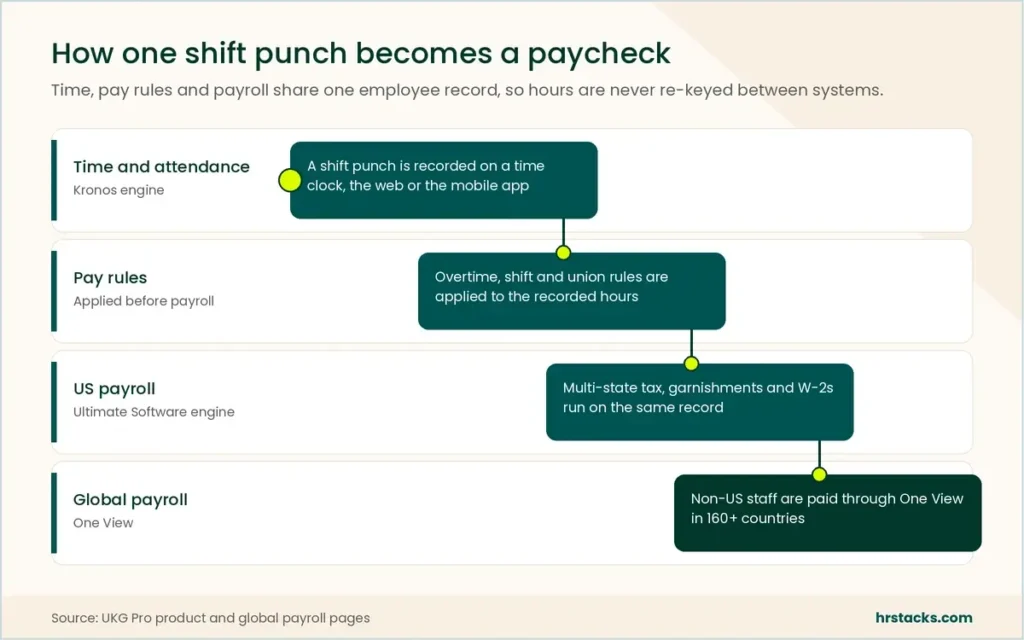
The core joins two older products. Ultimate Software’s engine handles US payroll, tax filing and complex pay rules, while the Kronos time and attendance engine feeds punches, overtime and union rules straight into each pay run. Non-US payroll runs through UKG One View inside the same suite.
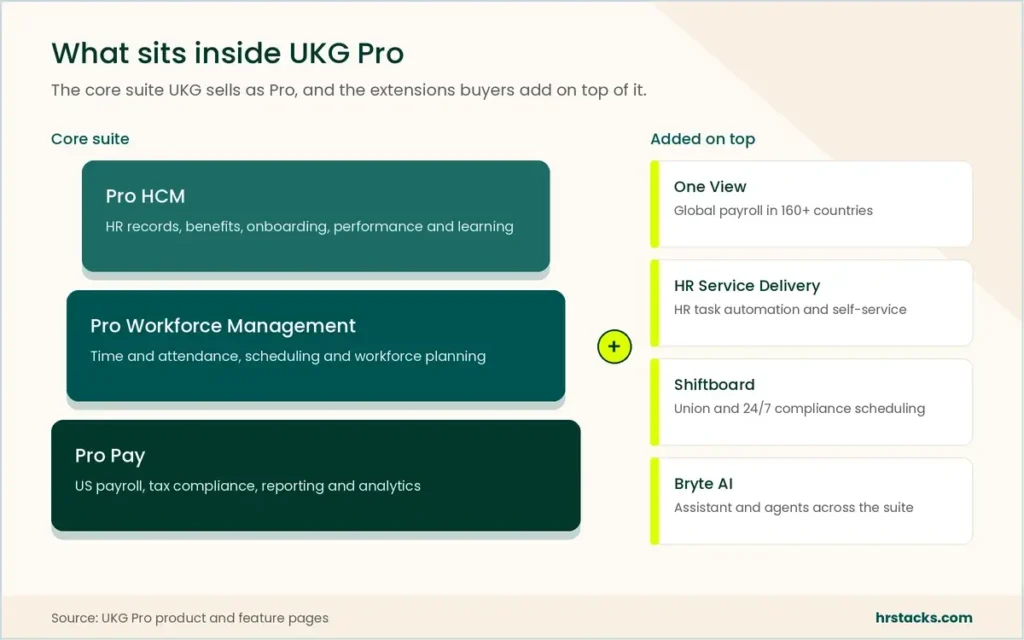
Around that core sit talent management modules, HR service delivery, Shiftboard for union scheduling and Bryte AI. UKG Pro targets enterprise employers, and UKG itself points smaller firms to UKG Ready. Under a few hundred employees, a lighter HRIS usually costs less to buy and to implement.
Editor’s Verdict on UKG Pro
UKG Pro is one of the strongest suites for US enterprises with large hourly, shift or unionized workforces, because time, scheduling and payroll share one engine. Below a few hundred employees, implementation cost and multi-year contracts usually outweigh that depth, and UKG Ready or a lighter suite fits better.
Users rate it 4.3 because daily tasks like clocking in and checking pay work well, while we score 3.9 because buyers also carry quote-only pricing, a five-month average implementation and inconsistent support.
UKG Pro Pros and Cons
UKG Pro’s biggest strength is that time, scheduling and payroll run on one engine, which few rivals match for hourly workforces. Its biggest weakness is cost visibility: no price list, a separately quoted implementation and multi-year terms. That trade suits large employers far better than mid-size ones.
Strengths
- Time and pay share one engineKronos timekeeping feeds the Ultimate Software payroll engine directly, so overtime, shift and union rules apply before every pay run.
- Handles complex US pay rulesMulti-state, union, tipped and shift-based pay run natively, which is where lighter payroll tools usually need manual workarounds.
- Global payroll in the suiteOne View covers payroll in 160+ countries, so US-headquartered employers can avoid signing a separate global payroll contract.
- Published security credentialsISO 27001, 27017 and 27018 certificates plus SOC 1 and SOC 2 Type 2 reports sit in a self-serve trust center.
Limitations
- No price list for ProPricing is quote only, UKG’s $20 to $26 guidance spans two products, and implementation is priced separately on top.Alternative: Rippling, from $8 per employee monthly plus a base fee
- Long, partner-heavy implementationUsers report about five months to go live, and several rollouts stall on payroll configuration before the first run.Alternative: Dayforce, payroll and time in a single application
- Support quality variesCustomer service is the weakest user-rated area at 4.0 of 5, with complaints about slow cases and changing account managers.Alternative: Paycom, a single-database suite built and supported in-house
UKG Pro Features
We rated eight capabilities against what large hourly employers need most. Time, payroll and scheduling are where UKG Pro leads, while analytics, AI and talent depth are good rather than leading.
Core features
- Time and attendanceThe Kronos engine applies pay rules, overtime and union terms to each punch before the hours reach payroll.Strong
- US payrollMulti-state tax filing, garnishments and W-2 preparation run inside the same employee record as HR and time data.Strong
- SchedulingDemand-based schedules and shift swaps, with Shiftboard adding union and 24/7 compliance rules for regulated industries.Strong
- Core HR and self-serviceEmployee records, org charts, benefits enrollment and a take-home pay what-if calculator in the mobile app.Strong
- Reporting and analyticsStandard and custom reports cover payroll and labor cost, but the BI layer needs training before admins build their own.Adequate
Extras
- Global payroll (One View)Covers 160+ countries in one view, though UKG doesn’t publish which countries it processes directly.Adequate
- Talent and learningRecruiting, performance, goals and UKG Pro Learning are included, but Workday’s talent suite goes further on skills planning.Adequate
- Bryte AIThe assistant and agents are new, and the People Assist agent only reached Google’s Gemini Enterprise in July 2026.Limited
UKG Pro Integrations
UKG Pro connects through a partner marketplace, a developer hub and named alliances with Microsoft and Google. Most connectors are partner-built, so integration cost depends on who builds them, not on a UKG price list.
 Microsoft 365
- Gemini Enterprise
- Slack
- iCIMS
- Greenhouse
- Sterling
- NetSuite
- Okta
- Visier
UKG Pro Pricing
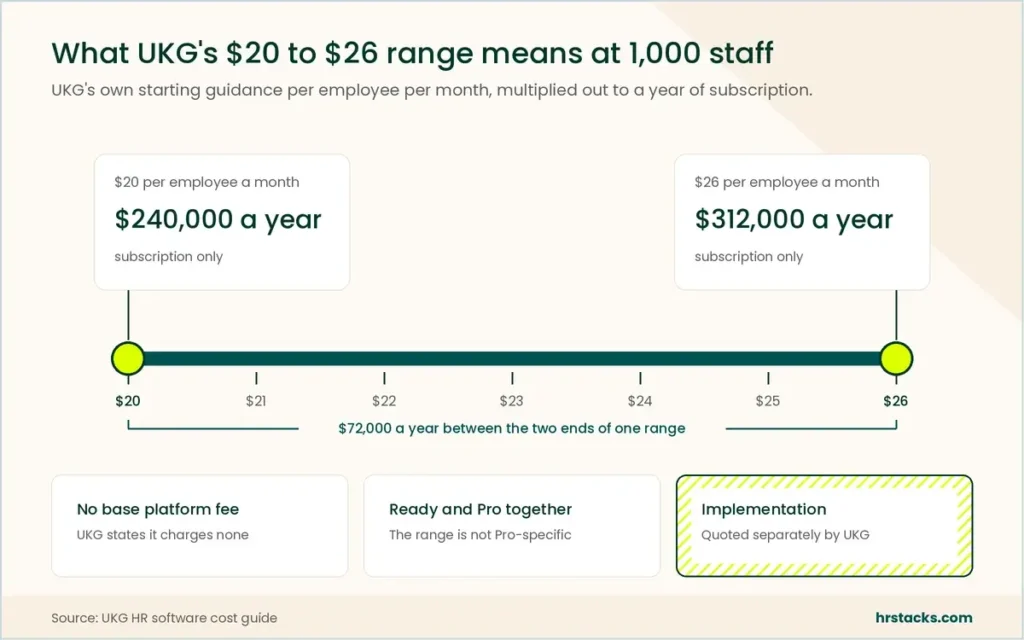
UKG Pro has no published price list. The only UKG figure is a $20 to $26 per employee monthly starting range from its own cost guide, which covers UKG Ready too. Implementation is quoted on top and is often the bigger first-year number.
Published plans
Billed per employee per month on a quoted contract, with no base platform fee.
Fees and contract terms
What UKG Pro states publicly, and what to get in writing before you sign.
What 1,000 employees cost a year
UKG’s own guidance puts 1,000 employees at $240,000 to $312,000 before implementation.
Who Should Use UKG Pro?
UKG Pro pays off when workforce complexity is the problem, not headcount alone. Employers with mostly salaried staff or a few hundred people usually get more value from a lighter suite with a published price.
Best for
- US employers with thousands of hourly or shift staff spread across many sites and states.
- Hospitals, retailers and manufacturers running union contracts, 24/7 rosters or fatigue rules.
- US-headquartered groups that want non-US payroll reporting inside the same suite as domestic pay.
- Buyers with an internal HRIS team and budget for a multi-month, partner-led rollout.
Skip if
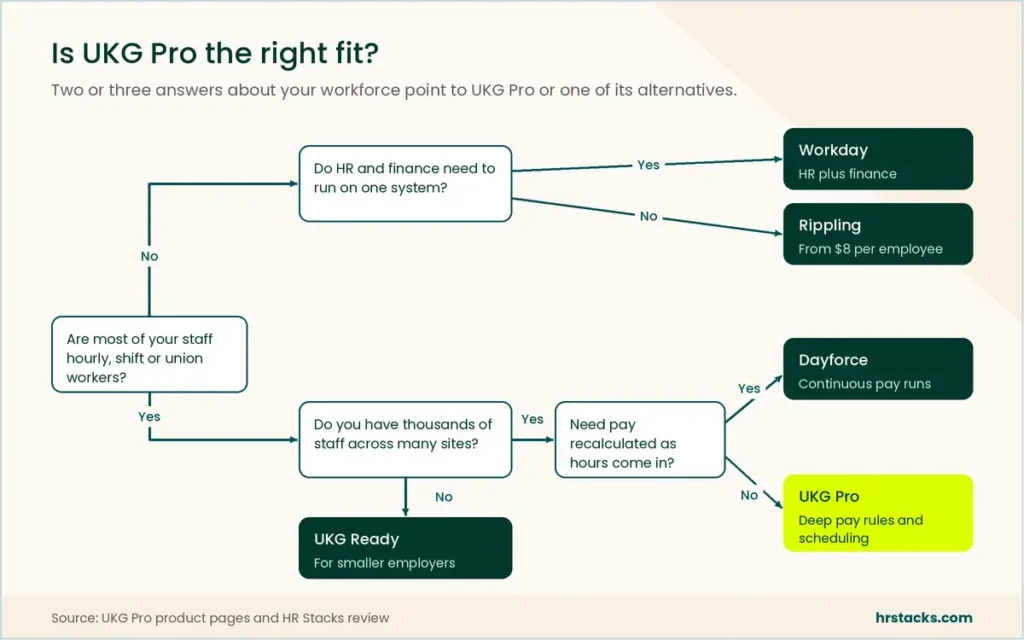
- You have a few hundred employees and want to see a price before the first sales call.Consider Rippling, from $8 per employee monthly
- Most of your staff are salaried knowledge workers and talent planning matters more than timekeeping.Consider Workday, HR and financials on one platform
- You want payroll that recalculates continuously as hours are recorded during the pay period.Consider Dayforce, continuous pay calculation
UKG Pro Alternatives
We picked the five suites UKG Pro meets most often on enterprise shortlists. Only Rippling publishes a rate, so the grids compare pricing models and delivery rather than list prices.
UKG Pro vs WorkdayWorkday wins on talent, UKG on hourly time.
Choose Workday if HR and finance must share one system and most staff are salaried. Read our Workday review
UKG Pro vs DayforceClosest rival for large hourly workforces.
Choose Dayforce if you want pay calculated as time is recorded rather than at period close. Read our Dayforce review
UKG Pro vs ADP Workforce NowPayroll-led option for mid-market US firms.
Choose ADP Workforce Now if payroll tax handling matters more than scheduling depth. Read our ADP review
UKG Pro vs PaycomSimpler single-database suite for mid-size firms.
Choose Paycom if you want one vendor to build, implement and support the whole system. Read our Paycom review
UKG Pro vs RipplingCheaper, faster start for smaller teams.
Choose Rippling if you have a few hundred staff and want device and app management alongside HR. Read our Rippling review
What Users Say About UKG Pro
Public reviews average 4.3 across 3,045 reviews, but the split matters. Listings written mostly by HR and payroll staff score UKG Pro 4.3, while a company-wide profile written largely by frontline employees sits at 2.4.
What users praise
- Simple daily employee tasksClocking in, time-off requests and pay stubs are the tasks users call quickest on web and mobile.
- Reliable payroll runsReviewers credit accurate pay, direct deposit and W-2 handling, with direct deposit their top-rated feature.
- Everything in one placeHR records, time, pay and benefits sit together, which cuts routine help desk requests for HR teams.
- Flexible custom fieldsAdmins value user-defined fields and role-based views for tracking data unique to their organization.
What users complain about
- Glitches and outagesTechnical problems are the largest negative theme, including clock-in failures and slow page loads.
- Inconsistent supportUsers describe slow case resolution, weeks-long waits on answers and frequent changes of account manager.
- Login and password frictionFrequent lockouts, expiring passwords and repeated verification codes frustrate employees and managers alike.
- Complex reporting setupAdmins say the BI tools need training and some settings sit deep in menus.
Is UKG Pro Worth It?
Yes, if you run a large US hourly or unionized workforce and need time, scheduling and payroll to agree without reconciliation. No, if you have a few hundred mostly salaried staff, because a five-month rollout and a multi-year contract will cost more than the depth returns.
Negotiate on the three numbers UKG never publishes: your per-employee rate, the implementation fee and the renewal escalator. Ask for one-year and three-year quotes side by side, since UKG’s own cost guide names contract term as a pricing lever.
Confirm these before you buy
None of them appear on UKG Pro’s website.
- Your rate at your headcountGet the per-employee rate for your exact count, including seasonal, inactive and terminated records.
- Implementation fee and partnerAsk who implements, the fixed fee, and who pays if go-live slips past plan.
- Renewal escalator capGet the annual price increase capped in writing for every renewal year of the term.
- Modules inside the quoteList included modules and the rate for adding Learning, HR Service Delivery or Shiftboard later.
- Global payroll by countryConfirm which One View countries UKG processes itself and which run through local providers.
- Support level and response timesAsk which support tier is included, the response targets, and whether you get a named contact.
UKG Pro: Common Questions
These are the questions buyers ask most when shortlisting UKG Pro. Answers draw on UKG’s own pages, checked in October 2026.
Is UKG Pro the same as UltiPro?
Yes. UltiPro was Ultimate Software’s HR and payroll product, and it became UKG Pro after Ultimate merged with Kronos in 2020.
How much does UKG Pro cost?
UKG doesn’t publish a price list for UKG Pro. Its own cost guide says UKG solutions typically start at about $20 to $26 per employee per month, a range that covers both UKG Ready and UKG Pro.
For 1,000 employees that works out to $240,000 to $312,000 a year before implementation. UKG says it charges no base platform fee.
Does UKG Pro have a free trial?
No. UKG offers a product demo and a 2-minute online tour, but no free trial or free plan.
Is UKG Pro good for small businesses?
Rarely. UKG positions Pro for enterprise employers and points smaller firms to UKG Ready. Implementation work and multi-year terms make Pro hard to justify for a few hundred staff.
How long does UKG Pro implementation take?
UKG doesn’t publish a timeline. Users report about five months on average, and multi-module rollouts take longer. Budget for a partner-led project and run parallel payroll before go-live.
What is the difference between UKG Pro and UKG Ready?
UKG Pro is built for enterprise employers with complex pay and scheduling. UKG Ready is UKG’s all-in-one HR and payroll product for small and mid-sized businesses, with a published plans page. Pro is sold by quote only.
What does UKG Pro include?
HR records, US payroll, time and attendance, scheduling, talent management, HR service delivery, compliance tools, reporting and employee communication. One View global payroll and Bryte AI sit in the same suite.
Does UKG Pro support global payroll?
Yes. UKG says UKG Pro supports payroll in 160+ countries through One View. Before you sign, confirm which countries UKG processes itself and which run through local providers.
Is UKG Pro secure?
UKG publishes ISO 27001, 27017 and 27018 certifications, SOC 1 and SOC 2 Type 2 reports, a SOC 3 report and CSA STAR status. Detailed reports are available on request through the UKG Trust Center.
Is UKG Pro easy to use?
For employees, mostly. Clocking in, checking pay stubs and requesting time off are simple on web and mobile.
Admins report a steeper curve. Custom reports and configuration take training, some settings sit deep in menus, and frequent password resets annoy users on both sides.
Does UKG Pro have a mobile app?
Yes. The free UKG Pro app runs on iOS and Android, but your employer must enable it and decide which features employees can use.
What does UKG Pro integrate with?
UKG runs a partner marketplace and a developer hub, with connections to Microsoft 365, Google Gemini Enterprise, Okta, NetSuite, iCIMS and others. UKG doesn’t publish integration fees or a total integration count.