Float Logo

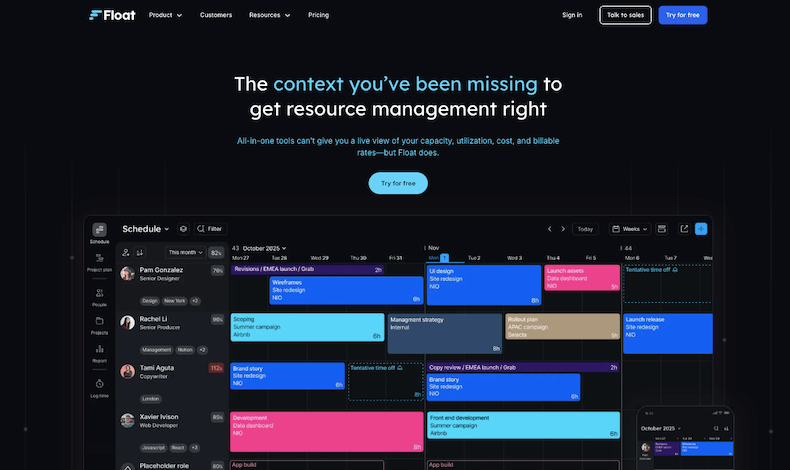
Float is best for efficient team scheduling and resource management, helping businesses plan workloads, track availability, and keep projects on schedule with ease.

Float Review 2026: Pricing, Features, Pros & Cons

What is Float?

Managing a team’s workload can get messy fast, especially when projects keep piling up and schedules shift all the time. That’s where Float comes in. It’s a resource management tool that helps businesses plan, schedule, and keep track of their team’s work without the usual chaos.

Instead of dealing with endless spreadsheets or clunky software, Float makes it easy to see who’s working on what, when they’re available, and how much capacity they have, all in one place.

One of the best things about Float is how simple it is. You can drag and drop tasks, shift schedules in seconds, and make quick updates without digging through layers of settings.

It’s flexible enough for teams of all sizes, whether you’re managing a handful of people or coordinating across multiple departments. The real-time updates mean everyone stays on the same page, so there’s no confusion over who’s supposed to be doing what.

Beyond just scheduling, Float helps with capacity planning too. You can see who’s overloaded, who has room for more work, and adjust things before burnout becomes an issue.

It also integrates with tools like Slack, Asana, and Trello, so you don’t have to juggle between apps. Plus, the time tracking feature gives insights into how long tasks actually take, helping teams make better estimates in the future.

At its core, Float keeps things organized and clear. Instead of last-minute scrambles and miscommunication, teams can plan smarter, work more efficiently, and actually focus on getting things done.

If your team struggles with managing resources, Float takes the headache out of scheduling and helps you run things smoothly.

Show More

Youtube video
About Float
Company Name: Float
Est: 2012
Employees: 11-50
HQ: New York, New York, United States
Support Offered
Email Support
Tutorial Videos & Documentation
Social Media

Key Features of Float

Visual Resource Scheduling
Float makes planning easy with a simple drag-and-drop interface. Quickly assign tasks, adjust timelines, and get a clear view of your team’s workload in one place.
Real-Time Updates
Any changes to schedules are instantly reflected, so everyone stays on the same page. No more outdated spreadsheets or miscommunication.
Capacity Planning
See who’s overbooked and who has availability. This helps prevent burnout and ensures work is distributed efficiently.
Time Tracking
Log hours directly in Float to compare estimated vs. actual time spent on tasks. Great for improving future planning.
Integrations with Popular Tools
Float connects seamlessly with apps like Slack, Asana, Trello, and more, reducing the need to switch between platforms.
Team Availability Management
Track time off, holidays, and work hours to avoid scheduling conflicts and ensure balanced workloads.
Project Budgeting
Monitor project budgets in real time by tracking billable hours and costs, helping teams stay on track financially.
Multi-Project Management
Easily handle multiple projects at once, making it ideal for agencies, consultancies, and large teams with overlapping work.
Custom Reporting
Generate reports with insights into team utilization, project progress, and workload trends to make better decisions.
Mobile Accessibility
Manage schedules on the go with Float’s mobile app, allowing team members to stay updated from anywhere.

Float Pros & Cons 2026

Pros
Simple and intuitive interface, easy to use.
Quick drag-and-drop scheduling for fast updates.
Real-time updates keep everyone on the same page.
Helps with capacity planning to avoid burnout.
Integrates with popular tools like Slack, Asana, and Trello.
Time tracking feature provides insights into project efficiency.
Cons
Limited customization for complex workflows.
Mobile app isn’t as robust as the desktop version.
Reporting features could be more advanced.
No built-in task management, just scheduling.
Can get pricey for larger teams.

Float Pricing 2026

Float offer 3 plans to choose from with 30-days Trial available. Their plan starts from $7.50 and so on. Here are complete details of plans
Starter
$7.50 USD per person/month
Pro
$12.50 USD per person/month
Enterprise
Custom

Float User Sentiment Analysis

Ease of Use

Float is simple and intuitive, with a clean interface that makes scheduling and resource planning quick and hassle-free.
User Sentiment Score
90%

Features

It offers powerful scheduling, time tracking, and capacity planning, but some users wish for more customization in reporting.
User Sentiment Score
89%

Value For Money

While not the cheapest option, it delivers great functionality and time-saving benefits, making it worth the cost for many teams.
User Sentiment Score
89%

Customer Support

Users appreciate the responsive support team, with quick replies and helpful guidance whenever issues arise.
User Sentiment Score
91%

Float Quick Comparison Table

Here is a quick comparison with some of the products that offers similar features as Float.
Monday.com Logo
monday.com
4.5
Free Trial
Yes
Starting Price
$9/User
Asana Logo
Asana
0
Free Trial
Yes
Starting Price
$11
Close-CRM-Logo
Close CRM
0
Free Trial
Yes
Starting Price
$49/Month
ClickUp-Logo-Icon
ClickUp
0
Free Trial
No
Starting Price
$10
Jira Logo
Jira
0
Free Trial
Yes
Starting Price
$7.53
Pipedrive-Logo
Pipedrive
5.0
Free Trial
Array
Starting Price
$9.90/Month

Float FAQs

Float is a resource management and team scheduling tool that helps businesses plan workloads, track availability, and manage project timelines efficiently.
Yes, Float includes a time tracking feature that allows teams to log hours, compare estimated vs. actual time spent, and improve project planning.
Yes, Float integrates with popular apps like Slack, Asana, Trello, and Jira, making it easy to sync schedules and streamline workflow.
Yes, Float works well for teams of all sizes, from small startups to large enterprises, helping them manage workloads and avoid scheduling conflicts.
Yes, Float offers a mobile app for iOS and Android, allowing users to manage schedules, track availability, and stay updated on the go.
Review Methodology

How HR Stacks reviews products

Every product on HR Stacks is reviewed using a consistent, five-part process that combines hands-on editorial analysis with real user feedback across trusted review platforms. Here's exactly how we evaluate each tool.

1. Data sources we rely on

Our research draws on verified user reviews from G2, Capterra, Trustpilot, TrustRadius, and Software Advice, combined with direct analysis of product documentation, feature sets, pricing pages, and public vendor information.

2. Hands-on editorial analysis

Each platform is evaluated across eight categories including features, pricing, ease of use, integrations, global coverage, compliance strength, support quality, and onboarding experience — the factors HR teams actually care about.

3. How we score each product

Each of the eight categories receives a score from 1 to 5, weighted by importance to produce an overall Editor's Rating. Scores reflect our own evaluation plus feedback patterns from verified user reviews — not vendor-supplied information.

4. User sentiment analysis

We analyze recurring themes across thousands of real user reviews to identify common strengths, limitations, and satisfaction patterns — surfacing the issues users actually encounter rather than the ones vendors highlight.

5. Independent and regularly updated

Our reviews are editorially independent and not influenced by vendors. We may earn an affiliate commission when readers purchase through our links, but this never affects our ratings. Every review is revisited periodically as products evolve.

Manjuri Dutta
Article By: Manjuri Dutta

Manjuri Dutta is the co-founder and Content Editor of HR Stacks, a leading HR tech and workforce management review platform, and EmployerRecords.com, specializing in Employer-of-Record services for global hiring. She brings a thoughtful and expert voice to articles designed to inform HR leaders, practitioners, and tech buyers alike.

HR Stacks offers comprehensive, data focused and unbiased solutions. We are a user supported platform and may earn a referral fee when you visit a vendor through our links

Get HR Stacks Weekly
Get our weekly news update with all latest news in HR community.
Float Review

Get Started With Float

Float Alternatives

Here is a quick list of some of the top Float alternatives with similar features that you may explore.
Monday.com Logo

monday.com

monday.com is a work operating system that enables teams and...
Asana Logo

Asana

Asana is a work management tool designed to help teams...
Close-CRM-Logo

Close CRM

Close CRM is a comprehensive CRM solution for all types...
ClickUp-Logo-Icon

ClickUp

ClickUp is a work management platform that helps teams bring...
Jira Logo

Jira

Jira is a powerful project management tool that helps teams...
Pipedrive-Logo

Pipedrive

Pipedrive is a leading CRM solution that can help you...
Rating Distribution
0
0 out of 5 stars (based on 0 reviews)
Excellent
Very good
Average
Poor
Terrible
Share Your Experience

Float: Recent Reviews

There are no reviews yet. Be the first one to write one.

Submit Your Review For Float

Featured HR Products

Deel Logo
Deel
Company Profile Deel Built by Deel, Inc....
Pebl Logo
Pebl
Company Profile Pebl Formerly Velocity Global ·...
usemultiplier_logo
Multiplier
Company Profile Multiplier Built by Multiplier Technologies...
When I Work Logo
When I Work
Company Profile When I Work Built by...
Connecteam Logo
Connecteam
Connecteam is an all-in-one employee management platform...

This website uses cookies to enhance user experience and to analyze performance and traffic on our website. By continuing to browse this site you are agreeing to our use of cookies.