


Humaans Key Facts
What Is Humaans?
Humaans is a cloud HRIS that keeps employee records, documents, absence and timesheets in one place. HR teams use it to onboard and offboard people without chasing spreadsheets, and employees update their own details.
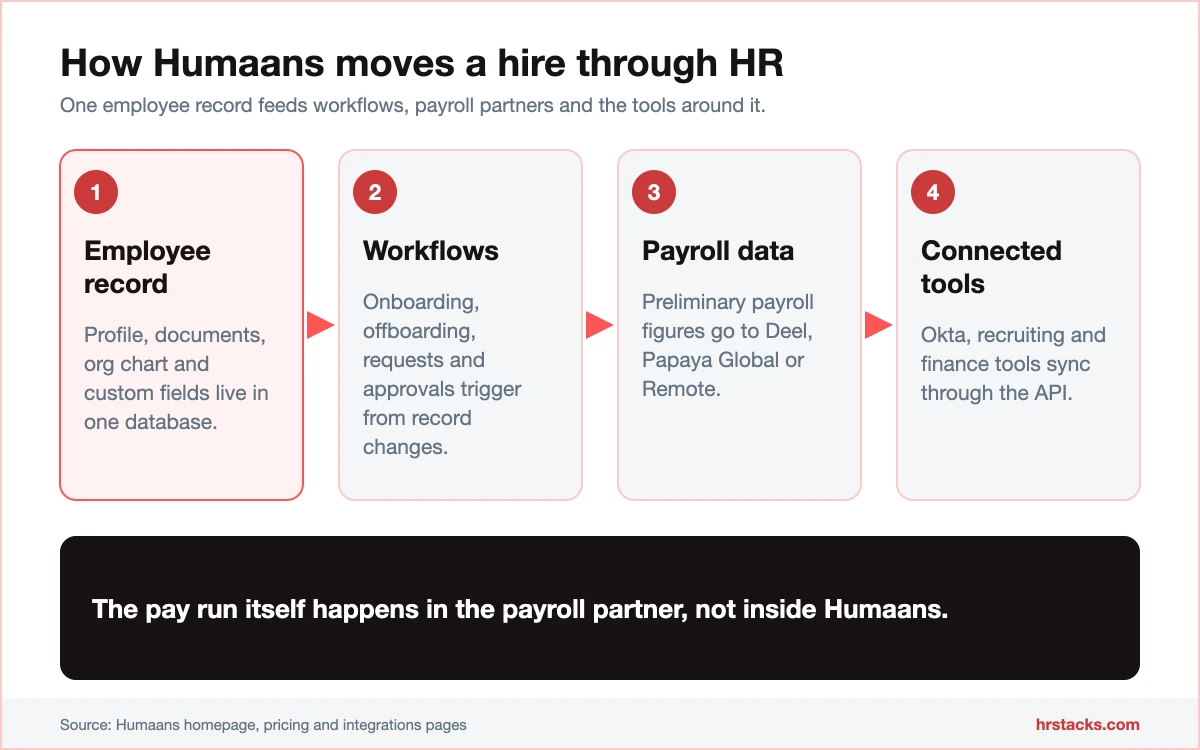
The core is a people database with an org chart, custom fields and workflow automation for requests and approvals. It prepares payroll data and connects to Deel, Papaya Global and Remote for the pay run, so teams hiring abroad can pair it with an employer of record or a payroll platform.
Paid add-ons cover performance reviews, headcount planning and an AI Companion, and Athena is a separate agent platform. It fits growing teams that value a clean interface and overshoots anyone who only needs leave tracking. You can book a demo on the Humaans site.
Editor’s Verdict on Humaans
Humaans is a fast, tidy system of record for growing and distributed teams, with strong security and a 9.6 out of 10 ease-of-use rating from users. The limits are budget transparency and depth: nothing is priced publicly and benefits administration lags.
We sit below users because we also score a hidden price list and thinner reporting, which reviewers rarely weigh.
Humaans Pros and Cons
Humaans’ biggest strength is how little friction it adds: users rate ease of use 9.6 out of 10. Its biggest weakness is that no plan or add-on shows a price. Choose it for the interface, then budget carefully.
Strengths
- Fast to adoptUsers rate ease of use 9.6 out of 10 and report an average implementation time of one month.
- Strong security credentialsSOC 2 Type II and ISO 27001:2022 certified, GDPR compliant, hosted in the EU on Google Cloud, with a data processing agreement for every customer.
- Open API and webhooksAPI access is part of Growth, and webhooks plus a dedicated sandbox come with Enterprise, so engineers can sync people data themselves.
- Workflows without scriptingOnboarding and offboarding automation, requests and approvals, and a rewards marketplace ship in the base Growth plan.
Limitations
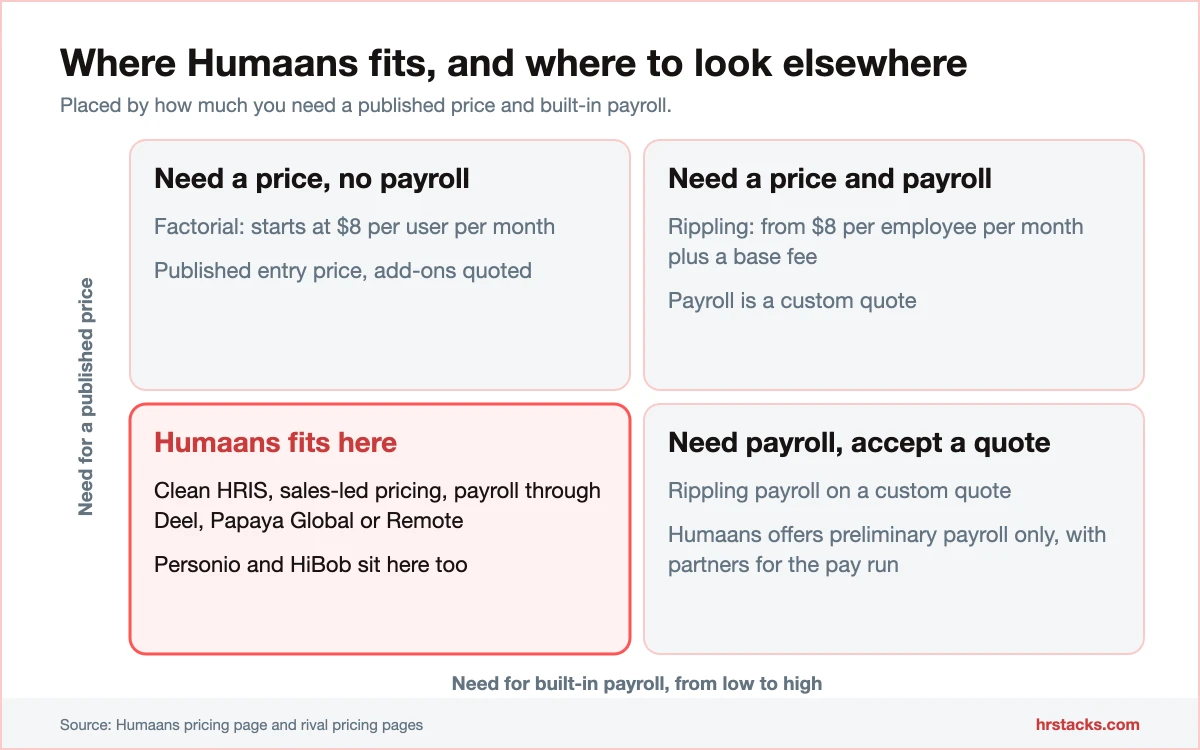
- No published pricingGrowth, Enterprise, Athena and every add-on say talk to sales. No per-employee rate, billing unit or minimum appears on the pricing page.Alternative: Factorial, publishes a starting rate of $8 per user per month
- Light on payroll and benefitsHumaans lists preliminary payroll only, and users score benefits administration 6.7 out of 10. A full pay run needs another provider.Alternative: Rippling, HR and payroll modules from $8 per employee per month plus a base fee
- Small public review basePublic reviews total 116 as of November 2026, so scores swing on small samples and only 3 come from the second source.Alternative: HiBob, 2,273 public reviews as of November 2026
Humaans Features
Humaans does the HRIS basics well and sells almost everything else as an add-on. Payroll is the clearest gap, so check what your pay run needs before you shortlist it.
Core features
- Employee database and documentsPeople directory, document storage and an org chart share one record, and unlimited custom fields are an Enterprise feature.Strong
- Absence and timesheetsLeave tracking and timesheets are included in Growth, so hours and time off live beside the employee profile.Strong
- Onboarding and offboarding workflowsAutomated checklists, requests and approvals trigger from employee changes, with two custom permission roles on Growth.Strong
- Preliminary payrollHumaans prepares payroll figures only and describes no pay run, so plan on a provider such as Rippling or Deel for payment.Limited
- Reports and insightsInsights and automated reports come with Growth, but users score benefits administration only 6.7 out of 10.Adequate
Extras
- AI CompanionA paid add-on that answers employee questions from your policies and drafts contracts, with no price published.Adequate
- Performance managementCustomisable review cycles with post-review insights, sold as a separate add-on rather than bundled.Adequate
- Athena agent platformA separate agentic AI product with pre-built agents and a natural-language builder, quoted apart from the HRIS.Limited
Humaans Integrations
Humaans lists close to 100 named tools, grouped by job. The payroll and recruiting rows matter most for hiring abroad, and the security row is where Enterprise earns its price.
 Papaya Global
- Deel
- Remote
- Oyster
- Multiplier
- Greenhouse
- Lever
- Workable
- Ashby
- Teamtailor
- Lattice
- Culture Amp
- Leapsome
- 15Five
- Okta
- JumpCloud
- Vanta
- 1Password
- Ramp
- Pleo
- Brex
- Spendesk
Humaans Pricing
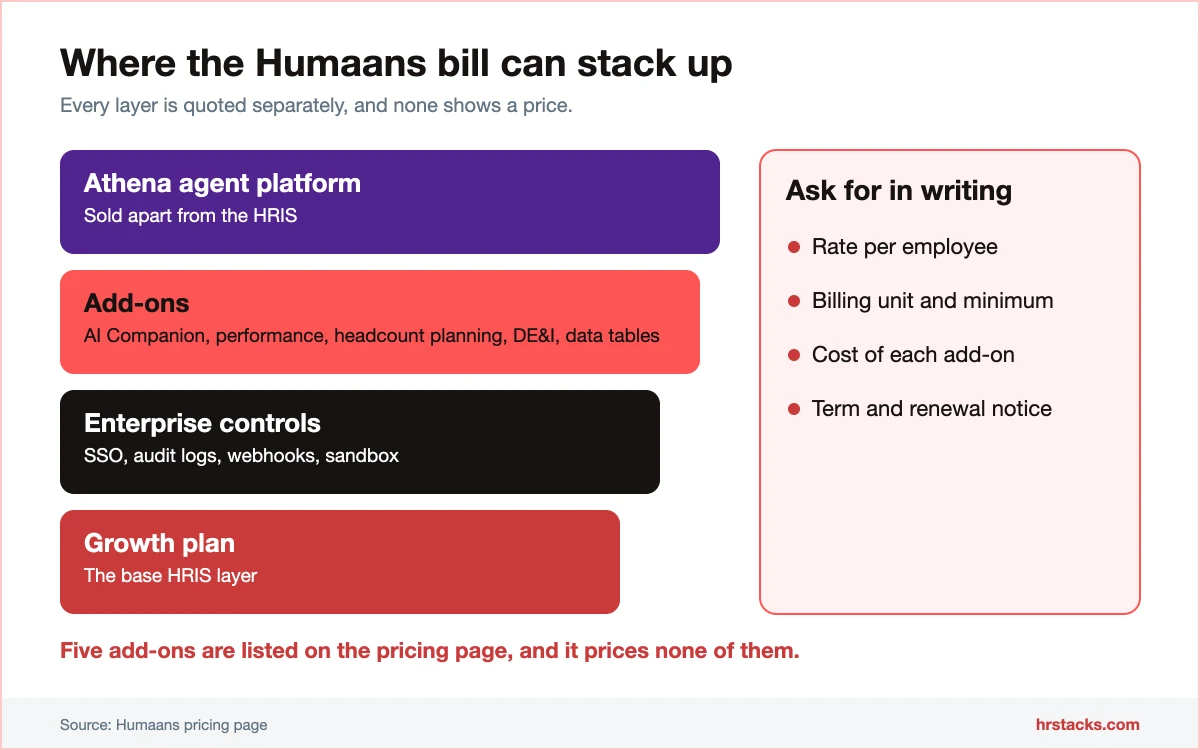
Humaans publishes plan names and feature lists but no prices. Every plan and add-on ends in a sales call, so a cost comparison starts with a quote. Expect extras on top of the base plan.
Published plans
No billing unit, annual rate or minimum is published, so confirm all three in writing.
Fees and contract terms
What Humaans states publicly, and what to get in writing before you sign.
What 50 employees cost a year
Only two rivals publish a starting rate, and both are entry prices, not full costs.
Who Should Use Humaans?
Humaans suits teams that care more about a clean interface and security evidence than a posted price. It is a weaker fit if you need payroll or benefits in the same contract.
Best for
- Mid-market teams of 51 to 1,000 employees that want an HRIS people will actually open.
- Distributed companies that need SOC 2 Type II and ISO 27001 evidence ready for customer security reviews.
- Engineering-minded HR teams that want API access and a sandbox to sync people data themselves.
- Companies already paired with Deel, Papaya Global or Remote for payroll, since Humaans connects to all three.
Skip if
- You need prices on a page before a demo, or a fixed budget before any sales call.Consider Factorial, from $8 per user per month
- You want HR, benefits and full payroll under one contract instead of integrations.Consider Rippling, modules from $8 per employee per month plus a base fee
- You need deep reporting or compensation tools, where Humaans leans on paid add-ons.Consider HiBob, lists Compensation, Hiring and Payroll Hub modules
Humaans Alternatives
These four are the HRIS platforms buyers most often compare with Humaans. Two publish a starting rate, and none shows a full price list.
Humaans vs PersonioBoth quote-only, Personio publishes its minimum term
Choose Personio if you want a stated 12-month run-time and a wider size range. Read our Personio review
Humaans vs FactorialFactorial wins on a published starting price
Choose Factorial if you need a number to budget against before talking to sales. Read our Factorial review
Humaans vs RipplingRippling wins on breadth, Humaans on simplicity
Choose Rippling if you want HR and payroll under one contract. Read our Rippling review
Humaans vs HiBobBoth hide prices, HiBob lists more modules
Choose HiBob if a larger review base and a payroll hub matter more than a lighter interface. Read our HiBob review
What Users Say About Humaans
Public reviews are strongly positive but thin. Scores cluster at 4.7 and 4.8, and most reviewers are mid-market HR teams.
What users praise
- Clean, intuitive interfaceEase of use scores 9.6 out of 10, and reviewers call everyday HR tasks quick.
- Helpful supportReviewers single out responsive, friendly help during rollout.
- Free, open APIUsers like tables, workflows and API access that carry no extra fee.
- Organised people dataDirectory and org structure score 9.2 out of 10 for organisation management.
What users complain about
- Limited customisationA few reviewers want more flexibility for complex HR processes.
- Caching and slow AIOne detailed review reports stale data from caching and slow AI features.
- Thin benefits toolsBenefits administration scores 6.7 out of 10 across 53 ratings.
- High perceived costUsers place cost in the top price band, and the vendor shows no figures.
Is Humaans Worth It?
Choose Humaans if you want a clean HRIS with strong security evidence and can accept a sales-led price. Skip it if you need published pricing, full payroll or deep benefits tools in one system.
Before signing, get the per-employee rate, the add-on bill and the Enterprise-only features in writing. Check what Growth’s two custom permission roles actually cover.
Confirm these before you buy
None of them appear on Humaans’s pricing page.
- Per-employee rate and billing unitAsk for the monthly rate per employee, whether it bills yearly, and any minimum seat count.
- Add-on pricingRequest separate quotes for AI Companion, performance reviews, headcount planning and DE&I insights.
- What Growth leaves outConfirm SSO, webhooks, unlimited custom fields and audit logs are Enterprise only before picking Growth.
- Payroll routeAsk which payroll partner receives Humaans data and whether the integration carries a fee.
- Exit and data export termsGet contract length, renewal notice and a data export format in writing.
Humaans: Common Questions
These are the questions buyers ask most about Humaans. Answers come from the vendor’s own pages, checked in November 2026.
How much does Humaans cost?
Humaans does not publish prices. Growth, Enterprise and the Athena AI platform all send you to sales, and add-ons are quoted separately.
Does Humaans have a free trial?
The pricing page does not mention one. Ask sales whether a pilot or integration sandbox is available before you commit.
Does Humaans run payroll?
It lists preliminary payroll only. For the pay run it connects to Deel, Papaya Global, Remote, Oyster and Multiplier, so most teams use a separate provider.
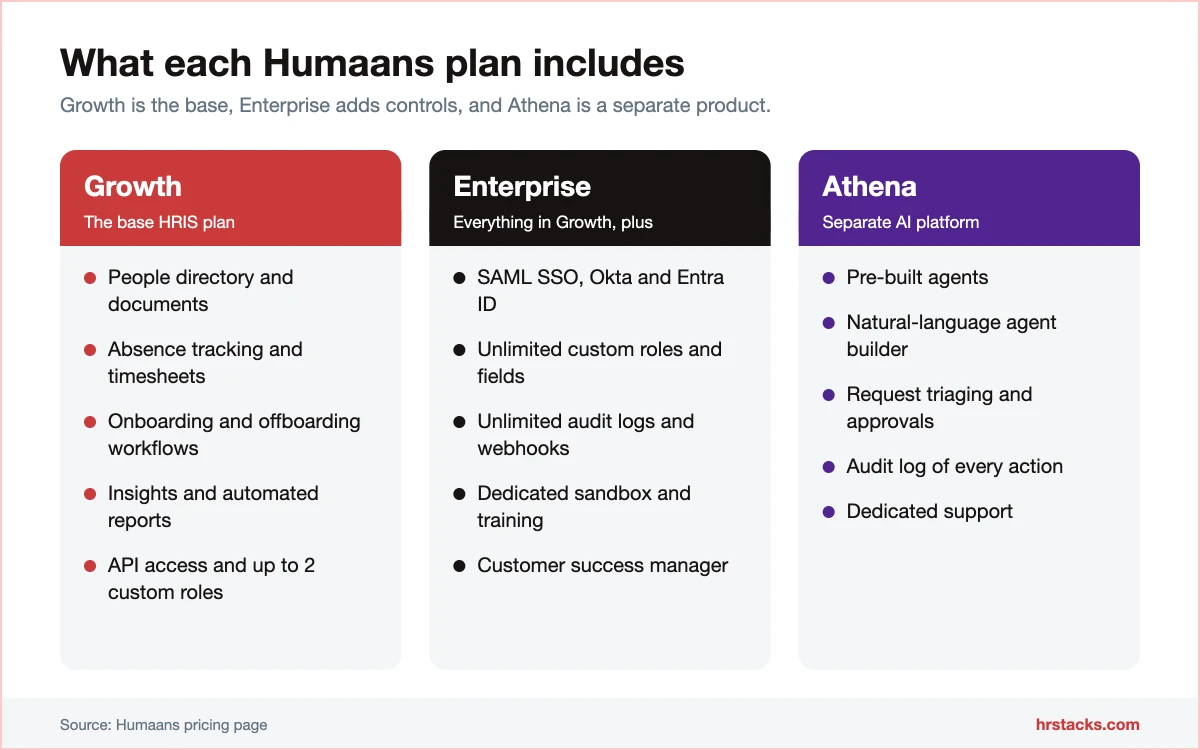
What is the difference between Growth and Enterprise?
Growth covers the directory, documents, absence, timesheets, workflows, analytics and API access, with up to two custom permission roles.
Enterprise adds SAML SSO, Okta and Entra ID, unlimited custom roles, fields and audit logs, webhooks, a dedicated sandbox and a customer success manager.
Is Humaans secure?
Yes on paper: SOC 2 Type II, ISO 27001:2022 and GDPR compliance, with EU hosting on Google Cloud and encryption in transit and at rest.
Does Humaans have an API?
Yes. API access is part of Growth, documented at docs.humaans.io, and Enterprise adds webhooks and a dedicated sandbox.
Is Humaans good for large companies?
It targets growing and global teams, and most public reviews come from mid-market companies of 51 to 1,000 employees.
Enterprise adds the SSO, audit logs and success management that larger buyers need, but benefits and reporting depth trail bigger suites.
How does Humaans compare with HiBob?
Both hide prices. Humaans scores higher for ease of use, while HiBob has a far larger review base and a payroll hub.
What are the best Humaans alternatives?
Is there a mobile app?
Humaans lists a mobile feature, but its pages do not name iOS or Android apps. Ask for a demo of the mobile experience.